
Dokumentenübersetzung Englisch nach Hindi
Sie können mit unserem Online-KI-Übersetzer Englisch nach Hindi oder Hindi nach Englisch und in jede andere benötigte Sprache übersetzen.
Dokument hochladen oder per Drag & Drop ziehen, um es zu übersetzen
Max. Dateigröße 1 GB auf Pro und Business
Der Button öffnet eine kostenlose Anmeldung. Die Übersetzung selbst läuft in Ihrem Dashboard, wo Sie die Datei erneut auswählen. Nutzen Sie einen KI-Assistenten? Verbinden Sie ihn über MCP.
- OCR für Scans und Fotos
- 108 Sprachen
- Original-Layout beibehalten
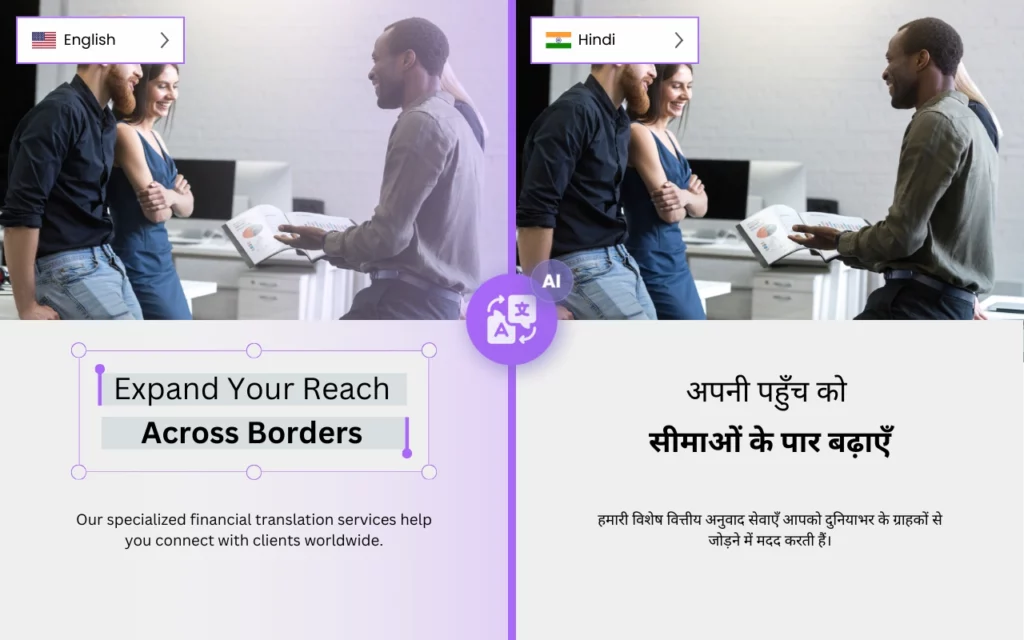

Wie kann ich Englisch nach Hindi übersetzen?
Benötigen Sie einen zuverlässigen und genauen Online-Übersetzer für die Hindi-Sprache? Suchen Sie nicht weiter als DocTranslator.
DocTranslator ist die beste Wahl für alle Ihre Übersetzungsbedürfnisse. Mit seiner fortschrittlichen Technologie bewältigt DocTranslator selbst die komplexesten und größten Dokumente mit Leichtigkeit. Egal, ob Sie ein 5.000-seitiges PDF oder eine 1-GB-Datei ins Hindi übersetzen müssen oder eine lange Excel-Arbeitsmappe, DocTranslator hat Sie abgedeckt.
Eine der Hauptfunktionen von DocTranslator ist die Fähigkeit, eine Vielzahl von Dateiformaten zu verarbeiten. Egal, ob Sie ein PDF-, Word-, Excel- oder sogar ein InDesign-Dokument haben, DocTranslator kann alles problemlos verarbeiten. Das bedeutet, dass DocTranslator jede Art von Dokument verarbeiten kann, das Sie übersetzen müssen.
Ein weiteres großartiges Merkmal von DocTranslator ist sein Fokus auf Genauigkeit. Mit seiner KI-Engine liefert DocTranslator Übersetzungen, die die Bedeutung und den Kontext des Originaldokuments beibehalten, und menschliche Übersetzung ist als separater Dienst verfügbar, wenn ein zertifiziertes Ergebnis benötigt wird. Das bedeutet, dass Sie sich darauf verlassen können, dass DocTranslator Übersetzungen liefert, die die Essenz des Originaldokuments wirklich erfassen.
Eine weitere großartige Sache an DocTranslator ist, dass es sich nicht nur um einen einfachen Wort-für-Wort-Übersetzer handelt. Es verwendet KI und maschinelles Lernen, um den Kontext zu verstehen und die Sätze mit den richtigen grammatikalischen Strukturen, idiomatischen Ausdrücken und kulturellen Referenzen zu übersetzen, wodurch die Übersetzungen natürlicher und genauer klingen.
DocTranslator bietet auch eine Vielzahl von Optionen für das Endformat der Übersetzungen. Sie können aus verschiedenen Dateitypen und sogar verschiedenen Layouts wählen. So sieht das übersetzte Dokument dem Original so ähnlich wie möglich.
Zusammenfassend lässt sich sagen, dass DocTranslator die perfekte Wahl für alle Ihre Übersetzungsbedürfnisse ist. Mit seiner Fähigkeit, große Dokumente zu verarbeiten, seiner Vielfalt an Dateiformaten und seinem Fokus auf Genauigkeit ist DocTranslator der beste und genaueste Online-Übersetzer für die Hindi-Sprache. Probieren Sie es noch heute aus und überzeugen Sie sich selbst vom Unterschied.

Lernen Sie DocTranslator kennen!
DocTranslator ist ein hochentwickelter Online-Übersetzungsdienst, der es Benutzern ermöglicht, verschiedene Dokumentenformate, einschließlich Word, PDF und PowerPoint, hochzuladen und in verschiedene Sprachen übersetzen zu lassen. DocTranslator ist speziell für Dokumente konzipiert und enthält zusätzliche Funktionen, die ihn für diesen Zweck besser geeignet machen als Standard-Übersetzungsdienste.
Nach Hindi übersetzen →
Indiens architektonisches Erbe: Eine Reise durch die Zeit
Indien verfügt über eine Reihe bemerkenswerter architektonischer Schätze, die verschiedene Epochen und Herrschaften umspannen. Das elegante Taj Mahal in Agra, ein Symbol der Hingabe, ist aus makellosem weißem Marmor gefertigt. In den weiten Landschaften Rajasthans erzählen die prächtigen Sandsteink Zitadellen Geschichten von früheren Herrschern und lassen die Besucher in eine edle Vergangenheit eintauchen. Weiter südlich beherbergt Tamil Nadu aufwendige Tempelanlagen, darunter den Meenakshi-Amman-Tempel in Madurai, der mit seinen farbenfrohen Gopurams, die sich zum Himmel erstrecken, die dravidische Architektur verkörpert. An der Ostfront zeichnet der UNESCO-geschützte Sonnentempel von Konark die Weisheit der alten Kalinga-Architektur mit seinem wagenförmigen Gebäude und der detaillierten Steinmetzarbeit auf.

Die vielfältigen Ökosysteme Indiens: Ein Mosaik des Lebens
Die ökologische Vielfalt Indiens spiegelt seine reiche kulturelle Mischung wider und bietet Umgebungen, die von den hoch aufragenden Himalaya bis zu den grünen Mangrovensümpfen der Sundarbans reichen. Diese vielfältigen Umgebungen beherbergen eine Vielzahl von Wildtieren. Der königliche Bengaltiger, ein Symbol der indischen Fauna, durchstreift dichte Waldgebiete. Für Ornithologen wird der Bharatpur-Vogelschutzgebiet in Rajasthan zu einem Zufluchtsort, der Hunderte von Vogelarten anzieht, insbesondere während der Zugzeit. Das hügelige Gelände der Westghats, bekannt für seine Bergketten und aromatischen Gewürzplantagen, beherbergt auch den scheuen Nilgiri Tahr und bunte Malabar-Riesenhörnchen. Das dichte Netz der Backwaters von Kerala beherbergt ein geschäftiges aquatisches Ökosystem mit Arten vom gewöhnlichen Eisvogel bis zu den seltenen Ottern.

Was ist der genaueste Hindi-Übersetzer?
Es gibt mehrere Übersetzer, die je nach den spezifischen Bedürfnissen des Benutzers als „beste“ für die Hindi-zu-Englisch-Übersetzung angesehen werden können. Zu den beliebtesten und am besten bewerteten Optionen gehören:
- Google Translate: Google Translate ist ein weit verbreiteter und beliebter Online-Übersetzer, der über 100 Sprachen unterstützt, darunter Hindi und Englisch. Er ist bekannt für seine schnelle und einfach zu bedienende Oberfläche und wird ständig mit neuen Funktionen und Verbesserungen aktualisiert.
- Microsoft Translator: Dies ist ein weiterer beliebter Online-Übersetzer, der mehrere Sprachen unterstützt, darunter Hindi und Englisch. Er bietet eine breite Palette von Funktionen wie Text-to-Speech, Dokumentenübersetzung und Offline-Übersetzung.
- SDL FreeTranslation: SDL FreeTranslation ist ein kostenloser Online-Übersetzer, der mehrere Sprachen unterstützt, darunter Hindi und Englisch. Er bietet eine einfache und benutzerfreundliche Oberfläche und liefert schnelle und genaue Übersetzungen.
- PROMT: PROMT ist eine professionelle Übersetzungssoftware, die mehrere Sprachen unterstützt, darunter Hindi und Englisch. Sie bietet eine breite Palette von Funktionen und Optionen, einschließlich maschineller Übersetzung, menschlicher Übersetzung und Übersetzungsspeicher.
- Translate Now: Translate Now ist ein Online-Übersetzungsdienst, der professionelle Übersetzungs-, Lokalisierungs- und Dolmetscherdienste in mehreren Sprachen, darunter Hindi und Englisch, anbietet. Sie verfügen über ein Team von professionellen Übersetzern, die Muttersprachler der Zielsprache sind und ein tiefes Verständnis für die Kultur und idiomatischen Ausdrücke haben.

Wie übersetze ich mein Dokument in die Hindi-Sprache?
Es gibt mehrere Möglichkeiten, ein Dokument in die Hindi-Sprache zu übersetzen. Einige der beliebtesten Optionen sind:
- Verwendung eines Online-Übersetzers: Es gibt viele Online-Übersetzer, wie z. B. Google Translate, Microsoft Translator, SDL FreeTranslation und PROMT. Diese Übersetzer unterstützen mehrere Sprachen, darunter Hindi und Englisch. Um einen Online-Übersetzer zu verwenden, laden Sie einfach Ihr Dokument auf die Website hoch, wählen Sie Hindi als Zielsprache aus, und die Übersetzung wird generiert.
- Beauftragung eines professionellen Übersetzers: Es gibt viele professionelle Übersetzer und Übersetzungsagenturen, die Ihr Dokument ins Hindi übersetzen können. Sie verfügen in der Regel über ein Team von erfahrenen Übersetzern, die Muttersprachler der Zielsprache sind und ein tiefes Verständnis für die Kultur und idiomatischen Ausdrücke haben. Sie können Ihr Dokument genau und zeitnah übersetzen.
- Verwendung einer Übersetzungssoftware: Es gibt auch viele Übersetzungssoftwareprogramme, die Dokumente ins Hindi übersetzen können. Zu den beliebtesten Optionen gehören SDL Trados, MemoQ und WordFast. Diese Softwareprogramme bieten in der Regel eine breite Palette von Funktionen und Optionen, einschließlich maschineller Übersetzung, menschlicher Übersetzung und Übersetzungsspeicher.
Bei der Übersetzung Ihres Dokuments ist es wichtig zu bedenken, dass die Qualität der Übersetzung von dem jeweiligen Übersetzer oder der verwendeten Software und dem Kontext des Textes abhängt. Es wird empfohlen, die Übersetzungen zu überprüfen und Korrektur zu lesen, insbesondere wenn es sich um eine ernste Angelegenheit oder ein offizielles Dokument handelt.
Unabhängig von der gewählten Methode ist es wichtig sicherzustellen, dass die Übersetzung genau und von hoher Qualität ist und dass die richtigen Werkzeuge und Ressourcen verwendet werden, um dies zu erreichen.
Ist Google Translate für Hindi genau?
Während Google Translate ein automatisierter maschineller Übersetzungsdienst ist, der in vielen Situationen hilfreich sein kann, ist er möglicherweise nicht immer die genaueste Option für Hindi-zu-Englisch-Übersetzungen. Google Translate verwendet fortschrittliche Algorithmen für künstliche Intelligenz und maschinelles Lernen, um Text zu übersetzen, aber die Genauigkeit der Übersetzung kann je nach Kontext und Komplexität des Textes variieren.
Obwohl Google Translate für grundlegende und gebräuchliche Phrasen relativ genau ist, kann er bei komplexeren oder idiomatischen Ausdrücken Schwierigkeiten haben und die Nuancen und den Kontext des Originaltextes möglicherweise nicht immer erfassen. Es ist auch wichtig zu beachten, dass Hindi eine reiche Sprache mit vielen idiomatischen Ausdrücken, kulturellen Anspielungen und grammatikalischen Strukturen ist, die von Algorithmen des maschinellen Lernens schwer zu erfassen sind.
Darüber hinaus verfügt Google Translate über keinen Korrekturleseprozess, sodass es Fehler oder Fehlübersetzungen in den vom Dienst bereitgestellten Übersetzungen geben kann.
Angesichts dieser Einschränkungen kann Google Translate immer noch ein nützliches Werkzeug sein, um ein allgemeines Verständnis des Textinhalts zu erhalten, aber es wird nicht für offizielle oder ernste Angelegenheiten empfohlen. Es ist immer ratsam, die Übersetzungen von einem professionellen Übersetzer überprüfen und Korrektur lesen zu lassen, insbesondere bei ernsten Angelegenheiten oder offiziellen Dokumenten.
Möchten Sie eine ganze Website statt eines Dokuments übersetzen? Unser Partner ConveyThis.com übernimmt die vollständige Website-Übersetzung, was eine andere Aufgabe ist, als eine Datei zu übersetzen.
So funktioniert's
Schritt 1: Kostenloses Konto erstellen
Beginnen Sie Ihre Übersetzungsreise, indem Sie ein kostenloses Konto auf unserer Plattform einrichten. Es dauert nur wenige Augenblicke, Ihre grundlegenden Informationen anzugeben und Ihre E-Mail-Adresse zu bestätigen. Dieses Konto dient als Ihr persönlicher Hub zum Hochladen, Verfolgen und Verwalten all Ihrer Übersetzungsprojekte.
Schritt 2: Datei hochladen
Nach der Anmeldung ist es Zeit, Ihr Dokument hochzuladen. Unser System unterstützt eine Vielzahl von Formaten, darunter MS Word, Excel, PowerPoint, TXT, InDesign und CSV. Ziehen Sie Ihre Datei einfach per Drag & Drop oder verwenden Sie die Option „Durchsuchen“, um die Datei von Ihrem Gerät auszuwählen.
Schritt 3: Original- und Zielsprache auswählen
Geben Sie die Sprache an, in der Ihr Originaldokument verfasst ist. Wählen Sie dann die Zielsprache aus, in die das Dokument übersetzt werden soll. Mit unserer umfangreichen Liste unterstützter Sprachen finden Sie die perfekte Übereinstimmung für Ihr Publikum, sei es für einen Geschäftsantrag oder eine kreative Kampagne.
Schritt 4: Auf Übersetzen klicken und herunterladen
Sobald Sie Ihre Spracheinstellungen festgelegt haben, klicken Sie auf die Schaltfläche "Hochladen", um mit der Verarbeitung zu beginnen. Lehnen Sie sich zurück und entspannen Sie sich, während unser fortschrittliches Übersetzungssystem an Ihrer Datei arbeitet und das ursprüngliche Layout und den Stil beibehält, während es eine genaue Übersetzung liefert.
Übersetzen Sie Ihre Datei jetzt!
Melden Sie sich noch heute an und entdecken Sie die Leistungsfähigkeit von DocTranslator und wie sehr es Ihnen und Ihrem Unternehmen helfen wird.
Unsere Partner
Verwandte Tools & Dienste
Dateiformate
PDF übersetzen nach Sprache
Unsere Partner




