
Document Vertalen Engels naar Hindi
U kunt Engels naar Hindi of Hindi naar Engels vertalen, en elke andere taal die u nodig heeft, met onze online AI-vertaler.
Upload of laat document vallen om te vertalen
Max. bestandsgrootte 1 GB op Pro en Business
De knop opent een gratis aanmelding. De vertaling zelf vindt plaats in uw dashboard, waar u het bestand opnieuw kiest. Gebruikt u een AI-assistent? Verbind deze via MCP.
- OCR voor scans en foto's
- 108 talen
- Originele lay-out behouden
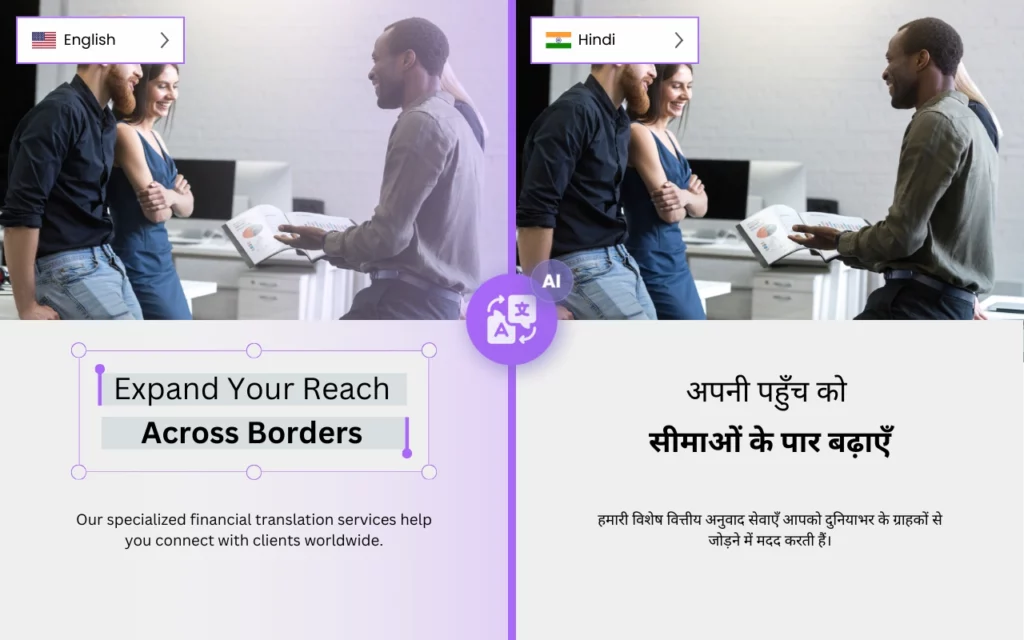

Hoe kan ik Engels naar Hindi vertalen?
Heeft u een betrouwbare en nauwkeurige online vertaler voor de Hindi taal nodig? Zoek niet verder dan DocTranslator.
DocTranslator is de beste keuze voor al uw vertaalbehoeften. Met zijn geavanceerde technologie verwerkt DocTranslator zelfs de meest complexe en grote documenten met gemak. Of u nu een PDF van 5.000 pagina's of een bestand van 1 GB naar het Hindi wilt vertalen of een lange Excel-werkmap, DocTranslator heeft het voor u.
Een van de belangrijkste functies van DocTranslator is de mogelijkheid om een verscheidenheid aan bestandsformaten te verwerken. Of u nu een PDF-, Word-, Excel- of zelfs InDesign-document hebt, DocTranslator kan het allemaal met gemak aan. Dit betekent dat DocTranslator elk type document dat u wilt vertalen, kan verwerken.
Een ander geweldig kenmerk van DocTranslator is de focus op nauwkeurigheid. Met zijn AI-engine levert DocTranslator vertalingen die de betekenis en context van het originele document behouden, en menselijke vertaling is beschikbaar als een aparte service wanneer een gecertificeerd resultaat nodig is. Dit betekent dat u DocTranslator kunt vertrouwen om vertalingen te leveren die werkelijk de essentie van het originele document vastleggen.
Nog een ander geweldig ding aan DocTranslator is dat het niet zomaar een simpele woord-voor-woord vertaler is, het gebruikt AI en machine learning om de context te begrijpen en de zinnen te vertalen met de juiste grammaticale structuren, idiomatische uitdrukkingen en culturele verwijzingen, waardoor de vertalingen natuurlijker en nauwkeuriger klinken.
DocTranslator biedt ook een verscheidenheid aan opties voor het uiteindelijke formaat van de vertalingen, u kunt kiezen uit verschillende bestandstypen en zelfs verschillende lay-outs, op deze manier zal het vertaalde document er zo veel mogelijk hetzelfde uitzien als het origineel.
Concluderend, DocTranslator is de perfecte keuze voor al uw vertaalbehoeften. Met zijn vermogen om grote documenten te verwerken, een verscheidenheid aan bestandsformaten en focus op nauwkeurigheid, is DocTranslator de beste en meest nauwkeurige online vertaler voor de Hindi taal. Probeer het vandaag nog en zie zelf het verschil.

Maak kennis met DocTranslator!
DocTranslator is een geavanceerde online vertaaldienst waarmee gebruikers verschillende documentformaten kunnen uploaden, waaronder Word, PDF en PowerPoint, en deze in verschillende talen kunnen laten vertalen. DocTranslator is specifiek ontworpen voor documenten en bevat extra functies die het geschikter maken voor dit doel in vergelijking met standaard vertaaldiensten.
Vertalen naar Hindi →
Het Architectonisch Erfgoed van India: Een Reis Door de Tijd
India heeft een reeks opmerkelijke architectonische schatten die verschillende tijdperken en soevereiniteiten overspannen. De elegante Taj Mahal in Agra, een symbool van devotie, is gemaakt van ongerept wit marmer. In de uitgestrekte landschappen van Rajasthan vertellen de grandioze zandstenen citadelen verhalen van voormalige heersers, waardoor bezoekers worden ondergedompeld in een nobel verleden. Verder naar het zuiden herbergt Tamil Nadu uitgebreide tempelcomplexen, waaronder de Meenakshi Amman-tempel in Madurai, die de Dravidische architectuur belichaamt met zijn felgekleurde gopurams die naar de hemel reiken. Aan de oostkant documenteert de door UNESCO beschermde Zonnetempel in Konark de oude Kalinga-architectuurwijsheid, met zijn wagenvormige bouwwerk en gedetailleerd steenhouwwerk.

De Diverse Ecosystemen van India: Een Mozaïek van Leven
De ecologische diversiteit van India weerspiegelt de rijke culturele mix, met omgevingen die variëren van de torenhoge Himalaya tot de weelderige mangrovemoerassen van de Sundarbans. Deze diverse omgevingen ondersteunen een verscheidenheid aan wilde dieren. De koninklijke Bengaalse tijger, een symbool van de Indiase fauna, zwerft door dichte bosgebieden. Voor ornithologen wordt het Bharatpur vogelreservaat in Rajasthan een toevluchtsoord, dat honderden vogelsoorten aantrekt, vooral tijdens de trekperiode. Het glooiende terrein van de West-Ghats, bekend om zijn bergketens en aromatische kruidplantages, biedt ook onderdak aan de schuwe Nilgiri Tahr en kleurrijke Malabar-reuzeneekhoorns. Het dichte netwerk van de backwaters van Kerala voedt een levendig aquatisch ecosysteem, met soorten van de gewone ijsvogel tot de zeldzame otters.

Wat is de meest nauwkeurige Hindi vertaler?
Er zijn verschillende vertalers die als de "beste" kunnen worden beschouwd voor Hindi naar Engelse vertaling, afhankelijk van de specifieke behoeften van de gebruiker. Enkele van de meest populaire en hoogst gewaardeerde opties zijn:
- Google Translate: Google Translate is een veelgebruikte en populaire online vertaler die meer dan 100 talen ondersteunt, waaronder Hindi en Engels. Het staat bekend om zijn snelle en gebruiksvriendelijke interface, en het wordt voortdurend bijgewerkt met nieuwe functies en verbeteringen.
- Microsoft Translator: Dit is een andere populaire online vertaler die meerdere talen ondersteunt, waaronder Hindi en Engels. Het biedt een breed scala aan functies, zoals tekst-naar-spraak, documentvertaling en offline vertaling.
- SDL FreeTranslation: SDL FreeTranslation is een gratis online vertaler die meerdere talen ondersteunt, waaronder Hindi en Engels. Het biedt een eenvoudige en gebruiksvriendelijke interface en levert snelle en nauwkeurige vertalingen.
- PROMT: PROMT is professionele vertaalsoftware die meerdere talen ondersteunt, waaronder Hindi en Engels. Het biedt een breed scala aan functies en opties, waaronder machinale vertaling, menselijke vertaling en vertaalgeheugen.
- Translate Now: Translate Now is een online vertaaldienst die professionele vertaal-, lokalisatie- en tolken diensten aanbiedt in meerdere talen, waaronder Hindi en Engels. Ze hebben een team van professionele vertalers die moedertaalsprekers zijn van de doeltaal en een diepgaand begrip hebben van de cultuur en idiomatische uitdrukkingen.

Hoe vertaal ik mijn document naar de Hindi taal?
Er zijn verschillende manieren om een document te vertalen naar de Hindi taal, enkele van de meest populaire opties zijn:
- Een online vertaler gebruiken: Er zijn veel online vertalers beschikbaar, zoals Google Translate, Microsoft Translator, SDL FreeTranslation en PROMT. Deze vertalers ondersteunen meerdere talen, waaronder Hindi en Engels. Om een online vertaler te gebruiken, uploadt u eenvoudig uw document naar de website, selecteert u Hindi als doeltaal en wordt de vertaling gegenereerd.
- Een professionele vertaler inhuren: Er zijn veel professionele vertalers en vertaalbureaus die uw document naar het Hindi kunnen vertalen. Ze hebben doorgaans een team van deskundige vertalers die moedertaalsprekers zijn van de doeltaal en een diepgaand begrip hebben van de cultuur en idiomatische uitdrukkingen. Ze kunnen uw document nauwkeurig en tijdig vertalen.
- Vertaalsoftware gebruiken: Er zijn ook veel vertaalprogramma's beschikbaar die documenten naar het Hindi kunnen vertalen. Enkele van de populairste opties zijn SDL Trados, MemoQ en WordFast. Deze softwareprogramma's bieden doorgaans een breed scala aan functies en opties, waaronder machinale vertaling, menselijke vertaling en vertaalgeheugen.
Houd er bij het vertalen van uw document rekening mee dat de kwaliteit van de vertaling afhangt van de specifieke vertaler of software die u gebruikt en de context van de tekst. Het wordt aanbevolen om de vertalingen te beoordelen en te proeflezen, vooral als het om serieuze zaken of officiële documenten gaat.
Ongeacht de gekozen methode is het belangrijk om ervoor te zorgen dat de vertaling nauwkeurig en van hoge kwaliteit is, en om de juiste tools en middelen te gebruiken om dit te bereiken.
Is Google Translate nauwkeurig voor Hindi?
Hoewel Google Translate een geautomatiseerde machinale vertaaldienst is die in veel situaties nuttig kan zijn, is het misschien niet altijd de meest nauwkeurige optie voor Hindi naar Engelse vertalingen. Google Translate maakt gebruik van geavanceerde algoritmen voor kunstmatige intelligentie en machinaal leren om tekst te vertalen, maar de nauwkeurigheid van de vertaling kan variëren afhankelijk van de context en complexiteit van de tekst.
Hoewel Google Translate relatief nauwkeurig is voor basis- en veelgebruikte zinnen, kan het moeite hebben met complexere of idiomatische uitdrukkingen en mogelijk niet altijd de nuances en context van de originele tekst vastleggen. Het is ook belangrijk op te merken dat Hindi een rijke taal is met veel idiomatische uitdrukkingen, culturele verwijzingen en grammaticale structuren die moeilijk vast te leggen zijn door machine learning-algoritmen.
Bovendien heeft Google Translate geen proefleesproces, dus er kunnen fouten of verkeerde vertalingen in de door de dienst geleverde vertalingen zitten.
Gezien deze beperkingen kan Google Translate nog steeds een nuttig hulpmiddel zijn om een algemeen begrip van de betekenis van een tekst te krijgen, maar het wordt niet aanbevolen voor officiële of serieuze zaken. Het is altijd raadzaam om een professionele vertaler de vertalingen te laten beoordelen en proeflezen, vooral voor serieuze zaken of officiële documenten.
Moet u een hele website vertalen in plaats van een document? Onze partner ConveyThis.com verzorgt de volledige websitevertaling, wat een andere taak is dan het vertalen van een bestand.
Hoe het werkt
Stap 1: Maak een gratis account aan
Begin uw vertaalreis door een gratis account aan te maken op ons platform. Het kost slechts een paar minuten om uw basisgegevens op te geven en uw e-mailadres te bevestigen. Dit account dient als uw persoonlijke hub voor het uploaden, volgen en beheren van al uw vertaalprojecten.
Stap 2: Upload een bestand
Na het inloggen is het tijd om uw document te uploaden. Ons systeem ondersteunt een breed scala aan formaten, waaronder MS Word, Excel, PowerPoint, TXT, InDesign en CSV. Sleep en plaats uw bestand of gebruik de optie "Bladeren" om het bestand vanaf uw apparaat te selecteren.
Stap 3: Selecteer de originele en doeltalen
Geef de taal op waarin uw originele document is geschreven. Kies vervolgens de doeltaal waarnaar u het document wilt laten vertalen. Met onze uitgebreide lijst met ondersteunde talen vindt u de perfecte match voor uw publiek, of het nu gaat om een zakelijk voorstel of een creatieve campagne.
Stap 4: Klik op de vertaalknop en download
Nadat u uw taalvoorkeuren hebt ingesteld, klikt u op de knop "Uploaden" om de verwerking te starten. Leun achterover en ontspan terwijl ons geavanceerde vertaalsysteem aan uw bestand werkt, waarbij de originele lay-out en stijl behouden blijven en tegelijkertijd een nauwkeurige vertaling wordt geleverd.
Vertaal nu uw bestand!
Meld u vandaag nog aan en ontdek de kracht van DocTranslator en welk verschil het zal maken voor u en uw bedrijf.
Onze Partners
Gerelateerde tools en services
Bestandsformaten
PDF vertalen per taal
Onze Partners




