
EPUB-oversetter
Oversett EPUB-bøker til 108 språk, med kapitler, overskrifter og formatering bevart.
Last opp eller dra dokument for å oversette
Maks. filstørrelse 1 GB på Pro og Business
Knappen åpner en gratis registrering. Selve oversettelsen kjøres i dashbordet ditt, der du velger filen på nytt. Bruker du en AI-assistent? Koble den til via MCP.
- OCR for skanninger og bilder
- 108 språk
- Opprinnelig layout beholdt
Revolusjonerer kommunikasjon
Hvilken EPUB-oversetter er best?
Å finne det rette verktøyet for å oversette EPUB-filene dine trenger ikke å være komplisert. Vår EPUB-oversetter er designet med enkelhet og presisjon i tankene, slik at du raskt kan transformere e-boken din til et annet språk uten å bekymre deg for å miste den originale layouten eller designet. Enten det er en roman, en forretningsguide eller en utdanningsbok, sikrer vi at kapitlene, fontene og bildene dine forblir akkurat der de hører hjemme, bare på språket du trenger. Med støtte for 108 språk er det det perfekte verktøyet for forfattere, utgivere og alle som trenger en pålitelig EPUB-oversettelsesløsning.
Vi har gjort prosessen enkel og stressfri. Last opp EPUB-filen din, velg målspråket ditt, og la verktøyet håndtere resten. På bare noen få minutter vil du ha en fullstendig oversatt e-bok klar til å deles, publiseres eller brukes. Det kreves ingen teknisk ekspertise, bare en brukervennlig opplevelse som fokuserer på å levere kvalitet og bekvemmelighet hver gang.
Møt DocTranslator!
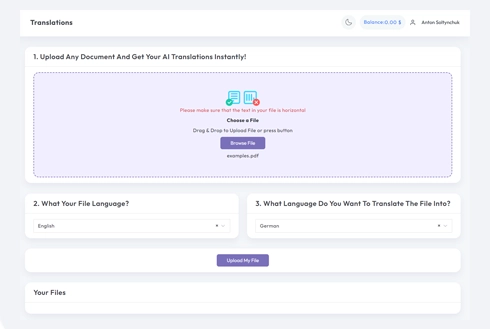
DocTranslator kjører i nettleseren, slik at en EPUB kan oversettes uten å installere e-bokprogramvare. Nettbasert oversettelsestjeneste for dokumenter er utviklet for å fungere i enhver moderne nettleser, enten det er Google Chrome, Mozilla Firefox eller Apple Safari.
Rask og enkel EPUB-filoversettelse: Din problemfrie løsning
Leter du etter en enkel måte å oversette EPUB-filer på? Vår EPUB-oversetter er det ultimate verktøyet for sømløs e-bokoversettelse. Den sikrer nøyaktig dokumentoversettelse samtidig som den bevarer EPUB-ens originale formatering, layout og design. Perfekt for oversettelse av romaner, forretningsdokumenter og utdanningsmateriell, den støtter 108 språk.
I motsetning til andre verktøy, beholder vår EPUB-oversetter kapitler, bilder og fonter intakte, og leverer profesjonelle resultater hver gang. Bare last opp EPUB-filen din, velg målspråk, og få et fullstendig oversett dokument på få minutter. Rask, pålitelig og brukervennlig, det er din go-to-løsning for flerspråklig e-bokoversettelse.
Forståelse av oversettelser av høy kvalitet: Alt du bør vite
Gode oversettelser handler om å sørge for at dokumentene dine gir mening på et annet språk, samtidig som de fortsatt høres naturlige og profesjonelle ut. Det er ikke bare å bytte ut ord, det handler om å beholde meningen, tonen og stilen den samme slik at det føles riktig for leseren. Enten det er en forretningsrapport, en juridisk kontrakt, en veiledning eller en e-bok, er nøkkelen å sørge for at ingenting viktig går tapt i oversettelsen.
En god oversetter fokuserer ikke bare på ord. Den ser på det store bildet, som hvordan folk på målspråket tenker og snakker. Derfor er gode verktøy for dokumentoversettelse en livredder. De sørger for at alt forblir på plass, som layout, fonter og til og med bilder, og de fungerer med alle slags filer, som PDF-er, Word-dokumenter og EPUB-er. I tillegg, med støtte for 108 språk, kan du dele tingene dine nesten hvor som helst.
Hvis du vil at dokumentene eller e-bøkene dine skal se bra ut og faktisk gi mening for folk i andre land, må du bruke de riktige verktøyene. Enten du deler noe for jobb, skole eller publisering, utgjør gode oversettelser hele forskjellen. Det handler om å koble seg til folk, uansett hvor de er.
Utforsk nøkkelfordelene med vår EPUB-oversetter
Vår EPUB-oversetter er fullpakket med funksjoner designet for å gjøre oversettelsen av e-bøkene dine uanstrengt og presis. Enten du er forfatter, utgiver eller pedagog, sikrer dette verktøyet at innholdet ditt blir oversatt nøyaktig, samtidig som den opprinnelige formateringen, layouten og designet opprettholdes. Det fungerer sømløst med EPUB-filer, og holder kapitler, bilder og fonter akkurat der de hører hjemme, slik at den oversatte versjonen ser like profesjonell ut som originalen.
Med støtte for 108 språk er vår EPUB-oversetter perfekt for å nå et globalt publikum. Prosessen er enkel. Last opp EPUB-filen din, velg målspråket, og la verktøyet håndtere resten. Det er ingen behov for tekniske ferdigheter eller komplekse oppsett. På bare noen få minutter vil din oversatte e-bok være klar til å deles, publiseres eller brukes.
Enten du oversetter romaner, lærebøker eller profesjonelle dokumenter, leverer vår EPUB-oversetter pålitelige resultater med minimal innsats. Det er din go-to-løsning for raske, høykvalitets e-bokoversettelser som holder innholdet ditt polert og tilgjengelig over hele verden.
HVORDAN FUNGERER DET?
Trinn 1: Opprett en gratis DocTranslator-konto
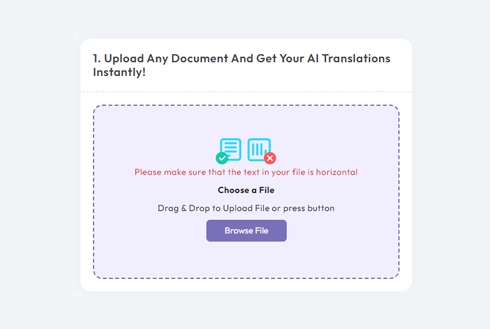
Vår gratis kontoopprettingsprosess tar noen minutter. Klikk bare på registreringsknappen og fyll ut registreringssiden vår. Detaljer som trengs inkluderer navn, e-postadresse og passord.
Trinn 2: Last opp filen
Du kan laste opp MS Word-, Excel-, PowerPoint-, TXT-, InDesign- og CSV-filer til oversetteren vår. Dra og slipp filene eller bla gjennom enheten din for å laste dem opp.
Trinn 3: Velg språkene
Velg originalspråket for dokumentet ditt og velg målspråket. Skriv inn språket eller bla gjennom samlingen vår for å velge ditt foretrukne alternativ.
Trinn 4: Klikk "Oversett" og last ned filen
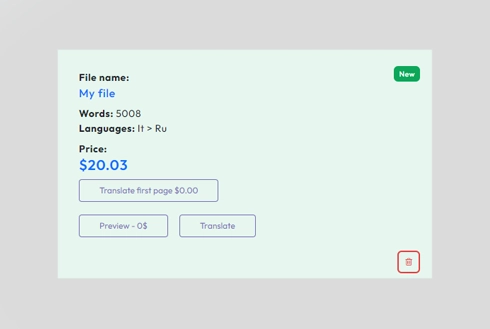
Fornøyd med språkvalget ditt? Fortsett og klikk oversett. Filen vil bli lastet opp og oversatt. Enda bedre, du kan forvente å beholde originalspråket og stilen, samtidig som du opprettholder en nøyaktig oversettelse for dine behov.
Ofte stilte spørsmål
Hvordan oversetter jeg en EPUB-fil?
Opprett en gratis DocTranslator-konto, last opp EPUB-filen din, velg original- og målspråk, og klikk deretter på Oversett. Den oversatte e-boken lastes ned på få minutter med originale kapitler, fonter, bilder og layout bevart.
Beholder EPUB-oversetteren den originale formateringen og layouten?
Ja. DocTranslator bevarer EPUB-filens opprinnelige formatering og layout, slik at kapitler, fonter og bilder forblir akkurat der de hører hjemme, bare på ditt valgte språk.
Hvor mange språk kan jeg oversette e-boken min til?
DocTranslator støtter 108 språk, inkludert spansk, fransk, tysk, kinesisk, japansk, koreansk, arabisk, portugisisk, italiensk og russisk, noe som gjør det enkelt å nå et globalt publikum.
Hvor stor EPUB-fil kan jeg laste opp?
Pro og Business aksepterer filer på opptil 1 GB eller 5000 sider, noe som er stort nok for hele romaner, lærebøker og forretningsguider. En enkelt bok på Basic-planen kan strekke seg til 100 MB og 300 sider, og på Free til 20 MB og 20 sider.
Hvilke andre filformater støtter DocTranslator?
I tillegg til EPUB-innhold fungerer DocTranslator med DOCX-, PDF-, XLSX-, PPTX-, IDML-, TXT-, CSV-, JSON-, JPG- og PNG-filer. Innebygd OCR leser også skannede PDF-er og bilder, slik at teksten inni dem kan oversettes.
Hvor mye koster det å oversette en EPUB?
Registrering og opplasting er gratis, og før du betaler ser du åpningen av boken allerede oversatt, der en forhåndsvisning er tilgjengelig for språkparet ditt. En hel bok koster minst med et abonnement: Basic, 4,99 dollar i måneden, inkluderer 300 000 ord med AI-oversettelse hver 30. dag, nok for en roman på 60 000 ord fem ganger over, og Pro inkluderer 1,5 millioner. På Free-planen betales hver EPUB separat, fra saldoen din eller ved utsjekking, til 0,005 dollar per ord og aldri mindre enn 0,99 dollar per bok. Prisingssiden sammenligner planene. For sertifiserte eller bekreftede oversettelser, som USCIS-innleveringer, kreves menneskelig oversettelse.
Oversett filen din nå!
Registrer deg i dag og oppdag kraften til DocTranslator og hvor stor forskjell det vil utgjøre for deg og din bedrift.
Våre partnere




Relaterte oversettelsestjenester
Filformater