AI 기반 · 120+ 언어

EPUB 번역기

Transform Your EPUBs Instantly: Flawless Translations, Unmatched Precision

최대 파일 크기 1GB 원본 형식 유지함
무료 가입

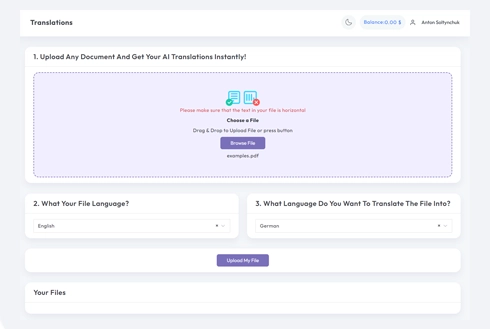
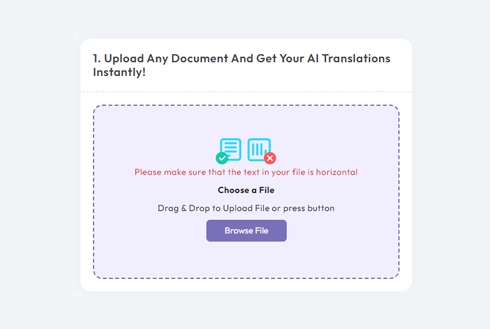
번역을 위해 문서를 업로드하거나 드롭하세요

최대. 파일 크기 1GB

.PDF .DOCX .PPTX . XLSX .TXT .JPG .PNG . IDML . EPUB .HTML
아프리칸스어 (아프리칸스어)
쉬킵 (알바니아어)
አማርኛ (암하라어)
العربية (아랍어)
Հայերեն (아르메니아어)
아제르바이잔 딜리 (아제르바이잔)
에우스카라 (바스크어)
벨라루스카야 (벨라루스어)
বাংলা (벵골어)
보산스키 (보스니아어)
Български (불가리아어)
မြန်မာဘာသာ (버마어)
카탈라(카탈루냐어)
세부아노어 (세부아노)
치체와(치체와)
中文 简体 (중국어 간체)
中文 繁體 (중국어 번체)
코르수(코르시카)
흐르바츠키 (크로아티아어)
체슈티나 (체코어)
덴마크어 (Dansk)
네덜란드(네덜란드어)
영어 (영어)
에스페란토 (에스페란토)
에스티 (에스토니아어)
수오미 (핀란드어)
프랑스어 (프랑스어)
프리스크 (프리슬란트어)
갈레고(갈리시아어)
ქართული (조지아어)
독일어 (독일어)
Ελληνικά (그리스어)
ગુજરાતી (구자라트어)
크레올 아이시옌 (아이티어)
하우사(하우사)
하와이 오렐로 (하와이어)
עברית (히브리어)
हिंदी (힌디어)
흐붑 (몽족)
마자르어 (헝가리어)
이슬렌스카 (아이슬란드어)
이그보족 (이그보족)
인도네시아 바하사 (인도네시아어)
게일어(아일랜드어)
이탈리아어(이탈리아어)
일본어 (일본어)
바사 자와(자바어)
ಕನ್ನಡ (칸나다어)
Қазақ тілі (카자흐어)
ខ្មែរ (크메르어)
이키냐르완다 (키냐르완다)
한국어 (한국어)
쿠르디 (쿠르드어)
키르기스어 Кыргызча
ລາວ (라오스어)
라티나 (라틴어)
라트비에슈 (라트비아어)
리투비우 (리투아니아어)
Lëtzebuergesch (룩셈브)
마케도니아어 마케덴어(Македонски)
마다가스카르 (말다가스카르)
말레이어 말라유어(말레이어)
മലയാളം (말라얄람어)
몰티 (몰타어)
테 레오 마오리(마오리)
मराठी (마라티어)
Монгол хэл (몽골어)
नेपाली (네팔어)
노르스크 (노르웨이어)
ଓଡ଼ିଆ (오디아어)
فارسی (페르시아어)
폴스키 (폴란드어)
포르투게스 (포르투갈어)
ਪੰਜਾਬੀ (펀자브어)
로마나 (루마니아어)
루시스키(러시아어)
가가나 사모아 (사모아)
가이들리그 (스코틀랜드어)
Српски (세르비아어)
세소토 (세소토)
쇼나 (쇼나)
سنڌي (신드어)
සිංහල (신할라어)
슬로벤치나 (슬로바키아어)
슬로벤슈치나 (슬로베니아어)
수말리 (소말리)
에스파뇰 (스페인어)
바사 순다 (순다어)
스와힐리어 (스와힐리어)
스벤스카 (스웨덴어)
타갈로그어 (타갈로그)
토치코 (타지크)
தமிழ் (타밀어)
타트아르차(타타르)
తెలుగు (텔루구어)
ไทย (태국어)
튀르크체 (터키어)
튀르크멘체 (투르크멘)
우크라이나 어(우크라이나어)
اردو (우르두어)
ئۇيغۇرچە (위구르어)
오즈벡차 (우즈벡어)
티앙 비엣 (베트남어)
쿰레이그 (웨일스어)
이시코사(코사)
ייִדיש (이디시어)
요루바 (요루바)
isiZulu (줄루)
아프리칸스어 (아프리칸스어)
쉬킵 (알바니아어)
አማርኛ (암하라어)
العربية (아랍어)
Հայերեն (아르메니아어)
아제르바이잔 딜리 (아제르바이잔)
에우스카라 (바스크어)
벨라루스카야 (벨라루스어)
বাংলা (벵골어)
보산스키 (보스니아어)
Български (불가리아어)
မြန်မာဘာသာ (버마어)
카탈라(카탈루냐어)
세부아노어 (세부아노)
치체와(치체와)
中文 简体 (중국어 간체)
中文 繁體 (중국어 번체)
코르수(코르시카)
흐르바츠키 (크로아티아어)
체슈티나 (체코어)
덴마크어 (Dansk)
네덜란드(네덜란드어)
영어 (영어)
에스페란토 (에스페란토)
에스티 (에스토니아어)
수오미 (핀란드어)
프랑스어 (프랑스어)
프리스크 (프리슬란트어)
갈레고(갈리시아어)
ქართული (조지아어)
독일어 (독일어)
Ελληνικά (그리스어)
ગુજરાતી (구자라트어)
크레올 아이시옌 (아이티어)
하우사(하우사)
하와이 오렐로 (하와이어)
עברית (히브리어)
हिंदी (힌디어)
흐붑 (몽족)
마자르어 (헝가리어)
이슬렌스카 (아이슬란드어)
이그보족 (이그보족)
인도네시아 바하사 (인도네시아어)
게일어(아일랜드어)
이탈리아어(이탈리아어)
일본어 (일본어)
바사 자와(자바어)
ಕನ್ನಡ (칸나다어)
Қазақ тілі (카자흐어)
ខ្មែរ (크메르어)
이키냐르완다 (키냐르완다)
한국어 (한국어)
쿠르디 (쿠르드어)
키르기스어 Кыргызча
ລາວ (라오스어)
라티나 (라틴어)
라트비에슈 (라트비아어)
리투비우 (리투아니아어)
Lëtzebuergesch (룩셈브)
마케도니아어 마케덴어(Македонски)
마다가스카르 (말다가스카르)
말레이어 말라유어(말레이어)
മലയാളം (말라얄람어)
몰티 (몰타어)
테 레오 마오리(마오리)
मराठी (마라티어)
Монгол хэл (몽골어)
नेपाली (네팔어)
노르스크 (노르웨이어)
ଓଡ଼ିଆ (오디아어)
فارسی (페르시아어)
폴스키 (폴란드어)
포르투게스 (포르투갈어)
ਪੰਜਾਬੀ (펀자브어)
로마나 (루마니아어)
루시스키(러시아어)
가가나 사모아 (사모아)
가이들리그 (스코틀랜드어)
Српски (세르비아어)
세소토 (세소토)
쇼나 (쇼나)
سنڌي (신드어)
සිංහල (신할라어)
슬로벤치나 (슬로바키아어)
슬로벤슈치나 (슬로베니아어)
수말리 (소말리)
에스파뇰 (스페인어)
바사 순다 (순다어)
스와힐리어 (스와힐리어)
스벤스카 (스웨덴어)
타갈로그어 (타갈로그)
토치코 (타지크)
தமிழ் (타밀어)
타트아르차(타타르)
తెలుగు (텔루구어)
ไทย (태국어)
튀르크체 (터키어)
튀르크멘체 (투르크멘)
우크라이나 어(우크라이나어)
اردو (우르두어)
ئۇيغۇرچە (위구르어)
오즈벡차 (우즈벡어)
티앙 비엣 (베트남어)
쿰레이그 (웨일스어)
이시코사(코사)
ייִדיש (이디시어)
요루바 (요루바)
isiZulu (줄루)
아랍어 포르투갈어 러시아어 이탈리아어 한국 네덜란드어 폴란드어 터키어 스웨덴어 영어 스페인어 프랑스어 독일어 중국어 일본어 힌디어 벵골어 베트남어 태국 그리스어 히브리어 아랍어 포르투갈어 러시아어 이탈리아어 한국 네덜란드어 폴란드어 터키어 스웨덴어 영어 스페인어 프랑스어 독일어 중국어 일본어 힌디어 벵골어 베트남어 태국 그리스어 히브리어
Translate PDF to Danish logo

커뮤니케이션 혁명

Which EPUB Translator is the best?

Finding the right tool, to translate your EPUB files doesn't have to be complicated. Our EPUB Translator is designed with simplicity and precision in mind, so you can quickly transform your eBook into another language without worrying about losing its original layout or design. Whether it's a novel, a business guide, or an educational textbook, we ensure your chapters, fonts, and images stay exactly where they belong, just in the language you need. With support, for over 100 languages, it's the perfect tool for authors, publishers, and anyone who needs a reliable EPUB translation solution.

We've made the process straightforward, and stress-free. Upload your EPUB file, select your target language, and let the tool handle the rest. In just a few minutes, you'll have a fully translated eBook ready to share, publish, or use. There's no technical expertise required, just a user-friendly experience that focuses on delivering quality and convenience every time.

Meet DocTranslator

DocTranslator을 만나보세요!

DocTranslator 데스크톱 방화벽과 플랫폼 신뢰성을 우회하도록 특별히 설계되었습니다. 웹 우선 online translation service for documents is developed to work in any modern web-browser whether it is Google Chrome, Mozilla Firefox or Apple Safari.

Quick and Easy EPUB File Translation

Quick and Easy EPUB File Translation: Your Hassle-Free Solution

Looking for an easy way, to translate EPUB files? Our EPUB Translator is the ultimate tool for seamless eBook translation. It ensures accurate 문서 번역 while preserving your EPUB's original formatting, layout, and design. Perfect for translating novels, business documents, and educational materials, it supports over 100 languages.

Unlike other tools, our EPUB Translator keeps chapters, images, and fonts intact, delivering professional results every time. Simply upload your EPUB file, choose your target language, and get, a fully translated document in minutes. Fast, reliable, and user-friendly, it is your go-to solution for multilingual eBook translation

Understanding High-Quality Translations

Understanding High-Quality Translations: Everything You Should Know

Good translations are all about making sure your documents make sense in another language while still sounding natural and professional. It is not, just swapping out words, it's about keeping the meaning, tone, and style the same so it feels right to the reader. Whether it's a business report, a legal contract, a, how to guide, or an eBook, the key is making sure nothing important gets lost in translation.

A great translator does not just focus on words. It looks at the bigger picture, like how people in the target language think and talk. That's why good tools for 문서 번역 are a lifesaver. They make sure everything stays in place, like the layout, fonts, and even images, and they work with all kinds of files, like PDFs, Word docs, and EPUBs. Plus, with support for over 100 languages, you can share your stuff pretty much anywhere.

If you want your documents or eBooks to look good and actually make sense to people in other countries, you've got to use the right tools. Whether you're sharing something for work, school, or publishing, good translations make all the difference. It's about connecting with people, no matter where they are.

Explore the Key Benefits of Our EPUB Translator

Our EPUB Translator is packed with features designed to make translating your eBooks effortless and precise. Whether you're an author, publisher, or educator, this tool ensures your content is translated accurately, while maintaining the original formatting, layoust, and design. It works seamlessly with EPUB files, keeping chapters, images, and fonts exactly where they belong, so the translated version looks just as professional as the original.

With support for over 100 languages, our EPUB Translator is perfect, for reaching a global audience. The process is simple. Upload your EPUB file, choose the target language, and let the tool handle the rest. There's no need for technical skills or complex setups. In just a few minutes, your translated eBook will be ready to share, publish, or use.

Whether you're translating novels, textbooks, or professional documents, our EPUB Translator delivers reliable results with minimal effort. It's your go-to solution for quick, high-quality eBook translations that keep your content polished and accessible worldwide.

필요한 단계

어떻게 작동하나요?

01

Step 1: Create a free DocTranslator account

Our free account setup process takes a few minutes. Simply click the sign-up button and fill out our registration page. Details needed include your name, email address, and password.

02

Step 2: Upload the file

MS Word, Excel, PowerPoint, TXT, InDesign, CSV 파일을 번역기에 업로드할 수 있습니다. 파일을 드래그 앤 드롭하거나 기기에서 검색하여 업로드하세요.

03

Step 3: Select the languages

문서의 원래 언어를 선택하고 대상 언어를 선택하세요. 원하는 언어를 직접 입력하거나 컬렉션을 탐색하여 원하는 옵션을 선택하세요.

04

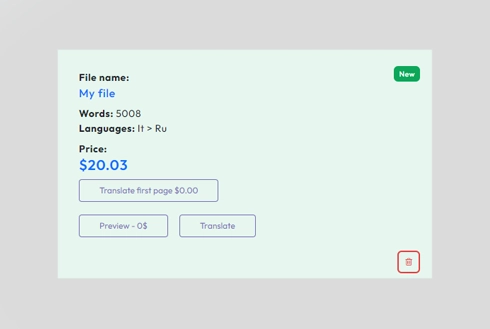
Step 4: Click "Translate" and download the file

선택한 언어에 만족하시나요? '번역'을 클릭하세요. 파일이 업로드되고 번역됩니다. 더 좋은 점은, 원본 언어와 스타일을 그대로 유지하면서도 필요에 맞는 정확한 번역을 얻을 수 있다는 것입니다.

자주 묻는 질문

How do I translate an EPUB file?

Create a free DocTranslator account, upload your EPUB file, choose the original and target languages, then click Translate. The translated eBook downloads in minutes with its original chapters, fonts, images, and layout preserved.

Does the EPUB translator keep the original formatting and layout?

Yes. DocTranslator preserves your EPUB's original formatting and layout, so chapters, fonts, and images stay exactly where they belong, just in your chosen language.

How many languages can I translate my eBook into?

DocTranslator supports 120+ languages, including Spanish, French, German, Chinese, Japanese, Korean, Arabic, Portuguese, Italian, and Russian, making it easy to reach a global audience.

How large an EPUB file can I upload?

You can upload files up to 1 GB or 5,000 pages, which is large enough for full-length novels, textbooks, and business guides.

What other file formats does DocTranslator support?

Besides EPUB content, DocTranslator works with DOCX, PDF, XLSX, PPTX, IDML, TXT, CSV, JSON, JPG, and PNG files. Built-in OCR also reads scanned PDFs and images so the text inside them can be translated.

How much does it cost to translate an EPUB?

Start with a 7-day trial for $2 (up to 10 pages or 3,000 words). After that, the Monthly plan is $14.99/month (100 pages or 30,000 words) or the Annual plan is $135/year (about $11.25/month). AI translation is priced at $0.005/word. For certified or notarized translations, such as USCIS submissions, human translation is required.

지금 파일을 번역해 보세요!

지금 가입하고 DocTranslator의 힘과 그것이 귀하와 귀하의 비즈니스에 얼마나 큰 변화를 가져올지 알아보세요.

우리의 파트너들

Accenture
Bloomberg
Citrix
P&G
SAP