
Apostille Translator
Fast and reliable apostille translation for your official documents. Upload PDFs, Word files, or images up to 1 GB and get precise, notarized translations accepted worldwide.
Upload or drop document to translate
Max. file size 1 GB
- OCR for scans and photos
- 108 languages
- Original layout kept
Translate Apostille Documents Easily
Our platform uses advanced OCR technology to automatically recognize text from scanned apostille documents and images. This ensures that even non-editable files are translated accurately without manual typing.
When you translate an apostille, DocTranslator keeps the original structure, stamps, and seals exactly as they appear in your document. You receive a perfectly formatted translation ready for submission.
With the professional translation option, you can request a certified notarization for your apostilled documents. This makes your translated files legally valid and ready for official use in institutions and courts.
DocTranslator combines powerful AI translation with quality checks to deliver highly accurate results. This ensures your apostille-certified translation is clear, correct, and accepted worldwide.
Apostille Translation Pricing
Start free and scale as you grow. Professional results at a fraction of human translator rates.
Free
No card needed to sign up
- $0.005/word AI translation
- $1 per page for scans and image PDFs
- Free preview of the first page, where available
- 108 languages
- Files up to 20 MB and 20 pages
- DOCX, PDF, XLSX, PPTX, IDML, TXT, JPG, PNG and CSV
- 24-hour file storage only
- PDF editor and PDF to DOCX converter
Basic
Most popularBilled every week · cancel any time
Billed monthly
Billed once a year · save 33%
- AI translation included every month
- Then $0.005/word AI translation
- Files up to 100 MB and 300 pages
- DOCX, PDF, XLSX, PPTX, IDML, TXT, JPG, PNG and CSV
- OCR for scanned documents
- Document storage
- Priority support
- 7-day free trial on the monthly plan, up to 30,000 words
- Cancel any time
Pro
Billed monthly
Billed once a year · save 34%
- AI translation included every month
- Then $0.004/word AI translation
- Files up to 1 GB and 5,000 pages
- DOCX, PDF, XLSX, PPTX, IDML, TXT, JPG, PNG and CSV
- Glossary
- Priority queue
- 5 team seats
- API requests · 1,000 pages a month
- MCP access for AI assistants
- Cancel any time
Business
Billed monthly
Billed once a year · save 33%
- AI translation included every month
- Then $0.003/word AI translation
- Files up to 1 GB and 5,000 pages
- DOCX, PDF, XLSX, PPTX, IDML, TXT, JPG, PNG and CSV
- Glossary
- Priority queue
- 15 team seats
- API requests · 5,000 pages a month
- MCP access for AI assistants
- Cancel any time
Enterprise
Need more volume, invoicing or a custom agreement? Talk to us about an Enterprise plan.
Apostille Translation Examples
Before submitting your documents, you can explore examples of certified translation apostille results to see the quality and accuracy DocTranslator provides. What you will see in the translated examples:
- The original structure of the apostille document remains fully preserved.
- All seals, stamps, and signatures are kept in their exact positions.
- Certified translation accuracy ensures every word is translated precisely.
- Professional formatting so nothing looks misplaced or shifted.
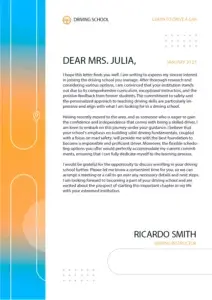
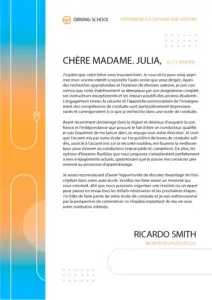


By clicking the button below, you can review complete examples of translated documents to confirm the reliability of our service.
See all translation examples →How to Use the Apostille Translator?
Follow these four simple steps to get your apostille-certified translation quickly and accurately:
Step 1: Upload your apostille document
Select your file in supported formats like PDF, DOCX, or PNG. DocTranslator can handle files up to 1 GB with ease.
Step 2: Choose a certified translation
Pick the professional translation option if you need a certified and notarized translation for legal purposes.
Step 3: Translate automatically with AI
Our AI-powered system ensures your apostille-certified translation is accurate while keeping the original formatting intact.
Step 4: Download your translated document
Instantly download your translated apostille document, ready for legal or official submission.
Frequently Asked Questions
Can I translate large PDF files online with AI?
Yes, DocTranslator uses AI-powered technology to translate PDF files up to 1 GB or 5,000 pages in length on the Pro and Business plans. Basic takes files up to 100 MB and 300 pages, and Free up to 20 MB and 20 pages.
What file formats does DocTranslator support?
DocTranslator supports DOCX (Word), PDF, XLSX (Excel), PPTX (PowerPoint), IDML (InDesign), TXT, JPG, JPEG, PNG, CSV, and JSON files. You can drag and drop files or browse your device to upload them.
How much does it cost to translate documents with AI?
Signing up is free, and on the Free plan every AI translation is paid per document: $0.005 per word, or $1 per page for scans, with a $0.99 minimum. A subscription includes AI translation every 30 days: up to 1,000 pages on Basic (from $1.99 a week) and up to 5,000 on Pro ($19.99 a month) and Business ($49.99 a month). All plans include 108 languages and full file format support.
How many languages does DocTranslator support?
DocTranslator supports 108 languages including Spanish, French, German, Chinese (Mandarin and Cantonese), Japanese, Korean, Arabic, Portuguese, Italian, Russian, and many more.
How fast is the AI document translation?
It depends mostly on the document. A short PDF with a text layer comes back sooner than a long scan, because each scanned page has to be recognised (OCR) before it can be translated. There is no setup step before that: you upload the file, choose the two languages, click "Translate" and download the result in its original format and layout.
Does DocTranslator preserve the original document formatting?
Yes, DocTranslator maintains the original language style, formatting, fonts, and layout of your document. The AI ensures accuracy and context while preserving the natural flow of your original document across all supported formats.
Is my document secure when using DocTranslator?
Yes, all communications with DocTranslator are encrypted. Your private documents are handled with discretion, and only authorized personnel can view your files. DocTranslator has robust privacy policies in place.
Can I preview my translation before paying?
Yes, where a preview is available for your language pair. After you upload a file, DocTranslator shows its first page already translated, free of charge, before you pay; for EPUB and HTML files it is the opening section. For a fuller check, the monthly Basic plan starts with a 7-day free trial for up to 30,000 words, or you can pay for a short document on its own, from $0.99.
What's the difference between AI translation and human translation?
AI translation is instant and affordable ($0.005/word on Free, less on Pro, paid per document) and ideal for quick understanding of content. For official purposes like USCIS submissions that require certified and notarized translations, you must use human translation services.
How do I get started with DocTranslator?
Create a free DocTranslator account by signing up with your name, email, and password. Then upload your file (Word, PDF, PowerPoint, etc.), select source and target languages, click "Translate," and download your translated document.
Related Document Translation Services
Immigration & USCIS
Document Types
Our Partners




Try DocTranslator's Apostille Translator Today
Get your documents processed quickly and securely. Upload your file, choose the target language, and receive a translation that preserves formatting and meets certification requirements.