
Technical Translation Services
Fast and accurate technical document translation services supporting PDF, Word, Excel, and PPT files up to 1 GB. Preserve your original formatting and get precise translations in 108 languages instantly.
Upload or drop document to translate
Max. file size 1 GB on Pro and Business
The button opens a free sign-up. The translation itself runs in your dashboard, where you choose the file again. Using an AI assistant? Connect it through MCP.
- OCR for scans and photos
- 108 languages
- Original layout kept
DocTranslator's Technical Document Translation Benefits
Discover the detailed benefits of using DocTranslator's professional technical translation services:
Handle Files up to 1 GB
Easily upload and translate large technical documents up to 1 GB without performance issues. DocTranslator supports PDF, DOCX, XLSX, CSV, PPTX, and TXT formats, making it ideal for manuals, specifications, reports, and research materials.
Preserve Original Formatting
DocTranslator ensures your translated technical documents keep the same layout, tables, diagrams, and charts. No reformatting is needed, saving you time and reducing the risk of losing essential data in complex engineering or scientific files.
Translate into 108 Languages
Our platform supports 108 languages, including German, English, Japanese, Korean, and Arabic. Whether your audience is global or regional, you can seamlessly deliver accurate technical translations tailored to any market.
AI-Powered Accuracy
DocTranslator uses advanced AI translation technology trained on millions of technical documents. This ensures that industry-specific terms, formulas, and abbreviations are translated with precision, maintaining clarity and context in every document.
Technical Translation Cost
Signing up is free. Pay per document on Free, or subscribe and get AI translation included every month.
Free
No card needed to sign up
- $0.005/word AI translation
- $1 per page for PDFs and scans
- Free preview of the first page, where available
- 108 languages
- Files up to 20 MB and 20 pages
- DOCX, PDF, XLSX, PPTX, IDML, TXT, JPG, PNG and CSV
- 24-hour file storage only
- PDF editor and PDF to DOCX converter
Basic
Most popularBilled every week · cancel any time
Billed monthly
Billed once a year · save 33%
- AI translation included every month
- Then $0.005/word AI translation
- Files up to 100 MB and 300 pages
- DOCX, PDF, XLSX, PPTX, IDML, TXT, JPG, PNG and CSV
- OCR for scanned documents
- Document storage
- Priority support
- 7-day free trial on the monthly plan, up to 30,000 words
- Cancel any time
Pro
Billed monthly
Billed once a year · save 34%
- AI translation included every month
- Then $0.004/word AI translation
- Files up to 1 GB and 5,000 pages
- DOCX, PDF, XLSX, PPTX, IDML, TXT, JPG, PNG and CSV
- Glossary
- Priority queue
- 5 team seats
- API requests · 1,000 pages a month
- MCP access for AI assistants
- Cancel any time
Business
Billed monthly
Billed once a year · save 33%
- AI translation included every month
- Then $0.003/word AI translation
- Files up to 1 GB and 5,000 pages
- DOCX, PDF, XLSX, PPTX, IDML, TXT, JPG, PNG and CSV
- Glossary
- Priority queue
- 15 team seats
- API requests · 5,000 pages a month
- MCP access for AI assistants
- Cancel any time
Enterprise
Need more volume, invoicing or a custom agreement? Talk to us about an Enterprise plan.
Technical Translation Software in Action
Before you upload your files, you can review sample translations created using DocTranslator's translation software for technical documents. This lets you see how accurately your content is handled and ensures formatting remains intact. What you can expect from our translations:
- Original formatting, tables, and charts are fully preserved.
- Accurate terminology for technical and industry-specific content.
- Support for multilingual projects with 108 languages.
- Fast and secure processing of documents up to 1 GB.
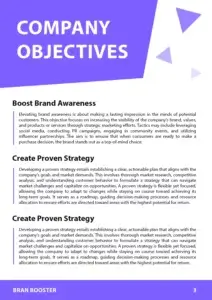
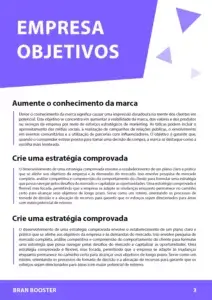


Click the button below to explore real examples of translated documents and confirm the quality of our service.
See all translation examples →How to Use Our Technical Document Translation Software?
Upload your technical document
Select your file in PDF, Word, Excel, PowerPoint, TXT, or another supported format. DocTranslator supports documents up to 1 GB in size.
Choose source and target languages
Specify the original language of your document and select one of the 108 available languages for translation.
Start the translation process
DocTranslator's technical language translation services use advanced AI to ensure accurate terminology and maintain formatting consistency across tables, charts, and diagrams.
Download your translated file
Once complete, instantly download your translated document with all original formatting preserved and technical accuracy ensured.
Frequently Asked Questions
Can I translate a long technical manual PDF without splitting it?
Service manuals and specification binders often run to hundreds of pages full of diagrams. Pro and Business accept a single PDF of up to 1 GB or 5,000 pages; Basic handles 100 MB and 300 pages, Free 20 MB and 20 pages. The large PDF translator page compares the plans for big manuals.
What file formats does DocTranslator support?
DocTranslator supports DOCX (Word), PDF, XLSX (Excel), PPTX (PowerPoint), IDML (InDesign), TXT, JPG, JPEG, PNG, CSV, and JSON files. You can drag and drop files or browse your device to upload them.
How much does it cost to translate documents with AI?
Signing up is free, and on the Free plan every AI translation is paid per document: $0.005 per word, or $1 per page for PDFs and scans, with a $0.99 minimum. A subscription includes AI translation every 30 days: up to 1,000 pages on Basic (from $1.99 a week) and up to 5,000 on Pro ($19.99 a month) and Business ($49.99 a month). All plans include 108 languages and full file format support.
How many languages does DocTranslator support?
DocTranslator supports 108 languages including Spanish, French, German, Chinese (Mandarin and Cantonese), Japanese, Korean, Arabic, Portuguese, Italian, Russian, and many more.
How fast is the AI document translation?
It depends mostly on the document. A short PDF with a text layer comes back sooner than a long scan, because each scanned page has to be recognised (OCR) before it can be translated. There is no setup step before that: you upload the file, choose the two languages, click "Translate" and download the result in its original format and layout.
Does DocTranslator preserve the original document formatting?
Yes, DocTranslator maintains the original language style, formatting, fonts, and layout of your document. The AI ensures accuracy and context while preserving the natural flow of your original document across all supported formats.
Is my document secure when using DocTranslator?
Yes, all communications with DocTranslator are encrypted. Your private documents are handled with discretion, and only authorized personnel can view your files. DocTranslator has robust privacy policies in place.
Can I preview my translation before paying?
Yes, where a preview is available for your language pair. After you upload a file, DocTranslator shows its first page already translated, free of charge, before you pay; for EPUB and HTML files it is the opening section. For a fuller check, the monthly Basic plan starts with a 7-day free trial for up to 30,000 words, or you can pay for a short document on its own, from $0.99.
What's the difference between AI translation and human translation?
AI translation is instant and affordable ($0.005/word on Free, less on Pro, paid per document) and ideal for quick understanding of content. For official purposes like USCIS submissions that require certified and notarized translations, you must use human translation services.
How do I get started with DocTranslator?
Create a free DocTranslator account by signing up with your name, email, and password. Then upload your file (Word, PDF, PowerPoint, etc.), select source and target languages, click "Translate," and download your translated document.
Get Started with Online Technical Translation Services
Experience seamless and accurate professional technical translation with DocTranslator. Upload your manuals, reports, specifications, and other technical documents to get high-quality translations in 108 languages. Our AI-powered platform keeps your formatting intact and supports files up to 1 GB.
More Tools
Industry Services
Document Types
File Formats
Our Partners