
InDesign Translation Services
Translate InDesign files here with our convenient translation tools!
Upload or drop document to translate
Max. file size 1 GB on Pro and Business
The button opens a free sign-up. The translation itself runs in your dashboard, where you choose the file again. Using an AI assistant? Connect it through MCP.
- OCR for scans and photos
- 108 languages
- Original layout kept
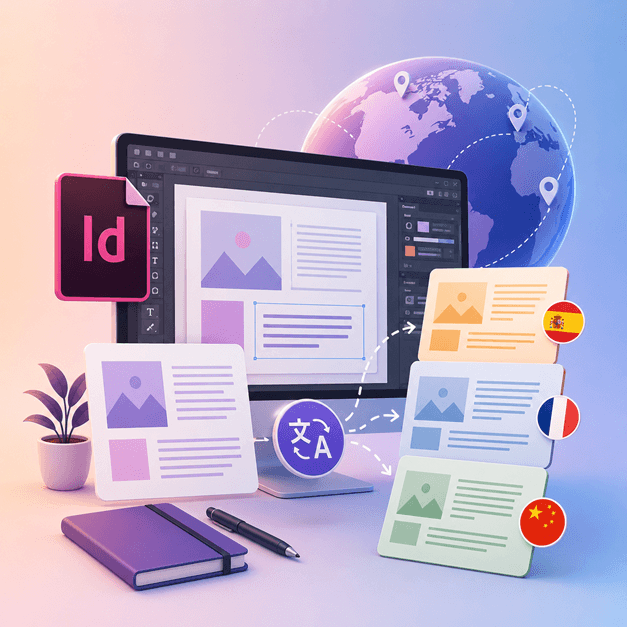
Revolutionizing Communication
How do I translate InDesign file?
If you are a designer or an artist who works with InDesign and would love to translate your designs into other languages, it's time for you to get DocTranslator.
The best way to translate InDesign files into other languages is by using DocTranslator. This tool helps you with the translation of any .IDML document/template into any language. You can use this tool to convert any template from InDesign into a different language.
Translate InDesign File →Meet DocTranslator!
DocTranslator is a sophisticated online translation service that allows users to upload various document formats, including Word, PDF, and PowerPoint, and have them translated into different languages. DocTranslator is specifically designed for documents and includes extra features that make it more suitable for this purpose compared to standard translation services.
Translate InDesign File →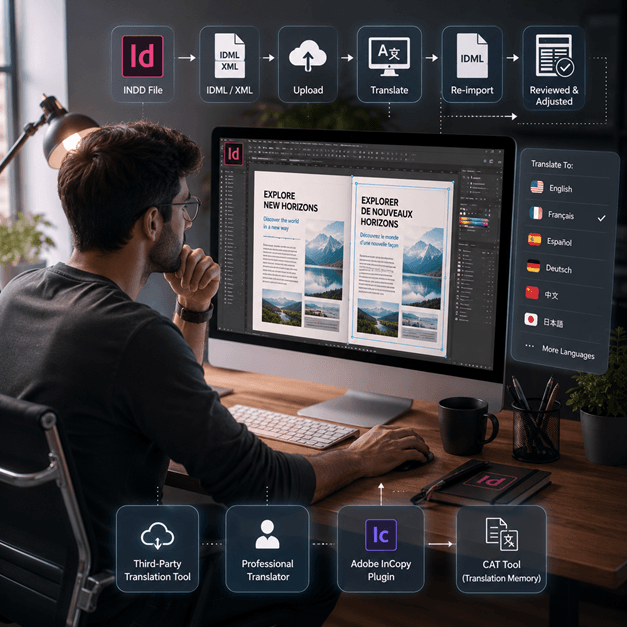
How to Translate an InDesign File
There are a few ways to translate an InDesign file online:
- Use a third-party translation tool: There are several online translation tools, such as SDL Trados, that can help you translate your InDesign file into another language. Simply upload your file to the website and select the language you want to translate it to.
- Hire a professional translator: If you want the highest quality translation, you can hire a professional translator to translate your InDesign file for you. They will have the expertise to translate not just the language but also the context and tone of the document.
- Use a plugin like Adobe InCopy, it allows you to translate your text inside InDesign document using the standard translation memory and term base technology.
- Another option is to export your InDesign file as an XML or IDML file, then use a CAT tool (Computer-assisted translation) to extract the text and translate it, then re-import the translated text.
Note: Keep in mind that some formatting may be lost during the translation process, so it is important to review the translated document and make any necessary adjustments.
Translate InDesign File →
Get to know InDesign Files
An InDesign file or INDD file, is a desktop publishing and page layout designing software application produced by Adobe. Released in 1999, InDesign is frequently used by graphic designers, marketers, journalists, and publishers. It can be used to create items such as posters, presentations, flyers, newspaper, and much more!
InDesign files are essential for anyone involved in graphic design and publishing. By understanding their structure and adhering to best practices, you can streamline your design process and produce professional-quality layouts. Whether you're designing a simple flyer or a complex magazine, mastering InDesign is key to unlocking your creative potential.
Need to translate a whole website rather than a document? Our partner ConveyThis.com handles full-site translation, which is a different job from translating a file.
Translate InDesign File →Adobe InDesign Trial: Explore Before You Subscribe
Adobe InDesign offers a free trial version for users to explore its features and capabilities before committing to a subscription. However, this trial version is only available for a limited time, usually 7 days. After the trial period ends, users must purchase a subscription to continue using the software. Unfortunately, there is no permanent free version of Adobe InDesign. Users can explore alternative software options that offer similar features and functionalities at no cost. It's essential to research and compare different software options to find the best fit for your needs and budget.
Translate InDesign File →Best way to translate your PPT Files
Watch this short video to find out the best way to translate your PowerPoint files!
HOW IT'S WORK
Step 1: Create a Free Account
Begin your translation journey by setting up a free account on our platform. It only takes a few moments to provide your basic information and confirm your email address. This account will serve as your personalized hub for uploading, tracking, and managing all your translation projects.
Step 2: Upload a File
After logging in, it's time to upload your document. Our system supports a wide variety of formats, including MS Word, Excel, PowerPoint, TXT, InDesign, and CSV. Simply drag and drop your file or use the "Browse" option to select the file from your device.
Step 3: Select the Original and Target Languages
Specify the language in which your original document is written. Then, choose the target language to which you want the document translated. With our extensive list of supported languages, you'll find the perfect match for your audience, whether it's for a business proposal or a creative campaign.
Step 4: Click the Translate Button and Download
Once you've set your language preferences, click the "Upload" button to begin processing. Sit back and relax while our advanced translation system works on your file, maintaining the original layout and style while delivering an accurate translation.
InDesign Translation: Frequently Asked Questions
How do I translate an InDesign file with DocTranslator?
Create a free account, upload your InDesign IDML file, select the original and target languages, then click Translate. DocTranslator processes the file and returns a translated version while keeping the original formatting and layout intact.
What InDesign file format does DocTranslator accept?
DocTranslator accepts the IDML format that Adobe InDesign exports. You can also translate DOCX, PDF, XLSX, PPTX, TXT, CSV, JSON, JPG, and PNG files in the same way.
Does DocTranslator keep the original InDesign layout and formatting?
Yes. DocTranslator keeps the original formatting and layout of your document, so fonts, styles, and structure carry over to the translated file. Some manual review may still be helpful after translation.
How many languages can I translate my InDesign file into?
DocTranslator supports 108 languages, including Spanish, French, German, Chinese, Japanese, Korean, Arabic, Portuguese, Italian, and Russian.
How large of an InDesign file can I translate?
On the Pro and Business plans DocTranslator handles files up to 1 GB or 5,000 pages, which covers large catalogs, magazines, and multi-page layouts in a single upload. Basic accepts up to 100 MB and 300 pages per file, and Free up to 20 MB and 20 pages.
How much does it cost to translate an InDesign file?
On a Free account an IDML file is priced by its word count at $0.005 per word and never under $0.99. A subscription covers a set number of pages every 30 days, so a catalog that fits the allowance costs nothing extra, and only the words past it are billed (plan details on the pricing page). For certified or notarized translations, such as USCIS submissions, a human translation is required.
Translate your file now!
Sign up today and discover the power of DocTranslator and how much difference it'll make for you and your business.
Our Partners




Related Translation Services
File Formats