
InDesign Tərcümə Xidmətləri
Rahat tərcümə alətlərimizlə InDesign fayllarını burada tərcümə edin!
Tərcümə üçün sənədi yükləyin və ya sürükleyib buraxın
Maks. fayl ölçüsü 1 GB
- Taranmış və fotoşəkillər üçün OCR
- 108 dil
- Orijinal tərtibat saxlanılır
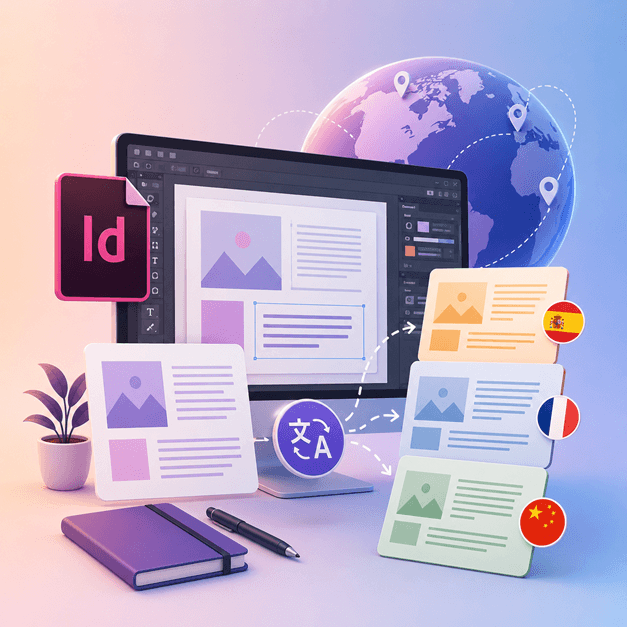
Əlaqəni İnqilab edirik
InDesign faylını necə tərcümə etmək olar?
Əgər siz InDesign ilə işləyən və dizaynlarınızı başqa dillərə tərcümə etmək istəyən bir dizayner və ya rəssamsınızsa, DocTranslator-u əldə etmək vaxtıdır.
InDesign fayllarını başqa dillərə tərcümə etməyin ən yaxşı yolu DocTranslator-dan istifadə etməkdir. Bu alət hər hansı bir .IDML sənədini/şablonunu istənilən dilə tərcümə etməkdə sizə kömək edir. Siz bu alətdən InDesign-dakı hər hansı bir şablonu başqa dilə çevirmək üçün istifadə edə bilərsiniz.
InDesign Faylını İngiliscəyə Tərcümə Et →DocTranslator ilə Tanış Olun!
DocTranslator istifadəçilərə müxtəlif sənəd formatlarını, o cümlədən Word, PDF və PowerPoint-i yükləməyə və onları müxtəlif dillərə tərcümə etməyə imkan verən mürəkkəb onlayn tərcümə xidmətidir. Google Translate mühərrikindən istifadə edən DocTranslator, sənədlər üçün xüsusi olaraq hazırlanmışdır və standart tərcümə xidmətləri ilə müqayisədə bu məqsəd üçün daha uyğun olan əlavə xüsusiyyətlərə malikdir.
InDesign Faylını İngiliscəyə Tərcümə Et →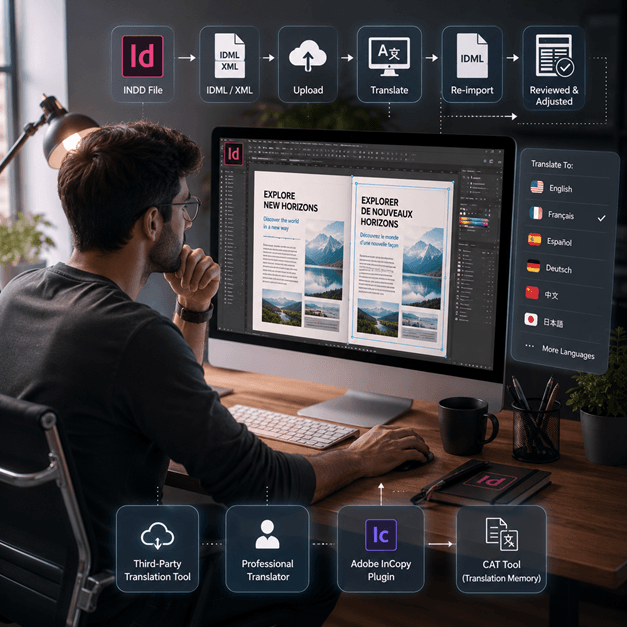
InDesign Faylını Necə Tərcümə Etmək
Bir InDesign faylını onlayn tərcümə etməyin bir neçə yolu var:
- Üçüncü tərəf tərcümə alətindən istifadə edin: InDesign faylınızı başqa dilə tərcümə etməkdə sizə kömək edə biləcək SDL Trados kimi bir sıra onlayn tərcümə alətləri var. Sadəcə faylınızı veb sayta yükləyin və tərcümə etmək istədiyiniz dili seçin.
- Peşəkar tərcüməçi işə götürün: Ən yüksək keyfiyyətli tərcümə istəyirsinizsə, InDesign faylınızı tərcümə etmək üçün peşəkar tərcüməçi işə götürə bilərsiniz. Onlar təkcə dilin deyil, həm də sənədin məzmununu və tonunu tərcümə etmək üçün təcrübəyə malik olacaqlar.
- Adobe InCopy kimi bir plugin istifadə edin, bu sizə standart tərcümə yaddaşı və termin bazası texnologiyasından istifadə edərək InDesign sənədinizdəki mətninizi tərcümə etməyə imkan verir.
- Başqa bir seçim InDesign faylınızı XML və ya IDML faylı kimi ixrac etmək, sonra mətnini çıxarmaq və tərcümə etmək üçün CAT alətindən (Kompüter dəstəkli tərcümə) istifadə etmək, sonra tərcümə edilmiş mətni yenidən idxal etməkdir.
Qeyd: Tərcümə prosesi zamanı bəzi formatların itirilə biləcəyini unutmayın, buna görə də tərcümə edilmiş sənədi nəzərdən keçirmək və lazımi düzəlişləri etmək vacibdir.
InDesign Faylını İngiliscəyə Tərcümə Et →
InDesign faylları haqqında məlumat əldə edin
InDesign faylı və ya INDD faylı, Adobe tərəfindən istehsal edilmiş bir masaüstü nəşriyyat və səhifə düzümü dizayn proqramıdır. 1999-cu ildə buraxılmış InDesign qrafik dizaynerləri, marketoloqlar, jurnalistlər və naşirlər tərəfindən tez-tez istifadə olunur. O, posterlər, təqdimatlar, bukletlər, qəzetlər və daha çox şey yaratmaq üçün istifadə edilə bilər!
InDesign faylları qrafik dizayn və nəşriyyatla məşğul olan hər kəs üçün vacibdir. Onların strukturunu anlamaq və ən yaxşı təcrübələrə riayət etməklə, dizayn prosesinizi optimallaşdıra və peşəkar keyfiyyətli düzənləmələr istehsal edə bilərsiniz. Sadə bir buklet və ya mürəkkəb bir jurnal dizayn etməyinizdən asılı olmayaraq, InDesign-da ustalaşmaq yaradıcı potensialınızı açmaq üçün açardır.
Bütün bir veb-saytı sənəd əvəzinə tərcümə etmək lazımdır? Partnyorumuz ConveyThis.com tam veb-sayt tərcüməsi ilə məşğuldur, bu da fayl tərcüməsindən fərqli bir işdir.
InDesign Faylını İngiliscəyə Tərcümə Et →Adobe InDesign Sınaq: Abunə Olmadan Əvvəl Araşdırın
Adobe InDesign, abunəliyə keçməzdən əvvəl istifadəçilərə onun xüsusiyyətlərini və imkanlarını araşdırmaq üçün pulsuz sınaq versiyası təklif edir. Lakin, bu sınaq versiyası yalnız məhdud müddətə, adətən 7 gün ərzində mövcuddur. Sınaq müddəti bitdikdən sonra, istifadəçilər proqramdan istifadəni davam etdirmək üçün abunəlik almalıdırlar. Təəssüf ki, Adobe InDesign-ın daimi pulsuz versiyası yoxdur. İstifadəçilər eyni xüsusiyyətləri və funksionallığı pulsuz təklif edən alternativ proqram seçimlərini araşdıra bilərlər. Ehtiyaclarınıza və büdcənizə ən uyğun olanı tapmaq üçün müxtəlif proqram seçimlərini araşdırmaq və müqayisə etmək vacibdir.
InDesign Faylını İngiliscəyə Tərcümə Et →PPT Fayllarınızı tərcümə etməyin ən yaxşı yolu
PowerPoint fayllarınızı tərcümə etməyin ən yaxşı yolunu öyrənmək üçün bu qısa videoya baxın!
NECƏ İŞLƏYİR
Addım 1: Pulsuz Hesab Yaradın
Platformamızda pulsuz hesab yaradaraq tərcümə səyahətinə başlayın. Əsas məlumatlarınızı təqdim etmək və e-poçt ünvanınızı təsdiqləmək bir neçə dəqiqə çəkir. Bu hesab, bütün tərcümə layihələrinizi yükləmək, izləmək və idarə etmək üçün fərdi mərkəziniz olacaq.
Addım 2: Faylı Yükləyin
Daxil olduqdan sonra sənədinizi yükləmək vaxtıdır. Sistemimiz MS Word, Excel, PowerPoint, TXT, InDesign və CSV daxil olmaqla geniş çeşiddə formatları dəstəkləyir. Sadəcə faylınızı sürükləyib buraxın və ya cihazınızdan faylı seçmək üçün "Gözdən keçir" seçimi istifadə edin.
Addım 3: Orijinal və Target Dilləri Seçin
Orijinal sənədinizin hansı dildə yazıldığını müəyyənləşdirin. Sonra, sənədin tərcümə olunmasını istədiyiniz hədəf dili seçin. Geniş dəstəklənən dillər siyahımızla, istər iş təklifi, istərsə də yaradıcı kampaniya üçün olsun, auditoriyanız üçün mükəmməl uyğunluğu tapacaqsınız.
Addım 4: Tərcümə Düyməsini Klikləyin və Yükləyin
Dil seçimlərinizi təyin etdikdən sonra, emala başlamaq üçün "Yükle" düyməsini basın. Qabaqcıl tərcümə sistemimiz orijinal düzülüşü və üslubunu qoruyaraq dəqiq tərcümə təqdim edərkən faylınız üzərində işlədiyi müddətdə arxada əyləşin və rahatlayın.
InDesign Tərcüməsi: Tez-tez Verilən Suallar
DocTranslator ilə InDesign faylını necə tərcümə etmək olar?
Pulsuz bir hesab yaradın, InDesign IDML faylınızı yükləyin, orijinal və hədəf dilləri seçin, sonra Tərcümə et düyməsini basın. DocTranslator faylı emal edir və orijinal formatlaşdırma və düzənləməni olduğu kimi saxlayaraq tərcümə edilmiş bir versiya qaytarır.
DocTranslator hansı InDesign fayl formatını qəbul edir?
DocTranslator Adobe InDesign-ın ixrac etdiyi IDML formatını qəbul edir. Eyni şəkildə DOCX, PDF, XLSX, PPTX, TXT, CSV, JSON, JPG və PNG fayllarını da tərcümə edə bilərsiniz.
DocTranslator orijinal InDesign düzənləməsini və formatlaşdırmasını saxlayır?
Bəli. DocTranslator sənədinizin orijinal formatlaşdırmasını və düzümünü saxlayır, buna görə də şriftlər, stillər və struktur tərcümə edilmiş fayla ötürülür. Tərcümədən sonra bəzi əl müayinəsi hələ də faydalı ola bilər.
InDesign faylınızı neçə dilə tərcümə edə bilərəm?
DocTranslator İspan, Fransız, Alman, Çin, Yapon, Koreya, Ərəb, Portuqal, İtalyan və Rus dilləri də daxil olmaqla 120-dən çox dili dəstəkləyir. Tərcümə Google neyron maşın tərcüməsindən istifadə edir.
Nə qədər böyük InDesign faylını tərcümə edə bilərəm?
Pro və Business plan-larında DocTranslator 1 GB-a qədər və ya 5000 səhifəyə qədər faylları emal edir, bu da böyük kataloqları, jurnalları və çoxsəhifəli düzülüşləri bir yükləmədə əhatə edir. Basic plan 100 MB və 300 səhifəyə, Free plan isə 20 MB və 20 səhifəyə qədər qəbul edir.
InDesign faylını tərcümə etmək nə qədər başa gəlir?
Free hesabında IDML faylı söz sayına görə $0.005/söz qiymətləndirilir və heç vaxt $0.99-dan aşağı olmur. Abunəlik hər 30 gündə müəyyən sayda səhifəni əhatə edir, buna görə də limitə uyğun gələn kataloq əlavə ödənişsizdir, yalnız limitdən kənar sözlər hesablanır (qiymətlər səhifəsində plan detalları). USCIS təqdimatları kimi təsdiqlənmiş və ya notarial təsdiqlənmiş tərcümələr üçün insan tərcüməsi tələb olunur.
Faylınızı indi tərcümə edin!
Bu gün qeydiyyatdan keçin və DocTranslator-un gücünü kəşf edin və sizin və biznesiniz üçün nə qədər fərq yaradacağını anlayın.
Partnyorlarımız




Əlaqəli Tərcümə Xidmətləri
Fayl Formatları