
Услуги перевода InDesign
Переводите файлы InDesign здесь с помощью наших удобных инструментов перевода!
Загрузите или перетащите документ для перевода
Макс. размер файла 1 GB
- OCR для сканов и фотографий
- 108 языков
- Оригинальная верстка сохранена
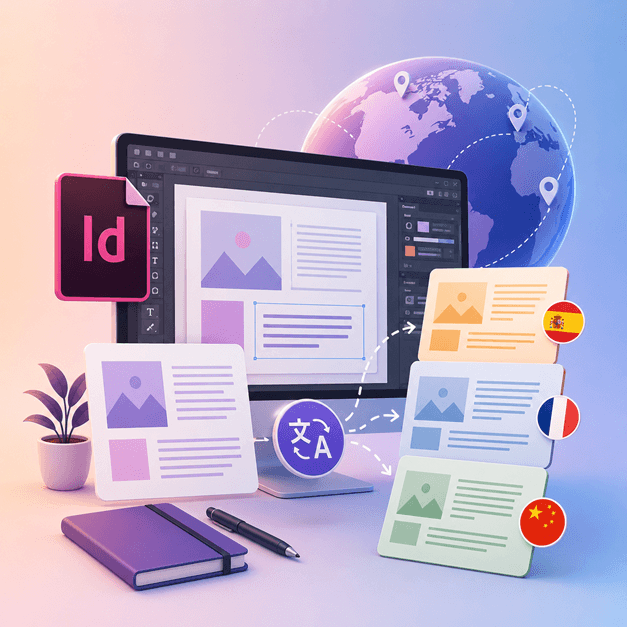
Революция в общении
Как перевести файл InDesign?
Если вы дизайнер или художник, который работает с InDesign и хотел бы перевести свои дизайны на другие языки, пришло время воспользоваться DocTranslator.
Лучший способ перевести файлы InDesign на другие языки — использовать DocTranslator. Этот инструмент поможет вам перевести любой документ/шаблон .IDML на любой язык. Вы можете использовать этот инструмент для преобразования любого шаблона из InDesign на другой язык.
Перевести файл InDesign →Знакомьтесь, DocTranslator!
DocTranslator — это сложный онлайн-сервис перевода, который позволяет пользователям загружать различные форматы документов, включая Word, PDF и PowerPoint, и переводить их на разные языки. Используя возможности движка Google Translate, DocTranslator специально разработан для документов и включает дополнительные функции, которые делают его более подходящим для этой цели по сравнению со стандартными службами перевода.
Перевести файл InDesign →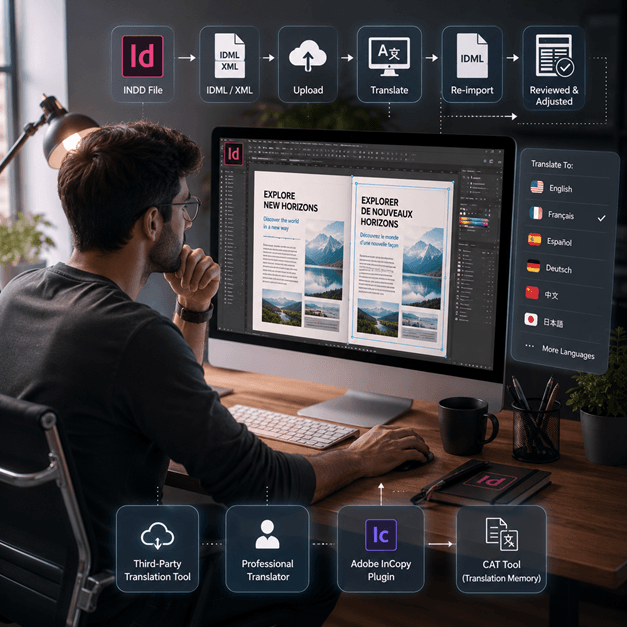
Как перевести файл InDesign
Существует несколько способов перевести файл InDesign онлайн:
- Используйте сторонний инструмент перевода: Существует несколько инструментов онлайн-перевода, таких как SDL Trados, которые могут помочь вам перевести ваш файл InDesign на другой язык. Просто загрузите свой файл на веб-сайт и выберите язык, на который вы хотите его перевести.
- Наймите профессионального переводчика: Если вы хотите получить перевод высочайшего качества, вы можете нанять профессионального переводчика для перевода вашего файла InDesign. У них будет опыт для перевода не только языка, но и контекста и тона документа.
- Используйте плагин, такой как Adobe InCopy, он позволяет переводить текст внутри документа InDesign, используя стандартную память переводов и технологию базы терминов.
- Другой вариант — экспортировать файл InDesign в формате XML или IDML, затем использовать CAT-инструмент (компьютерный перевод) для извлечения текста и его перевода, а затем повторно импортировать переведенный текст.
Примечание: Имейте в виду, что некоторое форматирование может быть потеряно в процессе перевода, поэтому важно проверить переведенный документ и внести необходимые коррективы.
Перевести файл InDesign →
Узнайте о файлах InDesign
Файл InDesign или файл INDD — это программное обеспечение для настольных издательских систем и верстки, разработанное Adobe. Выпущенный в 1999 году, InDesign часто используется графическими дизайнерами, маркетологами, журналистами и издателями. Его можно использовать для создания таких элементов, как плакаты, презентации, листовки, газеты и многое другое!
Файлы InDesign необходимы всем, кто занимается графическим дизайном и издательским делом. Понимая их структуру и следуя лучшим практикам, вы можете оптимизировать свой процесс проектирования и создавать макеты профессионального качества. Независимо от того, создаете ли вы простой флаер или сложный журнал, освоение InDesign является ключом к раскрытию вашего творческого потенциала.
Нужно перевести целый веб-сайт, а не документ? Наш партнер ConveyThis.com занимается полным переводом веб-сайтов, что отличается от перевода файла.
Перевести файл InDesign →Пробная версия Adobe InDesign: Изучите перед подпиской
Adobe InDesign предлагает бесплатную пробную версию, чтобы пользователи могли ознакомиться с его функциями и возможностями перед оформлением подписки. Однако эта пробная версия доступна только в течение ограниченного времени, обычно 7 дней. По истечении пробного периода пользователи должны приобрести подписку, чтобы продолжить использование программного обеспечения. К сожалению, постоянной бесплатной версии Adobe InDesign не существует. Пользователи могут изучить альтернативные варианты программного обеспечения, которые предлагают аналогичные функции и возможности бесплатно. Важно изучить и сравнить различные варианты программного обеспечения, чтобы найти то, что лучше всего соответствует вашим потребностям и бюджету.
Перевести файл InDesign →Лучший способ перевести ваши PPT-файлы
Посмотрите это короткое видео, чтобы узнать лучший способ перевода ваших файлов PowerPoint!
КАК ЭТО РАБОТАЕТ
Шаг 1: Создайте бесплатную учетную запись
Начните свой путь перевода, создав бесплатную учетную запись на нашей платформе. Создание учетной записи и подтверждение адреса электронной почты займет всего несколько минут. Эта учетная запись станет вашим персональным центром для загрузки, отслеживания и управления всеми вашими проектами перевода.
Шаг 2: Загрузите файл
После входа в систему пришло время загрузить ваш документ. Наша система поддерживает широкий спектр форматов, включая MS Word, Excel, PowerPoint, TXT, InDesign и CSV. Просто перетащите файл или воспользуйтесь опцией «Обзор», чтобы выбрать файл на вашем устройстве.
Шаг 3: Выберите исходный и целевой языки
Укажите язык, на котором написан ваш исходный документ. Затем выберите целевой язык, на который вы хотите перевести документ. Благодаря нашему обширному списку поддерживаемых языков вы найдете идеальное решение для вашей аудитории, будь то деловое предложение или творческая кампания.
Шаг 4: Нажмите кнопку «Перевести» и скачайте
После установки языковых предпочтений нажмите кнопку «Загрузить», чтобы начать обработку. Устройтесь поудобнее и расслабьтесь, пока наша передовая система перевода работает с вашим файлом, сохраняя исходное форматирование и стиль, обеспечивая при этом точный перевод.
Перевод InDesign: Часто задаваемые вопросы
Как перевести файл InDesign с помощью DocTranslator?
Создайте бесплатную учетную запись, загрузите файл InDesign IDML, выберите исходный и целевой языки, затем нажмите «Перевести». DocTranslator обработает файл и вернет переведенную версию, сохраняя исходное форматирование и макет без изменений.
Какой формат файла InDesign принимает DocTranslator?
DocTranslator принимает формат IDML, который экспортирует Adobe InDesign. Вы также можете переводить файлы DOCX, PDF, XLSX, PPTX, TXT, CSV, JSON, JPG и PNG таким же образом.
Сохраняет ли DocTranslator исходный макет и форматирование InDesign?
Да. DocTranslator сохраняет исходное форматирование и макет вашего документа, поэтому шрифты, стили и структура переносятся в переведенный файл. Некоторая ручная проверка после перевода все еще может быть полезна.
На сколько языков я могу перевести свой файл InDesign?
DocTranslator поддерживает 108 языков, включая испанский, французский, немецкий, китайский, японский, корейский, арабский, португальский, итальянский и русский.
Какого размера файл InDesign я могу перевести?
На планах Pro и Business DocTranslator обрабатывает файлы объемом до 1 ГБ или 5000 страниц, что достаточно для больших каталогов, журналов и многостраничных макетов при одной загрузке. Basic принимает до 100 МБ и 300 страниц на файл, а Free — до 20 МБ и 20 страниц.
Сколько стоит перевод файла InDesign?
На бесплатной учетной записи файл IDML оплачивается по количеству слов из расчета $0,005 за слово, но не менее $0,99. Подписка включает определенное количество страниц каждые 30 дней, поэтому каталог, соответствующий лимиту, не требует дополнительной платы, и оплачиваются только слова сверх лимита (подробности плана на странице с тарифами). Для заверенных или нотариально удостоверенных переводов, таких как документы для USCIS, требуется перевод человеком.
Переведите ваш файл прямо сейчас!
Зарегистрируйтесь сегодня и откройте для себя возможности DocTranslator и то, какое значение он будет иметь для вас и вашего бизнеса.
Наши партнеры




Связанные услуги перевода
Форматы файлов