
Servicios de traducción de InDesign
¡Traduce archivos de InDesign aquí con nuestras convenientes herramientas de traducción!
Sube o arrastra el documento para traducir
Tamaño máximo de archivo 1 GB en Pro y Business
El botón abre un registro gratuito. La traducción en sí se ejecuta en tu panel, donde vuelves a elegir el archivo. ¿Usando un asistente de IA? Conéctalo a través de MCP.
- OCR para escaneos y fotos
- 108 idiomas
- Diseño original conservado
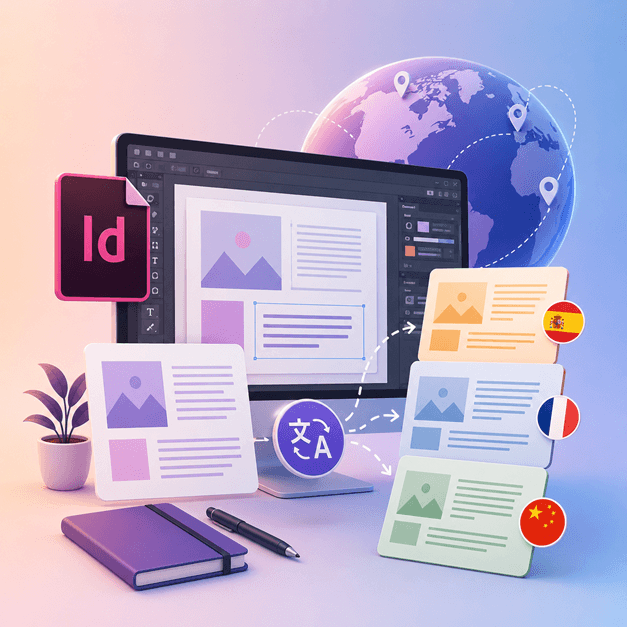
Revolucionando la comunicación
¿Cómo traduzco un archivo de InDesign?
Si eres un diseñador o artista que trabaja con InDesign y te gustaría traducir tus diseños a otros idiomas, es hora de que obtengas DocTranslator.
La mejor manera de traducir archivos de InDesign a otros idiomas es usando DocTranslator. Esta herramienta te ayuda con la traducción de cualquier documento/plantilla .IDML a cualquier idioma. Puedes usar esta herramienta para convertir cualquier plantilla de InDesign a un idioma diferente.
Traducir archivo de InDesign →¡Conozca DocTranslator!
DocTranslator es un sofisticado servicio de traducción en línea que permite a los usuarios cargar varios formatos de documentos, como Word, PDF y PowerPoint, y traducirlos a diferentes idiomas. DocTranslator está diseñado específicamente para documentos e incluye funciones adicionales que lo hacen más adecuado para este propósito en comparación con los servicios de traducción estándar.
Traducir archivo de InDesign →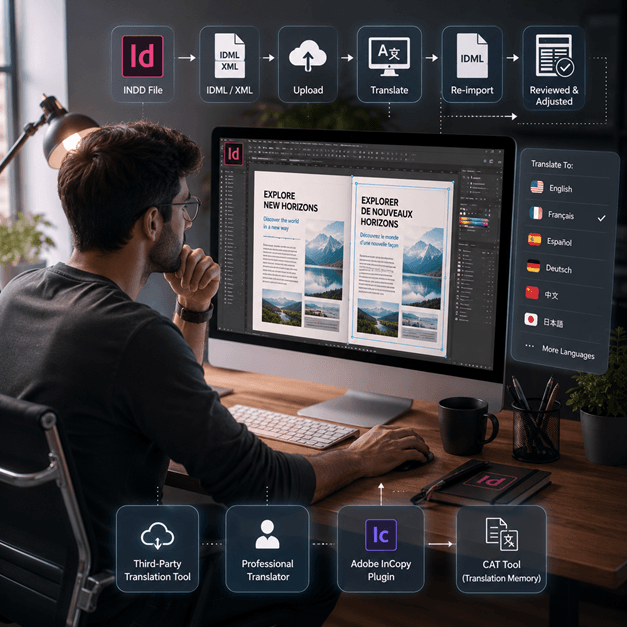
Cómo traducir un archivo de InDesign
Hay algunas maneras de traducir un archivo de InDesign en línea:
- Usa una herramienta de traducción de terceros: Hay varias herramientas de traducción en línea, como SDL Trados, que pueden ayudarte a traducir tu archivo de InDesign a otro idioma. Simplemente carga tu archivo en el sitio web y selecciona el idioma al que deseas traducirlo.
- Contrata a un traductor profesional: Si deseas la traducción de la más alta calidad, puedes contratar a un traductor profesional para traducir tu archivo de InDesign. Tendrán la experiencia para traducir no solo el idioma, sino también el contexto y el tono del documento.
- Usa un plugin como Adobe InCopy, te permite traducir tu texto dentro del documento de InDesign utilizando la tecnología estándar de memoria de traducción y base de términos.
- Otra opción es exportar tu archivo de InDesign como un archivo XML o IDML, luego usar una herramienta CAT (traducción asistida por computadora) para extraer el texto y traducirlo, luego volver a importar el texto traducido.
Nota: Tenga en cuenta que es posible que se pierda parte del formato durante el proceso de traducción, por lo que es importante revisar el documento traducido y realizar los ajustes necesarios.
Traducir archivo de InDesign →
Conoce los archivos de InDesign
Un archivo de InDesign o archivo INDD, es una aplicación de software de autoedición y diseño de maquetación producida por Adobe. Lanzado en 1999, InDesign es utilizado frecuentemente por diseñadores gráficos, especialistas en marketing, periodistas y editores. ¡Se puede utilizar para crear elementos como pósteres, presentaciones, folletos, periódicos y mucho más!
Los archivos de InDesign son esenciales para cualquier persona involucrada en diseño gráfico y publicación. Al comprender su estructura y seguir las mejores prácticas, puedes optimizar tu proceso de diseño y producir diseños de calidad profesional. Ya sea que estés diseñando un folleto simple o una revista compleja, dominar InDesign es clave para desbloquear tu potencial creativo.
¿Necesita traducir un sitio web completo en lugar de un documento? Nuestro socio ConveyThis.com se encarga de la traducción de sitios completos, que es una tarea diferente a la traducción de un archivo.
Traducir archivo de InDesign →Prueba de Adobe InDesign: Explora antes de suscribirte
Adobe InDesign ofrece una versión de prueba gratuita para que los usuarios exploren sus funciones y capacidades antes de comprometerse con una suscripción. Sin embargo, esta versión de prueba solo está disponible por un tiempo limitado, generalmente 7 días. Después de que finaliza el período de prueba, los usuarios deben comprar una suscripción para continuar usando el software. Desafortunadamente, no existe una versión gratuita permanente de Adobe InDesign. Los usuarios pueden explorar opciones de software alternativas que ofrecen características y funcionalidades similares sin costo alguno. Es esencial investigar y comparar diferentes opciones de software para encontrar la que mejor se adapte a tus necesidades y presupuesto.
Traducir archivo de InDesign →La mejor manera de traducir tus archivos PPT
¡Mira este vídeo corto para descubrir la mejor manera de traducir tus archivos de PowerPoint!
CÓMO FUNCIONA
Paso 1: Crea una cuenta gratuita
Comienza tu viaje de traducción creando una cuenta gratuita en nuestra plataforma. Solo te llevará unos momentos proporcionar tu información básica y confirmar tu dirección de correo electrónico. Esta cuenta servirá como tu centro personalizado para cargar, seguir y gestionar todos tus proyectos de traducción.
Paso 2: Sube un archivo
Después de iniciar sesión, es hora de cargar tu documento. Nuestro sistema admite una amplia variedad de formatos, incluidos MS Word, Excel, PowerPoint, TXT, InDesign y CSV. Simplemente arrastra y suelta tu archivo o usa la opción "Explorar" para seleccionar el archivo de tu dispositivo.
Paso 3: Selecciona los idiomas original y de destino
Especifica el idioma en el que está escrito tu documento original. Luego, elige el idioma de destino al que deseas traducir el documento. Con nuestra extensa lista de idiomas admitidos, encontrarás la opción perfecta para tu audiencia, ya sea para una propuesta comercial o una campaña creativa.
Paso 4: Haz clic en el botón Traducir y descarga
Una vez que hayas configurado tus preferencias de idioma, haz clic en el botón "Cargar" para comenzar el procesamiento. Siéntate y relájate mientras nuestro avanzado sistema de traducción trabaja en tu archivo, manteniendo el diseño y el estilo originales al tiempo que ofrece una traducción precisa.
Traducción de InDesign: Preguntas frecuentes
¿Cómo traduzco un archivo de InDesign con DocTranslator?
Crea una cuenta gratuita, sube tu archivo InDesign IDML, selecciona los idiomas original y de destino, y haz clic en Traducir. DocTranslator procesa el archivo y devuelve una versión traducida manteniendo intacto el formato y el diseño originales.
¿Qué formato de archivo de InDesign acepta DocTranslator?
DocTranslator acepta el formato IDML que exporta Adobe InDesign. También puedes traducir archivos DOCX, PDF, XLSX, PPTX, TXT, CSV, JSON, JPG y PNG de la misma manera.
¿DocTranslator mantiene el diseño y formato original de InDesign?
Sí. DocTranslator conserva el formato y el diseño originales de tu documento, por lo que las fuentes, los estilos y la estructura se transfieren al archivo traducido. Aún así, una revisión manual puede ser útil después de la traducción.
¿A cuántos idiomas puedo traducir mi archivo de InDesign?
DocTranslator admite 108 idiomas, entre ellos español, francés, alemán, chino, japonés, coreano, árabe, portugués, italiano y ruso.
¿Qué tamaño de archivo de InDesign puedo traducir?
En los planes Pro y Business, DocTranslator maneja archivos de hasta 1 GB o 5000 páginas, lo que cubre catálogos grandes, revistas y diseños de varias páginas en una sola carga. Basic acepta hasta 100 MB y 300 páginas por archivo, y Free hasta 20 MB y 20 páginas.
¿Cuánto cuesta traducir un archivo de InDesign?
En una cuenta Free, un archivo IDML se factura por su recuento de palabras a 0,005 $ por palabra y nunca menos de 0,99 $. Una suscripción cubre un número determinado de páginas cada 30 días, por lo que un catálogo que se ajuste a la asignación no cuesta nada adicional, y solo se facturan las palabras que la exceden (detalles del plan en la página de precios). Para traducciones certificadas o notarizadas, como las presentaciones ante el USCIS, se requiere una traducción humana.
¡Traduzca su archivo ahora!
Regístrese hoy y descubra el poder de DocTranslator y la diferencia que marcará para usted y su negocio.
Nuestros Socios




Servicios de traducción relacionados
Formatos de archivo