
ان ڈیزائن ترجمہ کی خدمات
ہمارے آسان ترجمہ کے ٹولز کے ساتھ یہاں ان ڈیزائن فائلوں کا ترجمہ کریں!
ترجمہ کرنے کے لیے دستاویز اپ لوڈ یا ڈراپ کریں
زیادہ سے زیادہ فائل سائز 1 جی بی پرو اور بزنس پر
یہ بٹن مفت سائن اپ کھولتا ہے۔ ترجمہ خود آپ کے ڈیش بورڈ میں چلتا ہے، جہاں آپ فائل کو دوبارہ منتخب کرتے ہیں۔ AI اسسٹنٹ استعمال کر رہے ہیں؟ اسے MCP کے ذریعے کنیکٹ کریں۔
- سکینز اور تصاویر کے لیے OCR
- 108 زبانیں
- اصل لے آؤٹ برقرار رکھا گیا
ارتباطات میں انقلاب لانا
میں ان ڈیزائن فائل کا ترجمہ کیسے کروں؟
اگر آپ ایک ڈیزائنر یا فنکار ہیں جو ان ڈیزائن کے ساتھ کام کرتا ہے اور اپنے ڈیزائن کا دوسری زبانوں میں ترجمہ کرنا پسند کرے گا، تو یہ آپ کے لیے DocTranslator حاصل کرنے کا وقت ہے۔
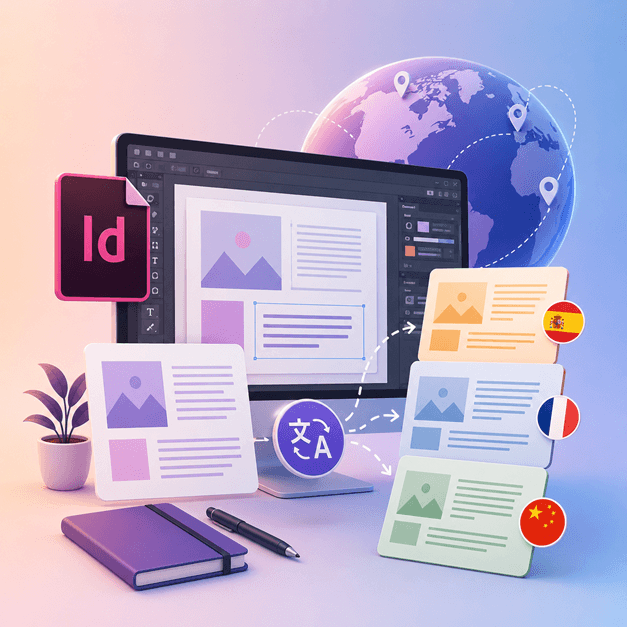
ان ڈیزائن فائلوں کا دوسری زبانوں میں ترجمہ کرنے کا بہترین طریقہ DocTranslator کا استعمال کرنا ہے۔ یہ ٹول آپ کو کسی بھی .IDML دستاویز/ٹیمپلیٹ کا کسی بھی زبان میں ترجمہ کرنے میں مدد کرتا ہے۔ آپ اس ٹول کا استعمال ان ڈیزائن سے کسی بھی ٹیمپلیٹ کو مختلف زبان میں تبدیل کرنے کے لیے کر سکتے ہیں۔
InDesign فائل کا ترجمہ کریں →DocTranslator سے ملیں!
DocTranslator ایک نفیس آن لائن ترجمہ سروس ہے جو صارفین کو ورڈ، پی ڈی ایف، اور پاورپوائنٹ سمیت مختلف دستاویز فارمیٹس اپ لوڈ کرنے اور انہیں مختلف زبانوں میں ترجمہ کروانے کی اجازت دیتی ہے۔ DocTranslator خاص طور پر دستاویزات کے لیے ڈیزائن کیا گیا ہے اور اس میں اضافی خصوصیات شامل ہیں جو اسے معیاری ترجمہ سروسز کے مقابلے میں اس مقصد کے لیے زیادہ موزوں بناتی ہیں۔
InDesign فائل کا ترجمہ کریں →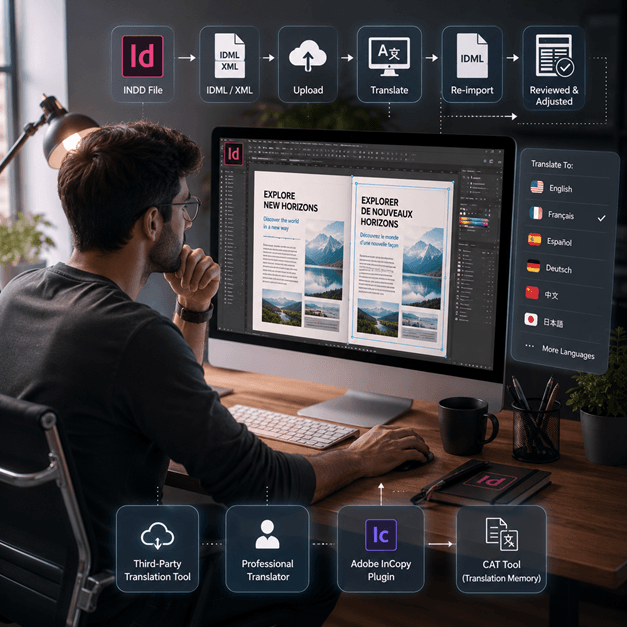
ان ڈیزائن فائل کا ترجمہ کیسے کریں
ان ڈیزائن فائل کا آن لائن ترجمہ کرنے کے چند طریقے ہیں:
- تھرڈ پارٹی ٹرانسلیشن ٹول استعمال کریں: کئی آن لائن ٹرانسلیشن ٹولز ہیں، جیسے SDL Trados، جو آپ کی ان ڈیزائن فائل کا دوسری زبان میں ترجمہ کرنے میں مدد کر سکتے ہیں۔ بس اپنی فائل ویب سائٹ پر اپ لوڈ کریں اور وہ زبان منتخب کریں جس میں آپ اس کا ترجمہ کرنا چاہتے ہیں۔
- پیشہ ور مترجم کی خدمات حاصل کریں: اگر آپ اعلیٰ ترین معیار کا ترجمہ چاہتے ہیں، تو آپ اپنے ان ڈیزائن فائل کا ترجمہ کرنے کے لیے ایک پیشہ ور مترجم کی خدمات حاصل کر سکتے ہیں۔ ان کے پاس نہ صرف زبان بلکہ دستاویز کے سیاق و سباق اور لہجے کا ترجمہ کرنے کی بھی مہارت ہوگی۔
- Adobe InCopy جیسے پلگ ان کا استعمال کریں، یہ آپ کو معیاری ترجمہ یادداشت اور ٹرم بیس ٹیکنالوجی کا استعمال کرتے ہوئے ان ڈیزائن دستاویز کے اندر اپنے متن کا ترجمہ کرنے کی اجازت دیتا ہے۔
- ایک اور آپشن یہ ہے کہ اپنی ان ڈیزائن فائل کو XML یا IDML فائل کے طور پر ایکسپورٹ کریں، پھر متن نکالنے اور اس کا ترجمہ کرنے کے لیے CAT ٹول (کمپیوٹر سے معاون ترجمہ) استعمال کریں، پھر ترجمہ شدہ متن کو دوبارہ امپورٹ کریں۔
نوٹ: یاد رکھیں کہ ترجمہ کے عمل کے دوران کچھ فارمیٹنگ ضائع ہو سکتی ہے، اس لیے ترجمہ شدہ دستاویز کا جائزہ لینا اور کوئی بھی ضروری ایڈجسٹمنٹ کرنا ضروری ہے۔
InDesign فائل کا ترجمہ کریں →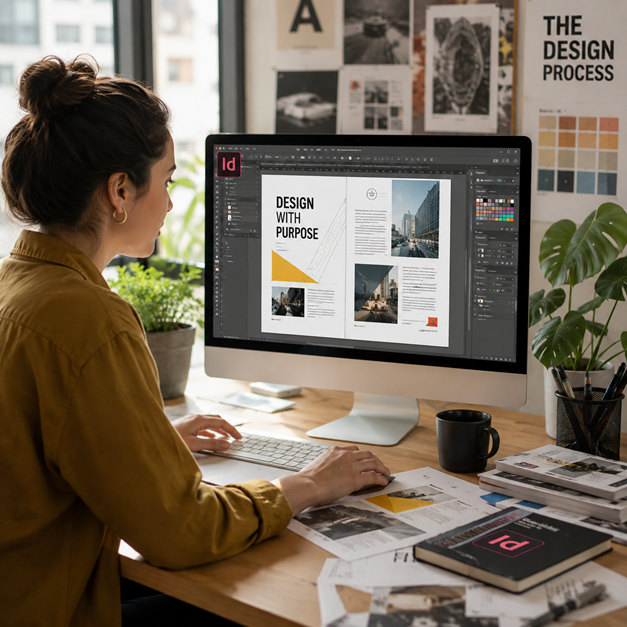
InDesign فائلوں کو جانیں
ایک InDesign فائل یا INDD فائل، Adobe کی طرف سے تیار کردہ ایک ڈیسک ٹاپ پبلشنگ اور پیج لے آؤٹ ڈیزائننگ سافٹ ویئر ایپلیکیشن ہے۔ 1999 میں ریلیز ہونے والی، InDesign کو اکثر گرافک ڈیزائنرز، مارکیٹرز، صحافیوں اور پبلشرز استعمال کرتے ہیں۔ اسے پوسٹرز، پریزنٹیشنز، فلائرز، اخبارات، اور بہت کچھ بنانے کے لیے استعمال کیا جا سکتا ہے!
ان ڈیزائن فائلیں گرافک ڈیزائن اور اشاعت میں شامل کسی بھی شخص کے لیے ضروری ہیں۔ ان کی ساخت کو سمجھ کر اور بہترین طریقوں پر عمل کر کے، آپ اپنے ڈیزائن کے عمل کو ہموار کر سکتے ہیں اور پیشہ ورانہ معیار کے لے آؤٹ تیار کر سکتے ہیں۔ چاہے آپ ایک سادہ فلائر ڈیزائن کر رہے ہوں یا ایک پیچیدہ میگزین، ان ڈیزائن میں مہارت حاصل کرنا آپ کی تخلیقی صلاحیتوں کو کھولنے کی کلید ہے۔
کیا آپ کو کسی دستاویز کے بجائے پوری ویب سائٹ کا ترجمہ کرنے کی ضرورت ہے؟ ہمارا پارٹنر ConveyThis.com مکمل سائٹ ترجمہ سنبھالتا ہے، جو کہ فائل کا ترجمہ کرنے سے ایک مختلف کام ہے۔
InDesign فائل کا ترجمہ کریں →Adobe InDesign ٹرائل: سبسکرائب کرنے سے پہلے دریافت کریں
Adobe InDesign صارفین کو سبسکرپشن کے لیے پابند ہونے سے پہلے اس کی خصوصیات اور صلاحیتوں کو دریافت کرنے کے لیے ایک مفت ٹرائل ورژن پیش کرتا ہے۔ تاہم، یہ ٹرائل ورژن صرف محدود وقت کے لیے دستیاب ہے، عام طور پر 7 دن۔ ٹرائل کی مدت ختم ہونے کے بعد، صارفین کو سافٹ ویئر کا استعمال جاری رکھنے کے لیے سبسکرپشن خریدنا ہوگا۔ بدقسمتی سے، Adobe InDesign کا کوئی مستقل مفت ورژن نہیں ہے۔ صارفین متبادل سافٹ ویئر کے اختیارات دریافت کر سکتے ہیں جو بغیر کسی لاگت کے اسی طرح کی خصوصیات اور فعالیتیں پیش کرتے ہیں۔ آپ کی ضروریات اور بجٹ کے مطابق بہترین فٹ تلاش کرنے کے لیے مختلف سافٹ ویئر کے اختیارات پر تحقیق اور موازنہ کرنا ضروری ہے۔
InDesign فائل کا ترجمہ کریں →اپنی پی پی ٹی فائلوں کا ترجمہ کرنے کا بہترین طریقہ
اس پاورپوائنٹ فائلوں کا ترجمہ کرنے کا بہترین طریقہ جاننے کے لیے یہ مختصر ویڈیو دیکھیں!
یہ کیسے کام کرتا ہے
مرحلہ 1: مفت اکاؤنٹ بنائیں
ہمارے پلیٹ فارم پر مفت اکاؤنٹ قائم کرکے اپنے ترجمے کے سفر کا آغاز کریں۔ آپ کی بنیادی معلومات فراہم کرنے اور اپنے ای میل ایڈریس کی تصدیق کرنے میں صرف چند لمحے لگیں گے۔ یہ اکاؤنٹ آپ کے تمام ترجمے کے منصوبوں کو اپ لوڈ کرنے، ٹریک کرنے اور منظم کرنے کے لیے آپ کے ذاتی مرکز کے طور پر کام کرے گا۔
مرحلہ 2: فائل اپ لوڈ کریں
لاگ ان کرنے کے بعد، اپنی دستاویز اپ لوڈ کرنے کا وقت ہے۔ ہمارا سسٹم مختلف قسم کے فارمیٹس کو سپورٹ کرتا ہے، بشمول MS Word, Excel, PowerPoint, TXT, InDesign, اور CSV۔ بس اپنی فائل کو ڈریگ اور ڈراپ کریں یا اپنے ڈیوائس سے فائل منتخب کرنے کے لیے "Browse" آپشن استعمال کریں۔
مرحلہ 3: اصل اور ہدف کی زبانیں منتخب کریں
اس زبان کی وضاحت کریں جس میں آپ کی اصل دستاویز لکھی گئی ہے۔ پھر، وہ ہدف زبان منتخب کریں جس میں آپ دستاویز کا ترجمہ کرنا چاہتے ہیں۔ ہماری معاون زبانوں کی وسیع فہرست کے ساتھ، آپ کو اپنے سامعین کے لیے بہترین میچ ملے گا، چاہے وہ کاروباری تجویز کے لیے ہو یا تخلیقی مہم کے لیے۔
مرحلہ 4: ترجمہ کے بٹن پر کلک کریں اور ڈاؤن لوڈ کریں
ایک بار جب آپ اپنی زبان کی ترجیحات طے کر لیتے ہیں، تو پروسیسنگ شروع کرنے کے لیے "اپ لوڈ" بٹن پر کلک کریں۔ آرام سے بیٹھیں اور آرام کریں جب ہمارا جدید ترجمہ نظام آپ کی فائل پر کام کرتا ہے، اصل لے آؤٹ اور انداز کو برقرار رکھتا ہے جبکہ درست ترجمہ فراہم کرتا ہے۔
ان ڈیزائن ترجمہ: اکثر پوچھے جانے والے سوالات
میں DocTranslator کے ساتھ InDesign فائل کا ترجمہ کیسے کروں؟
ایک مفت اکاؤنٹ بنائیں، اپنی InDesign IDML فائل اپ لوڈ کریں، اصل اور ہدف کی زبانیں منتخب کریں، پھر ترجمہ پر کلک کریں۔ DocTranslator فائل پر کارروائی کرتا ہے اور اصل فارمیٹنگ اور لے آؤٹ کو برقرار رکھتے ہوئے ایک ترجمہ شدہ ورژن واپس کرتا ہے۔
DocTranslator کون سی InDesign فائل فارمیٹ قبول کرتا ہے؟
DocTranslator وہ IDML فارمیٹ قبول کرتا ہے جو Adobe InDesign ایکسپورٹ کرتا ہے۔ آپ اسی طرح DOCX، PDF، XLSX، PPTX، TXT، CSV، JSON، JPG، اور PNG فائلوں کا بھی ترجمہ کر سکتے ہیں۔
کیا DocTranslator اصل InDesign لے آؤٹ اور فارمیٹنگ کو برقرار رکھتا ہے؟
جی ہاں۔ DocTranslator آپ کی دستاویز کی اصل فارمیٹنگ اور لے آؤٹ کو برقرار رکھتا ہے، لہذا فونٹ، اسٹائل، اور ڈھانچہ ترجمہ شدہ فائل میں منتقل ہو جاتے ہیں۔ ترجمہ کے بعد کچھ دستی جائزہ اب بھی مددگار ثابت ہو سکتا ہے۔
میں اپنی InDesign فائل کا کتنی زبانوں میں ترجمہ کر سکتا ہوں؟
DocTranslator 108 زبانوں کو سپورٹ کرتا ہے، جن میں ہسپانوی، فرانسیسی، جرمن، چینی، جاپانی، کورین، عربی، پرتگالی، اطالوی، اور روسی شامل ہیں۔
میں کتنی بڑی InDesign فائل کا ترجمہ کر سکتا ہوں؟
Pro اور Business پلانز پر DocTranslator 1 GB یا 5,000 صفحات تک کی فائلیں ہینڈل کرتا ہے، جو کہ ایک ہی اپلوڈ میں بڑے کیٹلاگ، میگزین اور ملٹی پیج لے آؤٹ کا احاطہ کرتا ہے۔ Basic فی فائل 100 MB اور 300 صفحات تک قبول کرتا ہے، اور Free 20 MB اور 20 صفحات تک۔
InDesign فائل کا ترجمہ کرنے میں کتنا خرچ آتا ہے؟
Free اکاؤنٹ پر ایک IDML فائل کی قیمت اس کے الفاظ کی تعداد کے حساب سے $0.005 فی لفظ کے حساب سے لگائی جاتی ہے اور $0.99 سے کم نہیں ہوتی۔ سبسکرپشن میں ہر 30 دن میں صفحات کی ایک مقررہ تعداد شامل ہوتی ہے، اس لیے الاؤنس میں فٹ ہونے والا کیٹلاگ اضافی لاگت کے بغیر ہوتا ہے، اور صرف اس سے زیادہ الفاظ ہی بل کیے جاتے ہیں (پلان کی تفصیلات قیمتوں کے صفحہ پر)۔ تصدیق شدہ یا نوٹرائزڈ ترجموں کے لیے، جیسے کہ USCIS جمع کروانے کے لیے، انسانی ترجمہ درکار ہے۔
ابھی اپنی فائل کا ترجمہ کریں!
آج ہی سائن اپ کریں اور DocTranslator کی طاقت دریافت کریں اور یہ آپ اور آپ کے کاروبار کے لیے کتنی بڑی تبدیلی لائے گا۔
ہمارے شراکت دار




متعلقہ ترجمہ کی خدمات
فائل فارمیٹس