
InDesign-vertaaldienste
Vertaal InDesign-lêers hier met ons gerieflike vertaal-instrumente!
Laai dokument op of sleep dit hierheen om te vertaal
Maks. lêergrootte 1 GB op Pro en Business
Die knoppie maak 'n gratis registrasie oop. Die vertaling self gebeur in jou dashboard, waar jy weer die lêer kies. Gebruik jy 'n KI-assistent? Koppel dit deur MCP.
- OCR vir skanderings en foto's
- 108 tale
- Oorspronklike uitleg behou
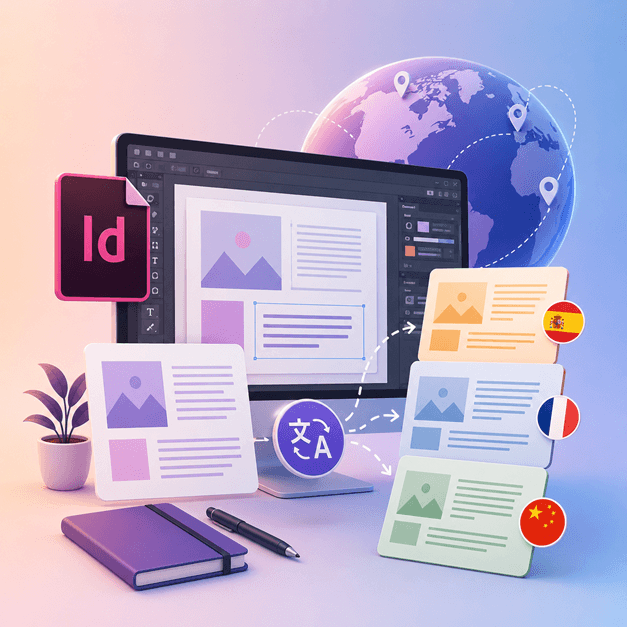
Kommunikasie Revolusioneer
Hoe vertaal ek 'n InDesign-lêer?
As jy 'n ontwerper of 'n kunstenaar is wat met InDesign werk en jou ontwerpe na ander tale wil vertaal, is dit tyd vir jou om DocTranslator te kry.
Die beste manier om InDesign-lêers na ander tale te vertaal, is deur DocTranslator te gebruik. Hierdie instrument help jou met die vertaling van enige .IDML-dokument/sjabloon na enige taal. Jy kan hierdie instrument gebruik om enige sjabloon van InDesign na 'n ander taal om te skakel.
Vertaal InDesign-lêer →Ontmoet DocTranslator!
DocTranslator is 'n gesofistikeerde aanlyn vertaaldiens wat gebruikers toelaat om verskeie dokumentformate op te laai, insluitend Word, PDF en PowerPoint, en dit in verskillende tale te laat vertaal. DocTranslator is spesifiek ontwerp vir dokumente en sluit ekstra funksies in wat dit meer geskik maak vir hierdie doel vergeleke met standaard vertaal dienste.
Vertaal InDesign-lêer →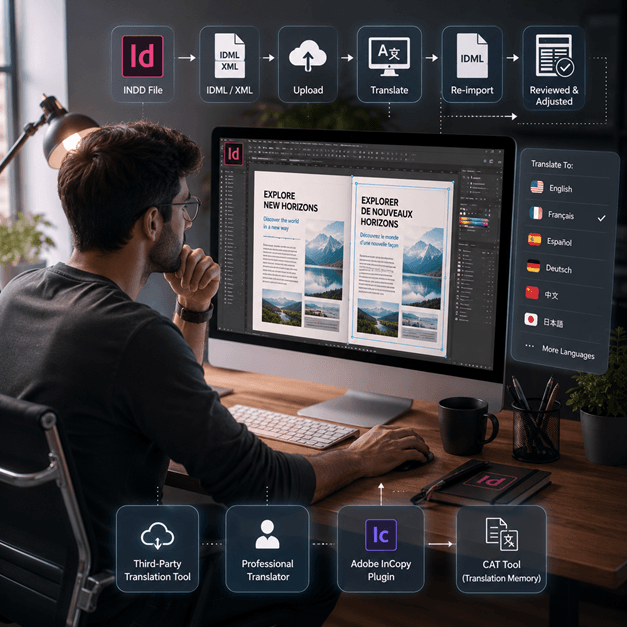
Hoe om 'n InDesign-lêer te vertaal
Daar is 'n paar maniere om 'n InDesign-lêer aanlyn te vertaal:
- Gebruik 'n derdeparty-vertaal-instrument: Daar is verskeie aanlyn vertaal-instrumente, soos SDL Trados, wat jou kan help om jou InDesign-lêer na 'n ander taal te vertaal. Laai eenvoudig jou lêer op die webwerf op en kies die taal waarna jy dit wil vertaal.
- Huur 'n professionele vertaler: As jy die hoogste gehalte vertaling wil hê, kan jy 'n professionele vertaler huur om jou InDesign-lêer te vertaal. Hulle sal die kundigheid hê om nie net die taal nie, maar ook die konteks en toon van die dokument te vertaal.
- Gebruik 'n inprop soos Adobe InCopy, dit laat jou toe om jou teks binne die InDesign-dokument te vertaal met behulp van die standaard vertaalgeheue en termbasis-tegnologie.
- Nog 'n opsie is om jou InDesign-lêer as 'n XML- of IDML-lêer uit te voer, dan 'n CAT-instrument (Rekenaargesteunde vertaling) te gebruik om die teks te onttrek en dit te vertaal, en dan die vertaalde teks weer in te voer.
Nota: Hou in gedagte dat sommige formatering mag verlore gaan tydens die vertaalproses, so dit is belangrik om die vertaalde dokument te hersien en enige nodige aanpassings te maak.
Vertaal InDesign-lêer →
Leer InDesign-lêers ken
'n InDesign-lêer of INDD-lêer, is 'n rekenaar-publiserings- en bladuitleg-ontwerptoepassing wat deur Adobe vervaardig word. Vrygestel in 1999, word InDesign gereeld gebruik deur grafiese ontwerpers, bemarkers, joernaliste en uitgewers. Dit kan gebruik word om items soos plakkate, aanbiedings, strooibiljette, koerante en nog baie meer te skep!
InDesign-lêers is noodsaaklik vir enigiemand wat betrokke is by grafiese ontwerp en publikasie. Deur hul struktuur te verstaan en by beste praktyke te hou, kan jy jou ontwerpproses stroomlyn en professionele uitlegte produseer. Of jy nou 'n eenvoudige pamflet of 'n komplekse tydskrif ontwerp, om InDesign te bemeester is die sleutel om jou kreatiewe potensiaal te ontsluit.
Moet jy 'n hele webwerf vertaal in plaas van 'n dokument? Ons vennoot ConveyThis.com hanteer volledige webwerfvertaling, wat 'n ander taak is as om 'n lêer te vertaal.
Vertaal InDesign-lêer →Adobe InDesign Proeflopie: Verken voordat jy inteken
Adobe InDesign bied 'n gratis proeflopie weergawe vir gebruikers om sy kenmerke en vermoëns te verken voordat hulle aan 'n intekening verbind. Hierdie proeflopie weergawe is egter slegs vir 'n beperkte tyd beskikbaar, gewoonlik 7 dae. Nadat die proeftydperk verstryk het, moet gebruikers 'n intekening koop om voort te gaan met die gebruik van die sagteware. Ongelukkig is daar geen permanente gratis weergawe van Adobe InDesign nie. Gebruikers kan alternatiewe sagteware-opsies verken wat soortgelyke kenmerke en funksies gratis bied. Dit is noodsaaklik om verskillende sagteware-opsies te ondersoek en te vergelyk om die beste pasvorm vir jou behoeftes en begroting te vind.
Vertaal InDesign-lêer →Beste manier om jou PPT-lêers te vertaal
Kyk hierdie kort video om uit te vind wat die beste manier is om jou PowerPoint-lêers te vertaal!
HOE DIT WERK
Stap 1: Skep 'n Gratis Rekening
Begin jou vertaalreis deur 'n gratis rekening op ons platform op te stel. Dit neem slegs 'n paar oomblikke om jou basiese inligting te verskaf en jou e-posadres te bevestig. Hierdie rekening sal dien as jou persoonlike spilpunt vir die oplaai, opspoor en bestuur van al jou vertaalprojekte.
Stap 2: Laai 'n Lêer Op
Nadat jy aangemeld het, is dit tyd om jou dokument op te laai. Ons stelsel ondersteun 'n wye verskeidenheid formate, insluitend MS Word, Excel, PowerPoint, TXT, InDesign, en CSV. Sleep en los eenvoudig jou lêer of gebruik die "Blaai"-opsie om die lêer vanaf jou toestel te kies.
Stap 3: Kies die Oorspronklike en Teikentaal
Spesifiseer die taal waarin jou oorspronklike dokument geskryf is. Kies dan die teikentaal waarna jy die dokument wil laat vertaal. Met ons uitgebreide lys van ondersteunde tale, sal jy die perfekte pasmaat vir jou gehoor vind, hetsy dit vir 'n sakevoorstel of 'n kreatiewe veldtog is.
Stap 4: Klik die Vertaalknoppie en Laai Af
Sodra jy jou taalvoorkeure gestel het, klik die "Laai Op" knoppie om die verwerking te begin. Sit terug en ontspan terwyl ons gevorderde vertaalstelsel aan jou lêer werk, die oorspronklike uitleg en styl behou terwyl 'n akkurate vertaling gelewer word.
InDesign-vertaling: Algemene Vrae
Hoe vertaal ek 'n InDesign-lêer met DocTranslator?
Skep 'n gratis rekening, laai jou InDesign IDML-lêer op, kies die oorspronklike en teikontale, klik dan Vertaal. DocTranslator verwerk die lêer en gee 'n vertaalde weergawe terug terwyl die oorspronklike formatering en uitleg ongeskonde bly.
Watter InDesign-lêerformaat aanvaar DocTranslator?
DocTranslator aanvaar die IDML-formaat wat Adobe InDesign uitvoer. Jy kan ook DOCX-, PDF-, XLSX-, PPTX-, TXT-, CSV-, JSON-, JPG- en PNG-lêers op dieselfde manier vertaal.
Behou DocTranslator die oorspronklike InDesign-uitleg en formatering?
Ja. DocTranslator behou die oorspronklike formatering en uitleg van jou dokument, sodat lettertipes, style en struktuur na die vertaalde lêer oorgedra word. Sommige handmatige oorsig mag steeds nuttig wees na vertaling.
Na hoeveel tale kan ek my InDesign-lêer vertaal?
DocTranslator ondersteun 108 tale, insluitend Spaans, Frans, Duits, Chinees, Japannees, Koreaans, Arabies, Portugees, Italiaans en Russies.
Hoe groot is 'n InDesign-lêer wat ek kan vertaal?
Op die Pro- en Business-planne hanteer DocTranslator lêers tot 1 GB of 5,000 bladsye, wat groot katalogusse, tydskrifte en uitlegte met veelvuldige bladsye in 'n enkele oplaai dek. Basic aanvaar tot 100 MB en 300 bladsye per lêer, en Free tot 20 MB en 20 bladsye.
Hoeveel kos dit om 'n InDesign-lêer te vertaal?
Op 'n Gratis rekening word 'n IDML-lêer geprys volgens sy woordtelling teen $0.005 per woord en nooit onder $0.99 nie. 'n Intekening dek 'n sekere aantal bladsye elke 30 dae, so 'n katalogus wat in die toelae pas kos niks ekstra nie, en slegs die woorde daar verby word gefaktureer (planbesonderhede op die pryse bladsy). Vir gesertifiseerde of geakkrediteerde vertalings, soos USCIS-inskrywings, is 'n menslike vertaling vereis.
Vertaal jou lêer nou!
Registreer vandag en ontdek die krag van DocTranslator en hoeveel verskil dit vir jou en jou besigheid sal maak.
Ons Vennote




Verwante Vertalingsdienste
Lêerformate