
InDesign Çeviri Hizmetleri
InDesign dosyalarınızı kullanışlı çeviri araçlarımızla buradan çevirin!
Çevrilecek belgeyi yükleyin veya sürükleyip bırakın
Pro ve Business planlarında maks. dosya boyutu 1 GB
Düğme ücretsiz kayıt açar. Çeviri işlemi, dosyayı tekrar seçtiğiniz kontrol panelinizde çalışır. Yapay zeka asistanı mı kullanıyorsunuz? MCP üzerinden bağlayın.
- Taramalar ve fotoğraflar için OCR
- 108 dil
- Orijinal düzen korundu
İletişimi Devrimleştiriyoruz
InDesign dosyasını nasıl çevirebilirim?
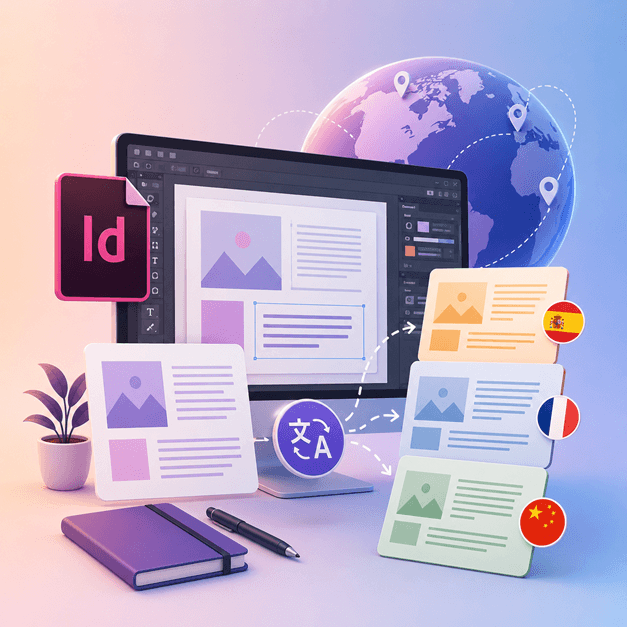
Eğer InDesign ile çalışan ve tasarımlarını başka dillere çevirmeyi seven bir tasarımcı veya sanatçıysanız, DocTranslator'ı kullanma zamanı gelmiş demektir.
InDesign dosyalarını başka dillere çevirmenin en iyi yolu DocTranslator kullanmaktır. Bu araç, herhangi bir .IDML belgesini/şablonunu herhangi bir dile çevirmenize yardımcı olur. Bu aracı InDesign'dan herhangi bir şablonu farklı bir dile dönüştürmek için kullanabilirsiniz.
InDesign Dosyasını Çevir →DocTranslator ile Tanışın!
DocTranslator, çeşitli belge biçimlerini (Word, PDF ve PowerPoint dahil) yüklemenize ve bunları farklı dillere çevirmenize olanak tanıyan gelişmiş bir çeviri hizmetidir. DocTranslator özellikle belgeler için tasarlanmıştır ve standart çeviri hizmetlerine kıyasla bu amaç için daha uygun hale getiren ek özellikler içerir.
InDesign Dosyasını Çevir →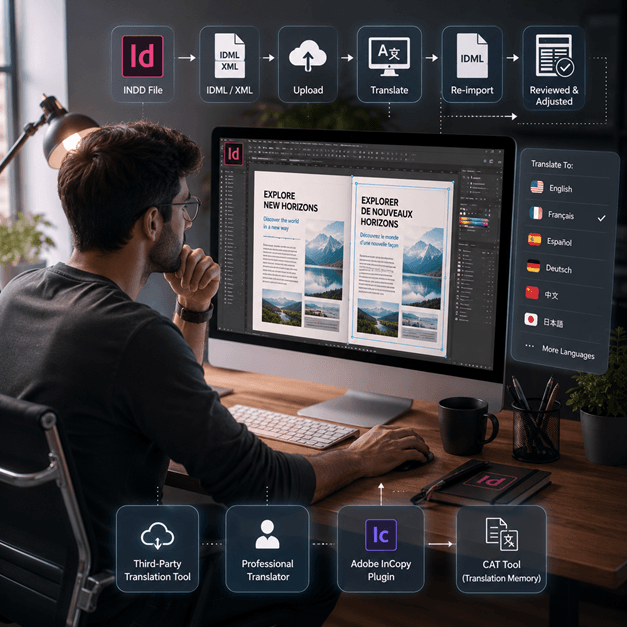
Bir InDesign Dosyasını Çevirme Nasıl Yapılır
Bir InDesign dosyasını çevrimiçi olarak çevirmenin birkaç yolu vardır:
- Üçüncü taraf bir çeviri aracı kullanın: SDL Trados gibi, InDesign dosyanızı başka bir dile çevirmenize yardımcı olabilecek çeşitli çevrimiçi çeviri araçları vardır. Dosyanızı web sitesine yüklemeniz ve çevirmek istediğiniz dili seçmeniz yeterlidir.
- Profesyonel bir çevirmen kiralayın: En yüksek kalitede çeviri istiyorsanız, InDesign dosyanızı sizin için çevirmesi için profesyonel bir çevirmen kiralayabilirsiniz. Sadece dilin değil, belgenin bağlamının ve tonunun da çevirisinde uzmanlığa sahip olacaklardır.
- Standart çeviri belleği ve terim tabanı teknolojisini kullanarak InDesign belgenizdeki metni çevirmenize olanak tanıyan Adobe InCopy gibi bir eklenti kullanın.
- Başka bir seçenek de InDesign dosyanızı XML veya IDML dosyası olarak dışa aktarmak, ardından metni çıkarmak ve çevirmek için bir CAT aracı (Bilgisayar destekli çeviri) kullanmak ve ardından çevrilmiş metni yeniden içe aktarmaktır.
Not: Çeviri işlemi sırasında bazı biçimlendirmelerin kaybolabileceğini unutmayın, bu nedenle çevrilmiş belgeyi gözden geçirmek ve gerekli ayarlamaları yapmak önemlidir.
InDesign Dosyasını Çevir →
InDesign Dosyalarını Tanıyın
Bir InDesign dosyası veya INDD dosyası, Adobe tarafından üretilen bir masaüstü yayıncılık ve sayfa düzeni tasarım yazılım uygulamasıdır. 1999'da piyasaya sürülen InDesign, grafik tasarımcıları, pazarlamacılar, gazeteciler ve yayıncılar tarafından sıkça kullanılır. Posterler, sunumlar, broşürler, gazeteler ve daha fazlası gibi öğeler oluşturmak için kullanılabilir!
InDesign dosyaları, grafik tasarım ve yayıncılıkla uğraşan herkes için önemlidir. Yapılarının anlaşılmasına ve en iyi uygulamalara uyulmasına bağlı kalarak, tasarım sürecinizi kolaylaştırabilir ve profesyonel kalitede düzenler üretebilirsiniz. Basit bir el ilanı veya karmaşık bir dergi tasarlıyor olun, InDesign'da ustalaşmak yaratıcı potansiyelinizi ortaya çıkarmanın anahtarıdır.
Bir belgeyi değil, tüm web sitesini çevirmeniz mi gerekiyor? İş ortağımız ConveyThis.com, bir dosyayı çevirmekten farklı bir iş olan tam site çevirisini halleder.
InDesign Dosyasını Çevir →Adobe InDesign Deneme Sürümü: Abone Olmadan Önce Keşfedin
Adobe InDesign, aboneliğe karar vermeden önce özelliklerini ve yeteneklerini keşfetmeleri için kullanıcılara ücretsiz bir deneme sürümü sunar. Ancak, bu deneme sürümü yalnızca sınırlı bir süre, genellikle 7 gün boyunca kullanılabilir. Deneme süresi sona erdikten sonra, yazılımı kullanmaya devam etmek için kullanıcıların bir abonelik satın almaları gerekir. Ne yazık ki, Adobe InDesign'ın kalıcı ücretsiz bir sürümü yoktur. Kullanıcılar, benzer özellikler ve işlevler sunan alternatif yazılım seçeneklerini ücretsiz olarak keşfedebilirler. İhtiyaçlarınıza ve bütçenize en uygun olanı bulmak için farklı yazılım seçeneklerini araştırmanız ve karşılaştırmanız önemlidir.
InDesign Dosyasını Çevir →PPT Dosyalarınızı Çevirmenin En İyi Yolu
PowerPoint dosyalarınızı çevirmenin en iyi yolunu öğrenmek için bu kısa videoyu izleyin!
NASIL ÇALIŞIR
Adım 1: Ücretsiz Hesap Oluşturun
Platformumuzda ücretsiz bir hesap oluşturarak çeviri yolculuğunuza başlayın. Temel bilgilerinizi sağlamanız ve e-posta adresinizi doğrulamanız yalnızca birkaç saniyenizi alacaktır. Bu hesap, tüm çeviri projelerinizi yüklemek, izlemek ve yönetmek için kişiselleştirilmiş merkeziniz olarak hizmet verecektir.
Adım 2: Dosya Yükleyin
Giriş yaptıktan sonra belgenizi yükleme zamanı. Sistemimiz MS Word, Excel, PowerPoint, TXT, InDesign ve CSV dahil olmak üzere çok çeşitli formatları destekler. Dosyanızı sürükleyip bırakmanız veya "Gözat" seçeneğini kullanarak cihazınızdan dosyayı seçmeniz yeterlidir.
Adım 3: Kaynak ve Hedef Dilleri Seçin
Orijinal belgenizin yazıldığı dili belirtin. Ardından, belgenin çevrilmesini istediğiniz hedef dili seçin. Kapsamlı desteklenen dil listemizle, ister iş teklifi ister yaratıcı bir kampanya için olsun, hedef kitleniz için mükemmel eşleşmeyi bulacaksınız.
Adım 4: Çevir Düğmesine Tıklayın ve İndirin
Dil tercihlerinizi belirledikten sonra, işlemeye başlamak için "Yükle" düğmesine tıklayın. Gelişmiş çeviri sistemimiz, doğru bir çeviri sunarken orijinal düzeni ve stili koruyarak dosyanız üzerinde çalışırken arkanıza yaslanın ve rahatlayın.
InDesign Çevirisi: Sıkça Sorulan Sorular
DocTranslator ile bir InDesign dosyasını nasıl çevirebilirim?
Ücretsiz bir hesap oluşturun, InDesign IDML dosyanızı yükleyin, kaynak ve hedef dilleri seçin, ardından Çevir'e tıklayın. DocTranslator dosyayı işler ve orijinal biçimlendirmeyi ve düzeni koruyarak çevrilmiş bir sürüm döndürür.
DocTranslator hangi InDesign dosya biçimini kabul ediyor?
DocTranslator, Adobe InDesign'ın dışa aktardığı IDML biçimini kabul eder. DOCX, PDF, XLSX, PPTX, TXT, CSV, JSON, JPG ve PNG dosyalarını da aynı şekilde çevirebilirsiniz.
DocTranslator orijinal InDesign düzenini ve biçimlendirmesini koruyor mu?
Evet. DocTranslator, belgenizin orijinal biçimlendirmesini ve düzenini korur, böylece yazı tipleri, stiller ve yapı çevrilen dosyaya aktarılır. Çeviriden sonra bazı manuel incelemeler hala faydalı olabilir.
InDesign dosyamı kaç dile çevirebilirim?
DocTranslator, İspanyolca, Fransızca, Almanca, Çince, Japonca, Korece, Arapça, Portekizce, İtalyanca ve Rusça dahil 108 dili desteklemektedir.
Ne kadar büyük bir InDesign dosyasını çevirebilirim?
Pro ve İş planlarında DocTranslator, 1 GB veya 5.000 sayfaya kadar dosyaları işler, bu da büyük katalogları, dergileri ve çok sayfalı düzenleri tek bir yüklemede kapsar. Temel plan dosya başına 100 MB ve 300 sayfaya, Ücretsiz plan ise 20 MB ve 20 sayfaya kadar kabul eder.
Bir InDesign dosyasını çevirmenin maliyeti nedir?
Free planda bir IDML dosyası, kelime başına 0,005 ABD doları ve minimum 0,99 ABD doları üzerinden fiyatlandırılır. Bir abonelik her 30 günde bir belirli sayıda sayfayı kapsar, bu nedenle kota dahilindeki bir katalog ek ücrete tabi olmaz ve yalnızca bu limiti aşan kelimeler faturalandırılır (plan detayları fiyatlandırma sayfasında). USCIS başvuruları gibi onaylı veya noter tasdikli çeviriler için insan çevirisi gereklidir.
Dosyanızı şimdi çevirin!
Bugün kaydolun ve DocTranslator'ın gücünü ve sizin ve işletmeniz için ne kadar fark yaratacağını keşfedin.
İş Ortaklarımız




İlgili Çeviri Hizmetleri
Dosya Formatları