
Usluge prevođenja InDesign-a
Prevedite InDesign fajlove ovde pomoću naših praktičnih alata za prevođenje!
Otpremite ili prevucite dokument za prevod
Maks. veličina datoteke 1 GB na Pro i Business
Dugme otvara besplatnu registraciju. Samo prevođenje se vrši u vašem kontrolnom panelu, gde ponovo birate datoteku. Koristite AI asistenta? Povežite ga preko MCP.
- OCR za skenirane dokumente i fotografije
- 108 jezika
- Originalni izgled očuvan
Revolucioniziramo komunikaciju
Kako da prevedem InDesign fajl?
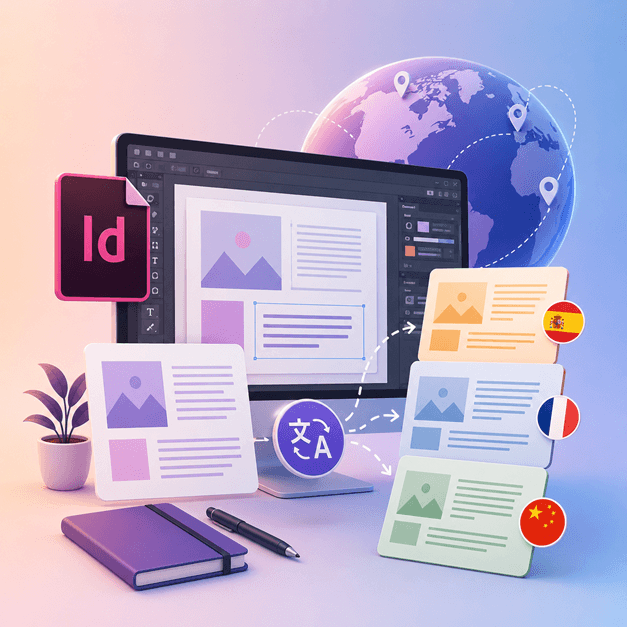
Ako ste dizajner ili umetnik koji radi sa InDesign-om i voleli biste da prevedete svoje dizajne na druge jezike, vreme je da nabavite DocTranslator.
Najbolji način za prevođenje InDesign fajlova na druge jezike je korišćenjem DocTranslator-a. Ovaj alat vam pomaže u prevođenju bilo kog .IDML dokumenta/šablona na bilo koji jezik. Možete koristiti ovaj alat za konvertovanje bilo kog šablona iz InDesign-a na drugi jezik.
Prevedi InDesign datoteku →Upoznajte DocTranslator!
DocTranslator je sofisticirana onlajn usluga prevođenja koja korisnicima omogućava da otpremaju različite formate dokumenata, uključujući Word, PDF i PowerPoint, i da ih prevedu na različite jezike. DocTranslator je specijalno dizajniran za dokumente i uključuje dodatne funkcije koje ga čine pogodnijim za ovu svrhu u poređenju sa standardnim prevodilačkim uslugama.
Prevedi InDesign datoteku →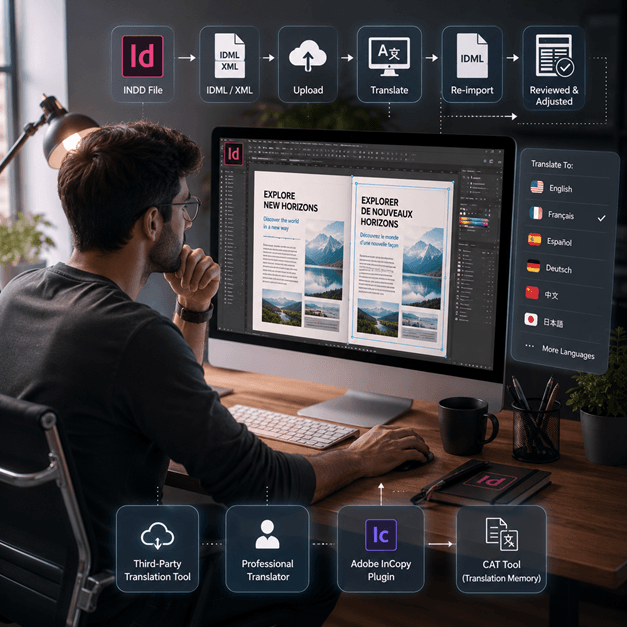
Kako prevesti InDesign fajl
Postoji nekoliko načina za prevođenje InDesign fajla online:
- Koristite alat za prevođenje treće strane: Postoji nekoliko online alata za prevođenje, kao što je SDL Trados, koji vam mogu pomoći da prevedete vaš InDesign fajl na drugi jezik. Jednostavno otpremite svoj fajl na veb lokaciju i izaberite jezik na koji želite da ga prevedete.
- Unajmite profesionalnog prevodioca: Ako želite najviši kvalitet prevoda, možete unajmiti profesionalnog prevodioca da prevede vaš InDesign fajl. Oni će imati stručnost da prevedu ne samo jezik, već i kontekst i ton dokumenta.
- Koristite dodatak kao što je Adobe InCopy, on vam omogućava da prevedete vaš tekst unutar InDesign dokumenta koristeći standardnu memoriju za prevode i tehnologiju baze termina.
- Druga opcija je da izvezete vaš InDesign fajl kao XML ili IDML fajl, zatim koristite CAT alat (prevod uz pomoć računara) da izdvojite tekst i prevedete ga, a zatim ponovo uvezete prevedeni tekst.
Napomena: Imajte na umu da neki format može biti izgubljen tokom procesa prevoda, tako da je važno pregledati prevedeni dokument i izvršiti sva potrebna podešavanja.
Prevedi InDesign datoteku →
Упознајте се са InDesign датотекама
InDesign датотека или INDD датотека, је софтверска апликација за издаваштво на рачунару и дизајн распореда страница коју производи Adobe. Објављен 1999. године, InDesign често користе графички дизајнери, маркетинг стручњаци, новинари и издавачи. Може се користити за креирање ставки као што су постери, презентације, флајери, новине и још много тога!
InDesign fajlovi su neophodni za svakoga ko se bavi grafičkim dizajnom i izdavaštvom. Razumevanjem njihove strukture i pridržavanjem najboljih praksi, možete pojednostaviti svoj proces dizajna i proizvesti profesionalne rasporede. Bilo da dizajnirate jednostavan letak ili složen magazin, savladavanje InDesign-a je ključno za otključavanje vašeg kreativnog potencijala.
Треба да преведете цео веб-сајт уместо документа? Наш партнер ConveyThis.com се бави преводом целог сајта, што је другачији посао од превођења датотеке.
Prevedi InDesign datoteku →Adobe InDesign Probna verzija: Istražite pre nego što se pretplatite
Adobe InDesign nudi besplatnu probnu verziju za korisnike da istraže njegove funkcije i mogućnosti pre nego što se obavežu na pretplatu. Međutim, ova probna verzija je dostupna samo ograničeno vreme, obično 7 dana. Nakon isteka probnog perioda, korisnici moraju kupiti pretplatu da bi nastavili da koriste softver. Nažalost, ne postoji trajna besplatna verzija Adobe InDesign-a. Korisnici mogu istražiti alternativne softverske opcije koje nude slične funkcije i mogućnosti bez troškova. Neophodno je istražiti i uporediti različite softverske opcije da biste pronašli najbolje rešenje za vaše potrebe i budžet.
Prevedi InDesign datoteku →Najbolji način za prevod vaših PPT fajlova
Pogledajte ovaj kratki video da biste saznali najbolji način za prevođenje vaših PowerPoint datoteka!
KAKO RADI
Корак 1: Направите бесплатан налог
Započnite svoje putovanje prevođenja postavljanjem besplatnog naloga na našoj platformi. Potrebno je samo nekoliko trenutaka da unesete osnovne podatke i potvrdite svoju adresu e-pošte. Ovaj nalog će vam služiti kao personalizovani centar za otpremanje, praćenje i upravljanje svim vašim projektima prevođenja.
Корак 2: Отпремите датотеку
Nakon prijavljivanja, vreme je da otpremite svoj dokument. Naš sistem podržava širok spektar formata, uključujući MS Word, Excel, PowerPoint, TXT, InDesign i CSV. Jednostavno prevucite i ispustite svoju datoteku ili koristite opciju „Pretraži“ da biste izabrali datoteku sa svog uređaja.
Корак 3: Изаберите оригинални и циљни језик
Navedite jezik na kojem je napisan vaš originalni dokument. Zatim izaberite ciljni jezik na koji želite da dokument bude preveden. Sa našom opsežnom listom podržanih jezika, pronaći ćete savršeno rešenje za svoju publiku, bilo da je reč o poslovnom predlogu ili kreativnoj kampanji.
Корак 4: Кликните на дугме Преведи и преузмите
Kada postavite jezička podešavanja, kliknite na dugme "Otpremi" da biste započeli obradu. Opustite se dok naš napredni sistem za prevođenje radi na vašem fajlu, zadržavajući originalni izgled i stil, a istovremeno isporučujući tačan prevod.
Prevođenje InDesign-a: Često postavljana pitanja
Kako da prevedem InDesign datoteku pomoću DocTranslator-a?
Kreirajte besplatan nalog, otpremite svoju InDesign IDML datoteku, izaberite izvorni i ciljni jezik, a zatim kliknite na Prevedi. DocTranslator obrađuje datoteku i vraća prevedenu verziju zadržavajući originalni format i izgled.
Koji format InDesign datoteke DocTranslator prihvata?
DocTranslator prihvata IDML format koji Adobe InDesign izvozi. Takođe možete prevesti DOCX, PDF, XLSX, PPTX, TXT, CSV, JSON, JPG i PNG datoteke na isti način.
Da li DocTranslator zadržava originalni InDesign izgled i formatiranje?
Da. DocTranslator zadržava originalno formatiranje i izgled vašeg dokumenta, tako da fontovi, stilovi i struktura prelaze u prevedeni fajl. Ručna provera i dalje može biti korisna nakon prevođenja.
Na koliko jezika mogu prevesti svoju InDesign datoteku?
DocTranslator podr eighborhood 108 jezika, uklju eighborhoodju eighborhoodi eighborhoodpanskom, francuskom, nema eighborhoodkom, kineskom, japanskom, korejskom, arapskom, portugalskom, italijanskom i ruskom.
Koliko veliku InDesign datoteku mogu prevesti?
Na Pro i Business planovima DocTranslator obrađuje fajlove do 1 GB ili 5.000 stranica, što pokriva velike kataloge, časopise i višestranične rasporede u jednom otpremanju. Basic prihvata do 100 MB i 300 stranica po fajlu, a Free do 20 MB i 20 stranica.
Koliko košta prevođenje InDesign datoteke?
Na Free nalogu, IDML fajl se naplaćuje po broju reči po ceni od 0,005$ po reči i nikada manje od 0,99$. Pretplata pokriva određeni broj stranica svakih 30 dana, tako da katalog koji se uklapa u dozvoljeni broj ne košta dodatno, a samo reči preko toga se naplaćuju (detalji plana na stranici sa cenama). Za overene ili legalizovane prevode, kao što su oni za USCIS, potreban je ljudski prevod.
Prevedite svoj fajl odmah!
Prijavite se danas i otkrijte snagu DocTranslator-a i koliko će razlike to doneti vama i vašem poslovanju.
Naši partneri




Сродне услуге превода
Formati datoteka