
InDesign Орчуулгын Үйлчилгээ
Манай тохиромжтой орчуулгын хэрэгслүүдээр InDesign файлыг энд орчуулна уу!
Орчуулах файл байршуулна уу эсвэл чирч оруулна уу
Хамгийн ихдээ файлын хэмжээ 1 GB
- скан болон зурагнаас OCR
- 108 хэл
- Анхны загвар хэвээр хадгалагдана
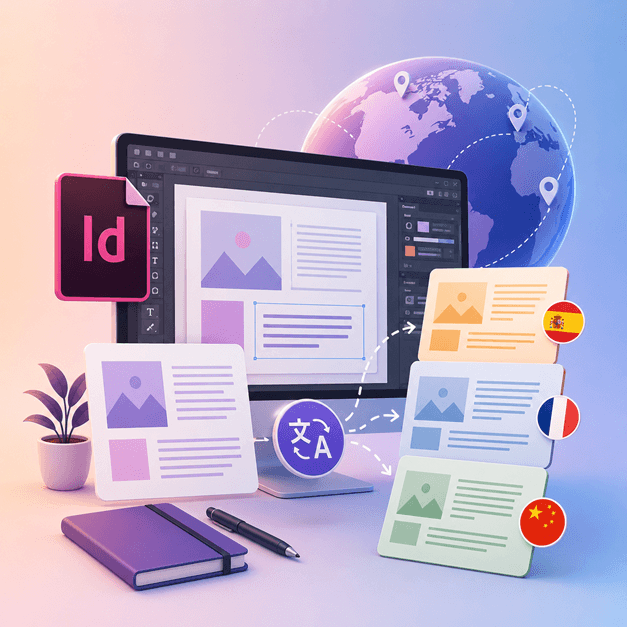
Харилцаа холбоог хувьсгалжуулж байна
InDesign файлыг хэрхэн орчуулах вэ?
Хэрэв та InDesign-тай ажилладаг, өөрийн дизайн хийсэн бүтээлээ бусад хэл рүү орчуулахыг хүсдэг дизайнер эсвэл уран бүтээлч бол DocTranslator-г ашиглах цаг болжээ.
InDesign файлыг бусад хэл рүү орчуулах хамгийн сайн арга бол DocTranslator ашиглах явдал юм. Энэхүү хэрэгсэл нь аливаа .IDML баримт бичиг/ загварыг ямар ч хэл рүү орчуулахад тань тусална. Та энэ хэрэгслийг InDesign-аас өөр хэл рүү ямар нэгэн загварыг хөрвүүлэхэд ашиглаж болно.
InDesign файлыг орчуулах →DocTranslator-тай танилцаарай!
DocTranslator нь хэрэглэгчдэд Word, PDF, PowerPoint зэрэг янз бүрийн баримт бичгийн формат байршуулж, өөр хэл рүү орчуулах боломжийг олгодог боловсронгуй онлайн орчуулгын үйлчилгээ юм. Google Translate хөдөлгүүрийн хүчийг ашиглан DocTranslator нь баримт бичгүүдэд зориулагдсан бөгөөд стандарт орчуулгын үйлчилгээнээс илүү тохиромжтой болгодог нэмэлт функцуудтай.
InDesign файлыг орчуулах →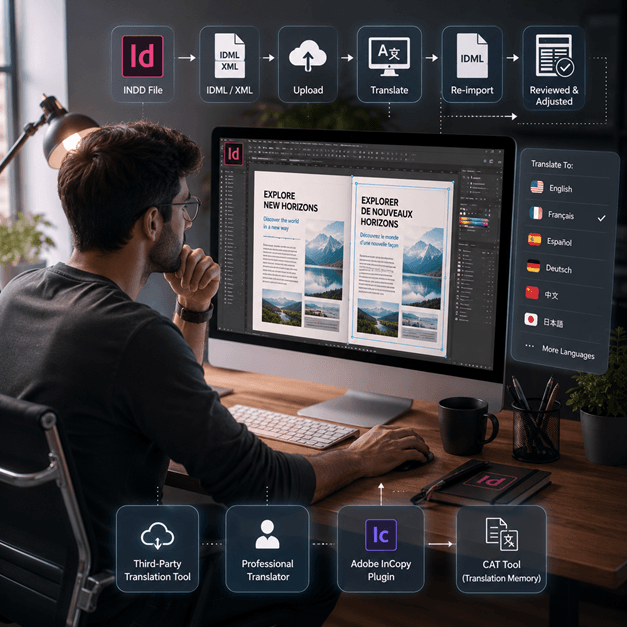
InDesign файлыг хэрхэн орчуулах вэ
InDesign файлыг онлайн орчуулах хэд хэдэн арга бий:
- Гуравдагч талын орчуулгын хэрэгсэл ашиглах: SDL Trados зэрэг хэд хэдэн онлайн орчуулгын хэрэгслүүд байдаг бөгөөд энэ нь таны InDesign файлыг өөр хэл рүү орчуулахад тусална. Файлаа вэбсайт руу байршуулж, орчуулахыг хүссэн хэлээ сонгоно уу.
- Мэргэжлийн орчуулагч хөлслөх: Хэрэв та хамгийн өндөр чанартай орчуулгыг хүсч байвал мэргэжлийн орчуулагчаар InDesign файлаа орчуулуулж болно. Тэд зөвхөн хэл төдийгүй баримт бичгийн агуулга, өнгө аясыг орчуулах туршлагатай байх болно.
- Adobe InCopy зэрэг плъгиныг ашиглан стандарт орчуулгын санах ой болон нэр томъёоны сангийн технологийг ашиглан InDesign баримт бичгийн доторх текстийг орчуулах боломжтой.
- Өөр нэг сонголт бол InDesign файлаа XML эсвэл IDML файл болгон экспортлоод, дараа нь CAT хэрэгсэл (Компьютер тусламжтай орчуулга) ашиглан текстийг гаргаж аваад орчуулж, дараа нь орчуулсан текстийг буцааж импортлох явдал юм.
Тэмдэглэл: Орчуулгын явцад зарим формат алдагдаж болзошгүйг анхаарна уу, тиймээс орчуулсан баримт бичгийг хянаж, шаардлагатай залруулга хийх нь чухал.
InDesign файлыг орчуулах →
InDesign файлуудыг мэдэж аваарай
Adobe-аас гаргасан InDesign файл эсвэл INDD файл нь ширээний хэвлэл болон хуудасны зохион байгуулалтын дизайны програм хангамж юм. 1999 онд худалдаанд гарсан InDesign нь график дизайнер, маркетер, сэтгүүлч, хэвлэн нийтлэгчдийн дунд өргөн хэрэглэгддэг. Үүнийг плакат, танилцуулга, флаер, сонин болон бусад зүйлийг бүтээхэд ашиглаж болно!
InDesign файлууд нь график дизайн болон хэвлэлийн салбарт ажилладаг хэн бүхэнд чухал ач холбогдолтой. Тэдгээрийн бүтцийг ойлгож, шилдэг туршлагыг дагаснаар та өөрийн дизайны процессыг оновчтой болгож, мэргэжлийн чанартай байрлалыг бий болгох боломжтой. Энгийн флаер эсвэл нарийн төвөгтэй сэтгүүл бүтээж байгаа эсэхээс үл хамааран InDesign-д эзэмших нь таны бүтээлч чадварыг нээх түлхүүр юм.
Баримт бичгийг орчуулахын оронд бүхэл бүтэн вэбсайтыг орчуулах шаардлагатай байна уу? Манай түнш ConveyThis.com нь бүхэл бүтэн сайтын орчуулгыг хариуцдаг бөгөөд энэ нь файлыг орчуулахаас өөр ажил юм.
InDesign файлыг орчуулах →Adobe InDesign Туршилт: Захиалахаасаа өмнө судлаарай
Adobe InDesign нь хэрэглэгчдэд захиалахаас өмнө түүний онцлог, чадварыг судлах боломжийг олгох үнэгүй туршилтын хувилбарыг санал болгодог. Гэсэн хэдий ч энэхүү туршилтын хувилбар нь зөвхөн тодорхой хугацаагаар, ихэвчлэн 7 хоног хүртэлх хугацаагаар ашиглах боломжтой. Туршилтын хугацаа дууссаны дараа хэрэглэгчид програмыг үргэлжлүүлэн ашиглахын тулд захиалга худалдаж авах ёстой. Харамсалтай нь Adobe InDesign-ийн байнгын үнэгүй хувилбар байхгүй. Хэрэглэгчид ижил төстэй онцлог, функцуудыг үнэ төлбөргүй санал болгодог өөр програмуудыг судлах боломжтой. Таны хэрэгцээ, төсөвт тохирсон хамгийн сайн сонголтыг олохын тулд өөр өөр програмуудыг судлах, харьцуулах нь чухал юм.
InDesign файлыг орчуулах →Таны PPT Файлуудыг орчуулах хамгийн сайн арга
Энэ богино видеог үзэж, PowerPoint файлуудаа хэрхэн хамгийн сайн орчуулах талаар мэдэж аваарай!
ХЭРХЭН АЖИЛЛАСАН
Алхам 1: Үнэгүй данс үүсгэх
Манай платформ дээр үнэгүй данс үүсгэснээр орчуулгын аялалаа эхлүүлээрэй. Анхны мэдээллээ оруулах, имэйл хаягаа баталгаажуулахад хэдхэн минут л болно. Энэхүү данс нь таны орчуулгын бүх төслүүдийг байршуулах, хянах, удирдах хувийн төв болно.
Алхам 2: Файл байршуулах
Нэвтэрсний дараа баримт бичгээ байршуулах цаг боллоо. Манай систем нь MS Word, Excel, PowerPoint, TXT, InDesign болон CSV зэрэг олон төрлийн формат дэмждэг. Файлаа чирч хая эсвэл төхөөрөмжөөсөө файлыг сонгохын тулд "Бүүз" сонголтыг ашиглана уу.
Алхам 3: Эх болон зорилтот хэлээ сонгох
Таны анхны баримт бичиг ямар хэлээр бичигдсэнийг зааж өгнө үү. Дараа нь баримт бичгийг орчуулахыг хүссэн хэлээ сонгоно уу. Бидний өргөн жагсаалттай хэлүүдийн тусламжтайгаар та бизнесийн санал эсвэл бүтээлч кампанит ажил байсан ч хамаагүй, үзэгчдэдээ тохирох төгс тохирохыг олох болно.
Алхам 4: Орчуулах товчийг дарж татаж авах
Хэлний тохиргоогоо хийсний дараа боловсруулж эхлэхийн тулд "Байршуулах" товчийг дарна уу. Анхны байршил, хэв маягийг хадгалж, нарийвчлалтай орчуулгыг хүргэхийн зэрэгцээ манай дэвшилтэт орчуулгын систем таны файлыг боловсруулж байх хооронд та сууж, амрах болно.
InDesign Орчуулга: Түгээмэл Асуултууд
DocTranslator ашиглан InDesign файлыг хэрхэн орчуулах вэ?
Үнэгүй бүртгэл үүсгэж, InDesign IDML файлаа байршуулж, эх болон зорилтот хэлээ сонгоод, Орчуулах товчийг дарна уу. DocTranslator файлыг боловсруулж, анхны формат болон байршлыг хэвээр хадгалсан орчуулсан хувилбарыг буцаана.
DocTranslator ямар InDesign файлын форматаар хүлээн авдаг вэ?
DocTranslator нь Adobe InDesign экспортлодог IDML форматыг хүлээн авдаг. Мөн DOCX, PDF, XLSX, PPTX, TXT, CSV, JSON, JPG, болон PNG файлуудыг ижил аргаар орчуулах боломжтой.
DocTranslator нь анхны InDesign байрлал болон форматыг хадгалдаг уу?
Тийм ээ. DocTranslator нь таны баримт бичгийн анхны хэлбэр болон загварыг хадгалдаг тул фонт, хэв маяг, бүтэц нь орчуулсан файл руу шилжинэ. Орчуулгын дараа зарим гараар хянах нь тустай байж болно.
InDesign файлаа хэчнээн хэл рүү орчуулж болох вэ?
DocTranslator нь испани, франц, герман, хятад, япон, солонгос, араб, португал, итали, орос зэрэг 120 гаруй хэлийг дэмждэг. Орчуулга нь Google-ийн нейроны машины орчуулгыг ашигладаг.
Хэчнээн том InDesign файлыг орчуулж болох вэ?
Pro болон Business төлөвлөгөөн дээр DocTranslator нь 1 GB эсвэл 5,000 хуудас хүртэлх файлуудыг боловсруулдаг бөгөөд энэ нь том каталогууд, сэтгүүлүүд болон олон хуудаст загваруудыг нэг удаа байршуулахад хангалттай. Basic нь нэг файл тутамд 100 MB болон 300 хуудас, Free нь 20 MB болон 20 хуудас хүлээн авдаг.
InDesign файлыг орчуулах өртөг хэд вэ?
Үнэгүй дансанд IDML файлыг үг тутамд $0.005, хамгийн багадаа $0.99-аар тооцно. Захиалга нь сард 30 хоногт тодорхой тооны хуудсыг багтаадаг тул хязгаарт багтсан каталоги нь нэмэлт төлбөргүй, зөвхөн хязгаараас хэтэрсэн үгсийг тооцно (багцын дэлгэрэнгүйг Үнэ-ийн хуудаснаас үзнэ үү). USCIS-д өгөх зэрэг баталгаажсан эсвэл нотариатаар гэрчлүүлсэн орчуулгын хувьд хүний орчуулга шаардлагатай.
Файлаа одоо орчуул!
Өнөөдөр бүртгүүлж, DocTranslator-ийн хүчийг олж мэдээд энэ нь та болон таны бизнест ямар их өөрчлөлт авчрахыг олж мэдээрэй.
Бидний түншүүд




Холбоотой орчуулгын үйлчилгээнүүд
Файлын төрлүүд