
اپوسٹل مترجم
آپ کی سرکاری دستاویزات کے لیے تیز اور قابل اعتماد اپوسٹائل ترجمہ۔ 1 جی بی تک کے پی ڈی ایف، ورڈ فائلز، یا امیجز اپ لوڈ کریں اور درست، نوٹرائزڈ ترجمے حاصل کریں جو دنیا بھر میں قبول کیے جاتے ہیں۔
ترجمہ کرنے کے لیے دستاویز اپ لوڈ یا ڈراپ کریں
زیادہ سے زیادہ فائل سائز 1 جی بی پرو اور بزنس پر
یہ بٹن مفت سائن اپ کھولتا ہے۔ ترجمہ خود آپ کے ڈیش بورڈ میں چلتا ہے، جہاں آپ فائل کو دوبارہ منتخب کرتے ہیں۔ AI اسسٹنٹ استعمال کر رہے ہیں؟ اسے MCP کے ذریعے کنیکٹ کریں۔
- سکینز اور تصاویر کے لیے OCR
- 108 زبانیں
- اصل لے آؤٹ برقرار رکھا گیا
اپوسٹائل دستاویزات کا آسانی سے ترجمہ کریں
ہمارا پلیٹ فارم اسکین شدہ اپوسٹائل دستاویزات اور امیجز سے متن کو خود بخود پہچاننے کے لیے جدید OCR ٹیکنالوجی کا استعمال کرتا ہے۔ یہ یقینی بناتا ہے کہ غیر قابل تدوین فائلز بھی دستی ٹائپنگ کے بغیر درست ترجمہ کی جائیں۔
جب آپ اپوسٹائل کا ترجمہ کرتے ہیں، تو DocTranslator اصل ساخت، اسٹامپ، اور مہروں کو بالکل ویسا ہی رکھتا ہے جیسا وہ آپ کی دستاویز میں نظر آتے ہیں۔ آپ کو ایک مکمل فارمیٹ شدہ ترجمہ موصول ہوتا ہے جو جمع کرانے کے لیے تیار ہے۔
پروفیشنل ترجمہ کے اختیار کے ساتھ، آپ اپنی اپوسٹائل شدہ دستاویزات کے لیے تصدیق شدہ نوٹرائزیشن کی درخواست کر سکتے ہیں۔ یہ آپ کی ترجمہ شدہ فائلوں کو قانونی طور پر درست اور اداروں اور عدالتوں میں سرکاری استعمال کے لیے تیار کرتا ہے۔
DocTranslator انتہائی درست نتائج فراہم کرنے کے لیے کوالٹی چیک کے ساتھ طاقتور AI ترجمہ کو یکجا کرتا ہے۔ یہ یقینی بناتا ہے کہ آپ کا اپوسٹائل-تصدیق شدہ ترجمہ واضح، درست، اور دنیا بھر میں قبول کیا جائے۔
اپوسٹائل ترجمہ کی قیمت
مفت شروع کریں اور جیسے جیسے آپ بڑھتے ہیں ویسے ہی پیمانہ کریں۔ انسانی مترجم کی شرحوں کے ایک حصے پر پیشہ ورانہ نتائج۔
Free
سائن اپ کرنے کے لیے کارڈ کی ضرورت نہیں
- $0.005/لفظ AI ترجمہ
- پی ڈی ایف اور اسکینز کے لیے $1 فی صفحہ
- دستیاب ہے جہاں بھی صفحہ اول کا مفت پیش نظارہ ہو
- 108 زبانیں
- 20 MB اور 20 صفحات تک کی فائلیں
- DOCX، PDF، XLSX، PPTX، IDML، TXT، JPG، PNG اور CSV
- صرف 24 گھنٹے فائل اسٹوریج
- PDF ایڈیٹر اور PDF سے DOCX کنورٹر
بنیادی
سب سے زیادہ مقبولہر ہفتے بل کیا جائے گا · کسی بھی وقت منسوخ کریں
ماہانہ بل کیا جائے گا
سالانہ بل کیا جائے گا · 33% بچائیں
- AI ترجمہ ہر مہینے شامل ہے
- پھر $0.005/لفظ AI ترجمہ
- 100 MB تک اور 300 صفحات تک کی فائلیں
- DOCX، PDF، XLSX، PPTX، IDML، TXT، JPG، PNG اور CSV
- اسکین شدہ دستاویزات کے لیے OCR
- دستاویز ذخیرہ
- ترجیحی معاونت
- 7 دن کا مفت ٹرائل ماہانہ پلان پر، 30,000 الفاظ تک
- کسی بھی وقت منسوخ کریں
Pro
ماہانہ بل کیا جائے گا
سالانہ بل کیا جائے گا · 34% بچائیں
- AI ترجمہ ہر مہینے شامل ہے
- پھر $0.004/لفظ AI ترجمہ
- 1 جی بی تک اور 5,000 صفحات تک کی فائلیں
- DOCX، PDF، XLSX، PPTX، IDML، TXT، JPG، PNG اور CSV
- لغت
- ترجیحی قطار
- 5 ٹیم سیٹ
- API درخواستیں · 1,000 صفحات فی مہینہ
- AI معاونین کے لیے MCP رسائی
- کسی بھی وقت منسوخ کریں
بزنس
ماہانہ بل کیا جائے گا
سالانہ بل کیا جائے گا · 33% بچائیں
- AI ترجمہ ہر مہینے شامل ہے
- پھر $0.003/لفظ AI ترجمہ
- 1 جی بی تک اور 5,000 صفحات تک کی فائلیں
- DOCX، PDF، XLSX، PPTX، IDML، TXT، JPG، PNG اور CSV
- لغت
- ترجیحی قطار
- 15 ٹیم سیٹ
- API درخواستیں · 5,000 صفحات فی مہینہ
- AI معاونین کے لیے MCP رسائی
- کسی بھی وقت منسوخ کریں
انٹرپرائز
مزید حجم، انوائسنگ یا کسٹم معاہدے کی ضرورت ہے؟ Enterprise پلان کے بارے میں ہم سے بات کریں۔
اپوسٹائل ترجمہ کی مثالیں
اپنی دستاویزات جمع کرانے سے پہلے، آپ تصدیق شدہ ترجمہ اپوسٹائل کے نتائج کی مثالیں دیکھ سکتے ہیں تاکہ DocTranslator کی طرف سے فراہم کردہ معیار اور درستگی کو دیکھ سکیں۔ آپ ترجمہ شدہ مثالوں میں کیا دیکھیں گے:
- اپوسٹائل دستاویز کی اصل ساخت مکمل طور پر محفوظ رہتی ہے۔
- تمام مہریں، اسٹامپ، اور دستخط اپنی اصل جگہ پر برقرار رکھے جاتے ہیں۔
- تصدیق شدہ ترجمے کی درستگی یقینی بناتی ہے کہ ہر لفظ کا درست ترجمہ کیا گیا ہے۔
- پیشہ ورانہ فارمیٹنگ تاکہ کچھ بھی بے ترتیب یا منتقل شدہ نظر نہ آئے۔
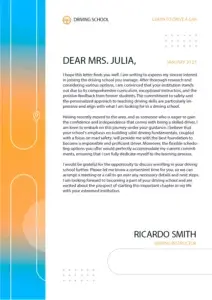
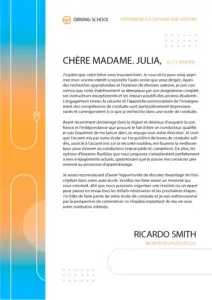


نیچے دیے گئے بٹن پر کلک کرکے، آپ ہمارے سروس کی وشوسنییتا کی تصدیق کرنے کے لیے ترجمہ شدہ دستاویزات کے مکمل مثالوں کا جائزہ لے سکتے ہیں۔
تمام ترجمے کی مثالیں دیکھیں →Apostille مترجم کو کیسے استعمال کریں؟
اپنے Apostille سے تصدیق شدہ ترجمے کو جلدی اور درستگی سے حاصل کرنے کے لیے ان چار آسان اقدامات پر عمل کریں:
مرحلہ 1: اپنی Apostille دستاویز اپ لوڈ کریں
PDF، DOCX، یا PNG جیسی معاون فارمیٹس میں اپنی فائل منتخب کریں۔ DocTranslator آسانی سے 1 GB تک کی فائلوں کو سنبھال سکتا ہے۔
مرحلہ 2: تصدیق شدہ ترجمہ منتخب کریں
اگر آپ کو قانونی مقاصد کے لیے تصدیق شدہ اور نوٹرائزڈ ترجمے کی ضرورت ہے تو پیشہ ورانہ ترجمہ کا اختیار منتخب کریں۔
مرحلہ 3: AI کے ساتھ خودکار طور پر ترجمہ کریں
ہمارا AI سے چلنے والا نظام یقینی بناتا ہے کہ آپ کا Apostille سے تصدیق شدہ ترجمہ درست ہو جبکہ اصل فارمیٹنگ کو برقرار رکھے۔
مرحلہ 4: اپنی ترجمہ شدہ دستاویز ڈاؤن لوڈ کریں
اپنی ترجمہ شدہ Apostille دستاویز کو فوری طور پر ڈاؤن لوڈ کریں، جو قانونی یا سرکاری جمع کرانے کے لیے تیار ہے۔
مزید دستاویز ترجمہ کی خدمات دریافت کریں
اکثر پوچھے جانے والے سوالات
DocTranslator کون سی فائل فارمیٹس کو سپورٹ کرتا ہے؟
DocTranslator DOCX (Word), PDF, XLSX (Excel), PPTX (PowerPoint), IDML (InDesign), TXT, JPG, JPEG, PNG, CSV, اور JSON فائلوں کو سپورٹ کرتا ہے۔ آپ فائلوں کو ڈریگ اور ڈراپ کر سکتے ہیں یا اپنے ڈیوائس کو براؤز کر کے اپ لوڈ کر سکتے ہیں۔
AI کے ساتھ دستاویزات کا ترجمہ کرنے میں کتنا خرچ آتا ہے؟
سائن اپ مفت ہے، اور Free پلان میں ہر AI ترجمہ فی دستاویز ادا کیا جاتا ہے: $0.005 فی لفظ، یا پی ڈی ایف اور اسکینز کے لیے $1 فی صفحہ، کم از کم $0.99 کے ساتھ۔ سبسکرپشن میں ہر 30 دن میں AI ترجمہ شامل ہے: Basic پر 1,000 صفحات تک (ہفتہ وار $1.99 سے) اور Pro ($19.99 ماہانہ) اور Business ($49.99 ماہانہ) پر 5,000 صفحات تک۔ تمام پلانز میں 108 زبانیں اور مکمل فائل فارمیٹ سپورٹ شامل ہے۔
DocTranslator کتنی زبانیں سپورٹ کرتا ہے؟
DocTranslator 108 زبانوں کی حمایت کرتا ہے جن میں ہسپانوی، فرانسیسی، جرمن، چینی (مینڈارن اور کینٹونیز)، جاپانی، کورین، عربی، پرتگالی، اطالوی، روسی، اور بہت سی شامل ہیں۔
AI دستاویز ترجمہ کتنا تیز ہے؟
یہ زیادہ تر دستاویز پر منحصر ہے۔ ٹیکسٹ لیئر والی ایک چھوٹی PDF ایک لمبے اسکین سے جلد واپس آ جاتی ہے، کیونکہ ترجمہ کرنے سے پہلے ہر اسکین شدہ صفحے کو پہچاننا (OCR) ہوتا ہے۔ اس سے پہلے کوئی سیٹ اپ مرحلہ نہیں ہے: آپ فائل اپ لوڈ کرتے ہیں، دو زبانیں منتخب کرتے ہیں، "Translate" پر کلک کرتے ہیں اور نتیجہ اس کی اصل شکل اور لے آؤٹ میں ڈاؤن لوڈ کرتے ہیں۔
کیا DocTranslator اصل دستاویز کی فارمیٹنگ کو برقرار رکھتا ہے؟
جی ہاں، DocTranslator آپ کی دستاویز کی اصل زبان کے انداز، فارمیٹنگ، فونٹ اور لے آؤٹ کو برقرار رکھتا ہے۔ AI تمام معاون فارمیٹس میں آپ کی اصل دستاویز کے قدرتی بہاؤ کو برقرار رکھتے ہوئے درستگی اور سیاق و سباق کو یقینی بناتا ہے۔
کیا DocTranslator استعمال کرتے وقت میری دستاویز محفوظ ہے؟
جی ہاں، DocTranslator کے ساتھ تمام مواصلات خفیہ کردہ ہیں۔ آپ کی نجی دستاویزات کو سمجھداری سے سنبھالا جاتا ہے، اور صرف مجاز اہلکار آپ کی فائلوں کو دیکھ سکتے ہیں۔ DocTranslator کی مضبوط رازداری کی پالیسیاں موجود ہیں۔
کیا میں ادائیگی سے پہلے اپنے ترجمے کا پیش منظر دیکھ سکتا ہوں؟
جی ہاں، جہاں آپ کی زبان کے جوڑے کے لیے پیش نظارہ دستیاب ہو۔ فائل اپ لوڈ کرنے کے بعد، DocTranslator ادائیگی سے پہلے اس کا پہلا صفحہ پہلے سے ترجمہ شدہ دکھاتا ہے، مفت چارج کے بغیر؛ EPUB اور HTML فائلوں کے لیے یہ افتتاحی سیکشن ہے۔ مکمل جانچ کے لیے، ماہانہ بنیادی پلان 30,000 الفاظ تک کے لیے 7 دن کے مفت ٹرائل کے ساتھ شروع ہوتا ہے، یا آپ $0.99 سے شروع ہونے والی ایک چھوٹی دستاویز کے لیے ادائیگی کر سکتے ہیں۔
AI ترجمہ اور انسانی ترجمہ میں کیا فرق ہے؟
AI ترجمہ فوری اور سستا ہے (Free پر $0.005/لفظ، Pro پر کم، فی دستاویز ادا کیا جاتا ہے) اور مواد کی فوری سمجھ کے لیے مثالی ہے۔ سرکاری مقاصد کے لیے جیسے کہ USCIS جمع کروانے کے لیے جن کے لیے تصدیق شدہ اور نوٹرائزڈ ترجمہ کی ضرورت ہوتی ہے، آپ کو انسانی ترجمہ کی خدمات استعمال کرنی چاہئیں۔
میں DocTranslator کے ساتھ کیسے آغاز کروں؟
اپنا نام، ای میل اور پاس ورڈ استعمال کر کے سائن اپ کر کے ایک مفت DocTranslator اکاؤنٹ بنائیں. پھر اپنی فائل (Word, PDF, PowerPoint, وغیرہ) اپ لوڈ کریں، سورس اور ٹارگٹ زبانیں منتخب کریں، "Translate" پر کلک کریں، اور اپنی ترجمہ شدہ دستاویز ڈاؤن لوڈ کریں۔
متعلقہ دستاویز ترجمہ خدمات
امیگریشن اور USCIS
دستاویزات کی اقسام
ہمارے شراکت دار




آج ہی DocTranslator کے Apostille مترجم کو آزمائیں
اپنی دستاویزات کو جلدی اور محفوظ طریقے سے پراسیس کروائیں۔ اپنی فائل اپ لوڈ کریں، ہدف کی زبان منتخب کریں، اور ایک ایسا ترجمہ حاصل کریں جو فارمیٹنگ کو برقرار رکھے اور سرٹیفیکیشن کی ضروریات کو پورا کرے۔