
पूरा PDF कैसे अनुवाद करें?
हम आपके लिए कुछ भी अनुवाद कर सकते हैं, अपनी PDF, TXT या DOCX फ़ाइल अपलोड करें, और अपना तेज़ ऑनलाइन अनुवाद प्राप्त करें!
अनुवाद के लिए दस्तावेज़ अपलोड या ड्रॉप करें
अधिकतम फ़ाइल आकार 1 GB
- स्कैन और फ़ोटो के लिए OCR
- 108 भाषाएँ
- मूल लेआउट रखा गया
संचार में क्रांति लाना
पूरी PDF का अनुवाद करें
हाँ, आप पूरे दस्तावेज़ का अनुवाद कर सकते हैं। ऐसे कई उपकरण उपलब्ध हैं जो आपकी मदद कर सकते हैं दस्तावेज़ का अनुवाद करें, जिनमें शामिल हैं:
- ऑनलाइन अनुवाद उपकरण: कई वेबसाइटें हैं जो अनुवाद सेवाएँ प्रदान करती हैं, जैसे Google Translate। बस अपनी दस्तावेज़ को वेबसाइट पर अपलोड करें और उन भाषाओं का चयन करें जिनसे और जिनमें आप अनुवाद करना चाहते हैं।
- अनुवाद सॉफ्टवेयर: ऐसे कई अनुवाद सॉफ्टवेयर प्रोग्राम भी उपलब्ध हैं जिन्हें आप अपने कंप्यूटर पर इंस्टॉल कर सकते हैं। ये प्रोग्राम दस्तावेज़ों और यहां तक कि पूरी वेबसाइटों का अनुवाद कर सकते हैं। कुछ लोकप्रिय अनुवाद सॉफ्टवेयर प्रोग्राम में SDL Trados और memoQ शामिल हैं।
- अनुवाद एजेंसियां: यदि आपको किसी दस्तावेज़ के पेशेवर अनुवाद की आवश्यकता है, तो आप अनुवाद एजेंसी को भी किराए पर ले सकते हैं। अनुवाद एजेंसियां पेशेवर अनुवादकों को नियुक्त करती हैं जो विभिन्न भाषाओं और विषय क्षेत्रों के विशेषज्ञ होते हैं। वे आपके दस्तावेज़ का तेज़ी से और सटीकता से अनुवाद कर सकते हैं।
चाहे आप कोई भी विकल्प चुनें, यह ध्यान रखना महत्वपूर्ण है कि मशीन अनुवाद (जैसे Google Translate द्वारा उत्पन्न) हमेशा सही नहीं होते हैं, और पेशेवर मानव अनुवाद अक्सर अधिक सटीक और सूक्ष्म होता है।
DocTranslator से मिलें!
DocTranslator एक परिष्कृत ऑनलाइन अनुवाद सेवा है जो उपयोगकर्ताओं को Word, PDF, और PowerPoint सहित विभिन्न दस्तावेज़ प्रारूपों को अपलोड करने और उन्हें विभिन्न भाषाओं में अनुवादित करने की अनुमति देती है। Google Translate इंजन की शक्ति का लाभ उठाते हुए, DocTranslator विशेष रूप से दस्तावेज़ों के लिए डिज़ाइन किया गया है और इसमें अतिरिक्त सुविधाएँ शामिल हैं जो इसे मानक अनुवाद सेवाओं की तुलना में इस उद्देश्य के लिए अधिक उपयुक्त बनाती हैं।
PDF क्या है?
PDF, जिसका संक्षिप्त रूप पोर्टेबल डॉक्यूमेंट फॉर्मेट है, विभिन्न प्लेटफार्मों और उपकरणों पर लेआउट और फॉर्मेटिंग को संरक्षित करने की अपनी क्षमता के कारण दस्तावेज़ों को साझा करने के लिए एक मानक बन गया है। इसकी स्थिर उपस्थिति से परे, PDF में क्लिक करने योग्य लिंक, फॉर्म फ़ील्ड और मल्टीमीडिया सामग्री जैसे इंटरैक्टिव तत्व भी शामिल हो सकते हैं। यह उन्हें व्यावसायिक रिपोर्ट, अकादमिक पेपर, कानूनी दस्तावेज़ और उपयोगकर्ता मैनुअल सहित विभिन्न उद्देश्यों के लिए आदर्श बनाता है।
इसके अलावा, PDF पासवर्ड सुरक्षा और डिजिटल हस्ताक्षर जैसी सुरक्षा सुविधाएँ प्रदान करते हैं, जो सामग्री की गोपनीयता और प्रामाणिकता सुनिश्चित करते हैं। उन्हें ईमेल, क्लाउड स्टोरेज या वेबसाइटों के माध्यम से आसानी से साझा किया जा सकता है, जिससे वे व्यापक दर्शकों को जानकारी वितरित करने के लिए एक सुविधाजनक विकल्प बन जाते हैं।
उनकी व्यावहारिकता के अलावा, PDF पर्यावरण के अनुकूल भी हैं, क्योंकि वे दस्तावेज़ों की भौतिक प्रतियां छापने और शिपिंग की आवश्यकता को कम करते हैं। यह व्यवसायों और संगठनों के लिए एक स्थायी विकल्प है जो अपने कार्बन फुटप्रिंट को कम करना चाहते हैं।
कुल मिलाकर, PDF आधुनिक संचार और दस्तावेज़ीकरण में एक महत्वपूर्ण भूमिका निभाते हैं, जो व्यक्तिगत और व्यावसायिक दोनों सेटिंग्स में जानकारी साझा करने के लिए एक विश्वसनीय और बहुमुखी प्रारूप प्रदान करते हैं।
DocTranslator बनाम Google Translate
DocTranslator बनाम Google Translate DocTranslator और Google Translate की तुलना करते समय, मूल प्रारूप और लेआउट को संरक्षित करते हुए पूरे PDF डेटा को परिवर्तित करने की उनकी क्षमताओं पर विचार करना महत्वपूर्ण है। क्या Google Translate में यह फ़ंक्शन है? इसका उत्तर सरल नहीं है। Google Translate में पूरे PDF को परिवर्तित करने की क्षमता है, लेकिन यह मूल प्रारूप और लेआउट को संरक्षित करने की क्षमता नहीं रखता है। यह अंतर दोनों समाधानों के बीच मौलिक अंतर से उत्पन्न होता है। Google Translate एक विशेषज्ञ अनुवाद समाधान की तुलना में एक स्वचालित थिसॉरस की तरह अधिक काम करता है। यह अपने डेटाबेस में शब्दों को ढूंढने और उन्हें मांगी गई भाषा में उनके अर्थ प्रदान करने पर निर्भर करता है। इस तकनीक का नुकसान संदर्भ को समझने में इसकी असमर्थता में निहित है। जबकि DocTranslator वास्तविक दस्तावेज़ों के पैराग्राफ या पृष्ठों का सही ढंग से अनुवाद कर सकता है, Google Translate यह समझने के लिए संघर्ष करता है कि शब्द वाक्यों या पैराग्राफ में कैसे एकीकृत होते हैं। नतीजतन, भले ही DocTranslator द्वारा पहले से अनुवादित PDF हो, Google Translate इसे फिर से अंग्रेजी में अनुवाद करने का प्रयास करते समय त्रुटियां उत्पन्न कर सकता है क्योंकि यह फ़ाइल के लेआउट और संरचना को पहचानने में विफल रहता है।
किसी दस्तावेज़ के बजाय पूरी वेबसाइट का अनुवाद करने की आवश्यकता है? हमारा भागीदार ConveyThis.com पूर्ण-साइट अनुवाद को संभालता है, जो फ़ाइल का अनुवाद करने से एक अलग काम है।
अपनी योजना चुनें
साइन अप करना मुफ़्त है। Free पर प्रति दस्तावेज़ भुगतान करें, या हर महीने शामिल AI अनुवाद के साथ सदस्यता लें।
Free
साइन अप करने के लिए कार्ड की आवश्यकता नहीं है
- $0.005/शब्द AI अनुवाद
- स्कैन और इमेज PDF के लिए $1 प्रति पृष्ठ
- 108 भाषाएँ
- 20 MB और 20 पृष्ठों तक की फ़ाइलें
- DOCX, PDF, XLSX, PPTX, IDML, TXT, JPG, PNG और CSV
- केवल 24-घंटे फ़ाइल स्टोरेज
- PDF संपादक और PDF से DOCX कनवर्टर
बुनियादी
सबसे लोकप्रियहर हफ्ते बिल · कभी भी रद्द करें
मासिक बिल
एक साल में बिल · 33% बचाएं
- एआई अनुवाद हर महीने शामिल
- फिर $0.005/शब्द एआई अनुवाद
- 100 एमबी तक की फाइलें और 300 पेज
- DOCX, PDF, XLSX, PPTX, IDML, TXT, JPG, PNG और CSV
- स्कैन किए गए दस्तावेज़ों के लिए OCR
- दस्तावेज़ भंडारण
- प्राथमिकता सहायता
- मासिक योजना पर 7-दिन का निःशुल्क परीक्षण
- कभी भी रद्द करें
Pro
मासिक बिल
एक साल में बिल · 34% बचाएं
- एआई अनुवाद हर महीने शामिल
- फिर $0.004/शब्द एआई अनुवाद
- 1 जीबी तक की फाइलें और 5,000 पेज
- DOCX, PDF, XLSX, PPTX, IDML, TXT, JPG, PNG और CSV
- शब्दावली
- प्राथमिकता कतार
- 5 टीम सीटें
- API अनुरोध · 1,000 पेज प्रति माह
- एआई सहायकों के लिए MCP एक्सेस
- कभी भी रद्द करें
व्यावसायिक
मासिक बिल
एक साल में बिल · 33% बचाएं
- एआई अनुवाद हर महीने शामिल
- फिर $0.003/शब्द एआई अनुवाद
- 1 जीबी तक की फाइलें और 5,000 पेज
- DOCX, PDF, XLSX, PPTX, IDML, TXT, JPG, PNG और CSV
- शब्दावली
- प्राथमिकता कतार
- 15 टीम सीटें
- API अनुरोध · 5,000 पेज प्रति माह
- एआई सहायकों के लिए MCP एक्सेस
- कभी भी रद्द करें
एंटरप्राइज
अधिक मात्रा, चालान या कस्टम समझौते की आवश्यकता है? Enterprise योजना के बारे में हमसे बात करें।
यह कैसे काम करता है
चरण 1: एक निःशुल्क खाता बनाएँ
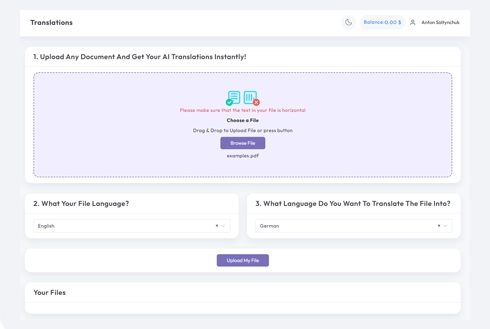
हमारे प्लेटफ़ॉर्म पर एक मुफ़्त खाता स्थापित करके अपनी अनुवाद यात्रा शुरू करें। अपनी बुनियादी जानकारी प्रदान करने और अपने ईमेल पते की पुष्टि करने में केवल कुछ क्षण लगते हैं। यह खाता आपके सभी अनुवाद परियोजनाओं को अपलोड करने, ट्रैक करने और प्रबंधित करने के लिए आपके व्यक्तिगत हब के रूप में काम करेगा।
चरण 2: एक फ़ाइल अपलोड करें
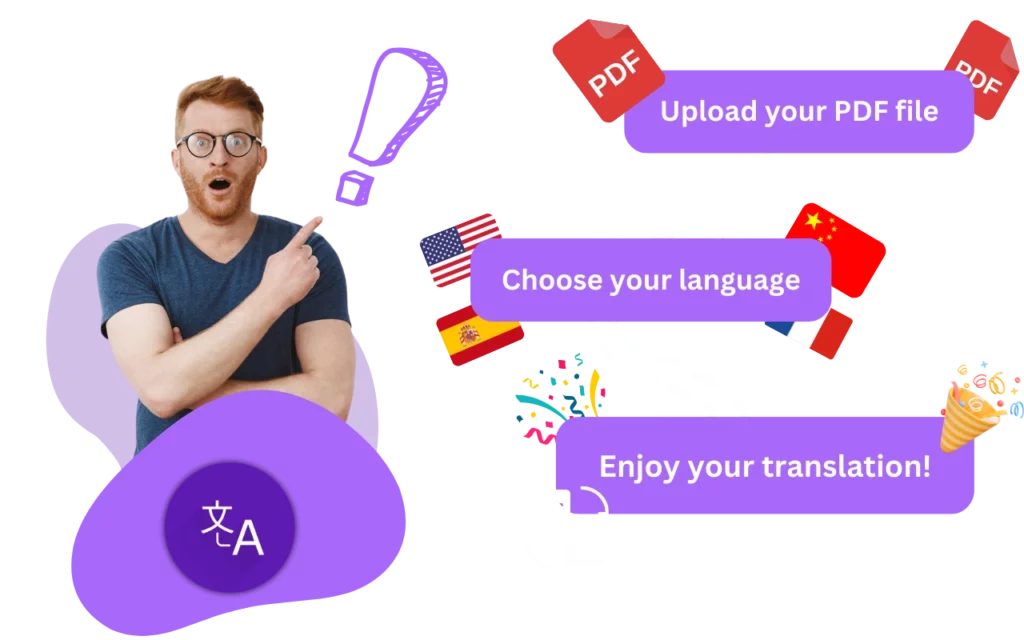
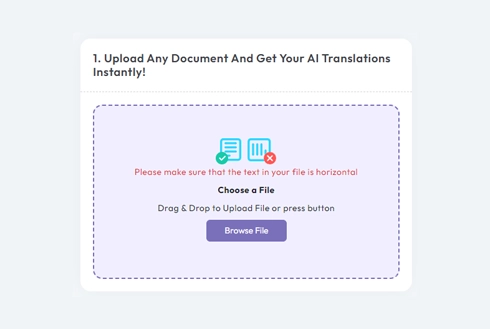
लॉग इन करने के बाद, अपने दस्तावेज़ को अपलोड करने का समय आ गया है। हमारा सिस्टम MS Word, Excel, PowerPoint, TXT, InDesign, और CSV सहित विभिन्न प्रकार के प्रारूपों का समर्थन करता है। बस अपनी फ़ाइल को ड्रैग और ड्रॉप करें या अपने डिवाइस से फ़ाइल का चयन करने के लिए "ब्राउज़ करें" विकल्प का उपयोग करें।
चरण 3: मूल और लक्ष्य भाषाएँ चुनें
उस भाषा को निर्दिष्ट करें जिसमें आपका मूल दस्तावेज़ लिखा गया है। फिर, वह लक्ष्य भाषा चुनें जिसमें आप दस्तावेज़ का अनुवाद करना चाहते हैं। समर्थित भाषाओं की हमारी विस्तृत सूची के साथ, आपको अपने दर्शकों के लिए एकदम सही मिलान मिलेगा, चाहे वह व्यावसायिक प्रस्ताव के लिए हो या रचनात्मक अभियान के लिए।
चरण 4: अनुवाद बटन पर क्लिक करें और डाउनलोड करें
एक बार जब आप अपनी भाषा वरीयताएँ निर्धारित कर लेते हैं, तो प्रसंस्करण शुरू करने के लिए "अपलोड" बटन पर क्लिक करें। जब हमारा उन्नत अनुवाद सिस्टम आपकी फ़ाइल पर काम करता है, तो मूल लेआउट और शैली को बनाए रखते हुए एक सटीक अनुवाद प्रदान करते हुए आराम से बैठें और आराम करें।
अक्सर पूछे जाने वाले प्रश्न
मैं पूरे PDF दस्तावेज़ का अनुवाद कैसे करूँ?
एक निःशुल्क खाता बनाएँ, अपना PDF अपलोड करें, मूल और लक्ष्य भाषाएँ चुनें, फिर अनुवाद पर क्लिक करें और तैयार फ़ाइल डाउनलोड करें। DocTranslator पूरे दस्तावेज़ को एक साथ संसाधित करता है और मूल फ़ॉर्मेटिंग और लेआउट को बनाए रखता है।
मैं कितना बड़ा PDF अनुवाद कर सकता हूँ?
Pro और Business पर, DocTranslator 1 GB या 5,000 पृष्ठों तक की फ़ाइलों को संभालता है (Basic 100 MB और 300 पृष्ठ, Free 20 MB और 20 पृष्ठ), जो Google Translate जैसे टूल पर लगभग 10 MB की सीमा से कहीं अधिक है, इसलिए आप एक ही अपलोड में पूर्ण-लंबाई वाली रिपोर्ट, मैनुअल और किताबें अनुवाद कर सकते हैं।
मैं PDF का कितनी भाषाओं में अनुवाद कर सकता हूँ?
आप 120+ भाषाओं में PDF का अनुवाद कर सकते हैं। वह स्रोत भाषा चुनें जिसमें आपका दस्तावेज़ लिखा गया है और वह लक्ष्य भाषा जिसकी आपको आवश्यकता है, और न्यूरल मशीन अनुवाद इंजन का उपयोग करके अनुवाद उत्पन्न किया जाता है।
क्या अनुवादित PDF अपने मूल स्वरूपण को बनाए रखेगा?
हाँ। DocTranslator आपके PDF की मूल फ़ॉर्मेटिंग और लेआउट को संरक्षित करता है, जिसमें पैराग्राफ और पृष्ठों की संरचना भी शामिल है, इसलिए अनुवादित फ़ाइल स्रोत दस्तावेज़ की तरह दिखती है।
क्या मैं स्कैन किए गए PDF का अनुवाद कर सकता हूँ?
हाँ। DocTranslator में स्कैन किए गए PDF और छवियों के लिए अंतर्निहित OCR है, इसलिए स्कैन और JPG या PNG फ़ाइलों के अंदर के टेक्स्ट को मानक दस्तावेज़ों के साथ पहचाना और अनुवादित किया जा सकता है।
PDF का अनुवाद करने में कितना खर्च आता है?
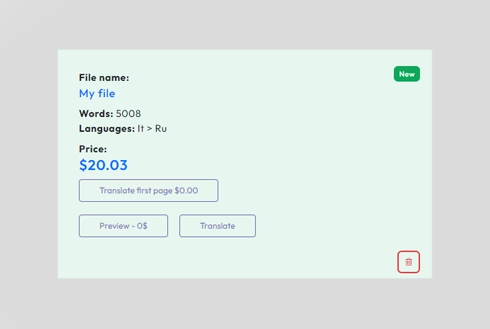
Free प्लान पर पूरा PDF एक दस्तावेज़ के रूप में बिल किया जाता है: $0.005 प्रति शब्द, या यदि यह एक स्कैन है तो $1 प्रति पृष्ठ, $0.99 न्यूनतम के साथ। Basic, Pro या Business सब्सक्रिप्शन इसके बजाय हर 30 दिनों में रीसेट होने वाले अनुवादित पृष्ठों के कोटा से PDF निकालता है (देखें मूल्य निर्धारण)। प्रमाणित या नोटरीकृत अनुवादों के लिए, जैसे कि USCIS सबमिशन, मानव अनुवाद आवश्यक है।
अभी अपनी फ़ाइल का अनुवाद करें!
आज ही साइन अप करें और DocTranslator की शक्ति की खोज करें और यह आपके और आपके व्यवसाय के लिए कितना बड़ा अंतर लाएगा।
हमारे भागीदार




संबंधित अनुवाद सेवाएँ
DocTranslator बनाम अन्य
PDF उपकरण
फ़ाइल प्रारूप