
Prekladač PDF Google Translate
Automatický preklad PDF v 108 jazykoch pomocou AI
Nahrajte alebo presuňte dokument na preklad
Max. veľkosť súboru 1 GB v plánoch Pro a Business
Tlačidlo otvorí bezplatnú registráciu. Samotný preklad prebieha vo vašom používateľskom rozhraní, kde si súbor vyberiete znova. Používate asistenta s umelou inteligenciou? Pripojte ho cez MCP.
- OCR pre skeny a fotografie
- 108 jazykov
- Pôvodné rozloženie zachované
Revolúcia v komunikácii
Prečo Google Translate nestačí
Google Prekladač využíva umelú inteligenciu na rýchly preklad dokumentov v rôznych formátoch. Patria sem Word, PDF a obyčajný text. Napriek tomu má zjavné obmedzenia. Najbežnejším problémom sú problémy s formátovaním, ktoré ho robia nevhodným pre špecifické obchodné aplikácie, ktoré vyžadujú zachovanie štrukturálnej integrity dokumentu. Napríklad pri preklade prezentačného balíka, kde musí zostať nezmenené usporiadanie obrázkov a textu, alebo pri práci so základnými dokumentmi, ako sú obchodné zmluvy a návrhy.
DocTranslator vyniká ako vynikajúca prekladateľská služba oproti Google Translate. Funguje lepšie v špecifických scenároch. Platforma, hoci je poháňaná prekladateľským enginom AI Google Translate, navyše integruje technológiu optického rozpoznávania znakov (OCR). DocTranslator dokáže previesť súbory PDF do 108 jazykov a zároveň zabezpečiť, aby pôvodné formátovanie zostalo nedotknuté, čím sa predíde akýmkoľvek problémom s preformátovaním. Zachytáva tiež kultúrne a idiomatické aspekty prekladov. Technológia OCR poskytuje prostriedky na extrakciu textu zo skenovaných dokumentov, čím rozširuje svoju využiteľnosť.
Za hranicami Google Prekladača: Nástroj na preklad PDF novej generácie
Keď sú organizácie a profesionáli frustrovaní z nesprávnej interpretácie svojich hodnôt v rôznych jazykoch, obracajú sa na DocTranslator. Naša platforma je navrhnutá tak, aby spĺňala požiadavky na podnikovú komunikáciu mnohých spoločností, ktoré spolupracujú s medzinárodnými klientmi. DocTranslator im umožňuje zostať agilnými a zároveň posilňovať svoju lokálnu a globálnu prítomnosť. Je to ideálna voľba pre tých, ktorí prerástli staré nástroje ako Google Prekladač a hľadajú inteligentnejšie riešenie na podnikovej úrovni.
Preložte svoj PDF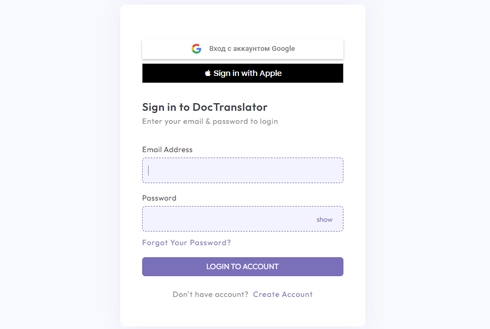
Zoznámte sa s DocTranslator!
DocTranslator ponúka bezproblémový preklad súborov Word, PDF a prezentácií PowerPoint. Funguje na vlastnom prekladateľskom engine DocTranslator AI a vracia preklady pri zachovaní pôvodného formátu dokumentu. S DocTranslator si užite rýchle, spoľahlivé preklady bez obmedzení štandardných nástrojov.
Vyskúšajte DocTranslator zadarmo →
Nevýhody používania Google Prekladača na preklad PDF
Hoci je Google Prekladač pre mnohých používateľov pohodlným nástrojom, má niekoľko nevýhod, ktoré ho robia menej efektívnym pre kritické preklady dokumentov:
Slabá kontextová inteligencia
Google Prekladač má tendenciu generovať preklady, ktoré sú primárne doslovné a povrchné. Ignoruje kultúrny kontext potrebný pre jasnú komunikáciu. To je zrejmé v idiomatických výrazoch, jazyku špecifickom pre daný odbor alebo regionálnych dialektoch. Výsledná práca znie neohrane, nesprávne pochopená alebo veľmi chybná.
Nekonzistentná kvalita naprieč jazykovými pármi
Vernostnosť prekladu je výrazne nekonzistentná naprieč rôznymi jazykovými kombináciami. Zatiaľ čo prominentné jazyky často dosahujú prijateľnú presnosť, menej používané jazyky môžu viesť k menej kvalitným prekladom, čo môže ohroziť spoľahlivosť nástroja pre globálne spoločnosti s rôznorodými potrebami obsahu.
Nevhodné pre kritické obchodné prípady použitia
Google Prekladač nie je navrhnutý pre prípady použitia s vysokou presnosťou. Odporúča sa vyhnúť jeho použitiu v obchodnom, právnom, technickom alebo špecializovanom terminológii, ako aj v situáciách týkajúcich sa ochrany súkromia. Je vhodnejší pre neformálne, osobné preklady.
Chyby formátovania v skenovaných súboroch
PDF vyžadujú zachovanie štruktúry: tabuľky, hlavičky, vizuály a rozloženie musia zostať nedotknuté. Google Prekladač narúša pôvodné formátovanie v textoch obrázkov, čo vedie k nesprávne zarovnanému alebo nepoužiteľnému výstupu, ktorý vytvára viac práce pre tímy v ďalších fázach.
Vstupy z davu a obavy o ochranu údajov
Integruje preklady z davu, ktoré zavádzajú potenciálne nepresnosti, čím sa znižuje kvalita. Ďalšou obavou je, že nahrávanie citlivého obsahu na platformu spotrebiteľskej úrovne predstavuje značné riziká pre ochranu údajov, najmä pre organizácie pôsobiace v regulovaných odvetviach.
Odomknite skutočný dopad s DocTranslator
Preklad PDF pripravený pre podniky, ktorý ide ďaleko za to, čo môže ponúknuť Google Prekladač.
Presnosť na podnikovej úrovni
Preklady poháňané umelou inteligenciou, ktoré zachovávajú tón, terminológiu a zámer, ideálne pre regulovaný a technický obsah.
Zachovanie formátu
Udržuje pôvodnú štruktúru, rozloženie a dizajn vo všetkých hlavných typoch súborov vrátane PDF a dokumentov Word.
Schopnosť spracovať veľké objemy
Jeden PDF na nahrávanie, až 5 000 strán alebo 1 GB v plánoch Pro a Business.
Podporovaných 108 jazykov
Umožňuje bezproblémovú komunikáciu naprieč globálnymi trhmi a regiónmi.
Vstavaná funkcia OCR
Prekladá skenované dokumenty a súbory založené na obrazoch bez externých nástrojov.
Prístup cez prehliadač
Žiadne sťahovanie ani inštalácie. Prístupné kdekoľvek, okamžite z akéhokoľvek zariadenia.
Upraviteľný výstup
Poskytuje čisté, upraviteľné súbory pripravené na konečnú kontrolu alebo publikovanie.
Bezpečnosť údajov
Šifrované nahrávanie a PDF z bezplatného plánu sa odstraňuje približne 24 hodín po nahraní. Pozrite si zásady ochrany osobných údajov pre platené plány.
Nákladovo efektívne
Platba za dokument od 0,99 USD v pláne Free, alebo preklad v rámci povoleného počtu strán, ktorý predplatné zahŕňa každý mesiac, vytvorené pre rozpočtovo uvedomelé globálne operácie.
Rýchle dodanie
Rýchle, automatizované spracovanie na splnenie náročných termínov v rozsahu.
Alternatíva
DocTranslator ako alternatíva ku Google Translate pre PDF
DocTranslator.com je platforma na preklad dokumentov poháňaná umelou inteligenciou, ktorá podporuje formáty PDF, Word a Excel v 108 jazykoch. V pláne Free stojí PDF približne 1 dolár za stranu a Basic obsahuje 1 000 strán každý mesiac za 4,99 dolára mesačne. Naše porovnanie desiatich PDF prekladačov ukazuje, kde sa limity Google Prekladača 10 MB a 300 strán umiestňujú oproti ostatným. Po tomto strope Pro a Business prijímajú jeden súbor až do 1 GB alebo 5 000 strán, takže môžete preložiť veľký PDF súbor, ktorý Google odmieta jedným nahraním. Ak Google práve odmietol váš súbor, prečítajte si ako preložiť PDF väčší ako 10 MB, krok za krokom.
Prepnúť na DocTranslator →Pozrite si to v akcii
DocTranslator a Google Translate vedľa seba
Pozrite si toto video a dozviete sa, čo odlišuje DocTranslator.
Vyberte si svoj plán
Registrácia je bezplatná. Plaťte za dokument v pláne Free, alebo si predplaťte a získajte mesačne AI preklady.
Free
Na registráciu nie je potrebná žiadna karta
- 0,005 $ za slovo AI preklad
- 1 $ za stránku pre súbory PDF a skeny
- Bezplatná ukážka prvej strany, ak je k dispozícii
- 108 jazykov
- Súbory do 20 MB a 20 strán
- DOCX, PDF, XLSX, PPTX, IDML, TXT, JPG, PNG a CSV
- Iba 24-hodinové úložisko súborov
- Editor PDF a prevodník PDF do DOCX
Základný
NajobľúbenejšíFakturácia každý týždeň · zrušiť kedykoľvek
Fakturácia mesačne
Fakturácia raz ročne · ušetrite 33 %
- AI prekladov mesačne
- Potom 0,005 $/slovo AI preklad
- Súbory do 100 MB a 300 strán
- DOCX, PDF, XLSX, PPTX, IDML, TXT, JPG, PNG a CSV
- OCR pre naskenované dokumenty
- Úložisko dokumentov
- Prioritná podpora
- 7-dňová bezplatná skúšobná verzia mesačného plánu, až 30 000 slov
- Zrušiť kedykoľvek
Pro
Fakturácia mesačne
Fakturácia raz ročne · ušetrite 34 %
- AI prekladov mesačne
- Potom 0,004 $/slovo AI preklad
- Súbory do 1 GB a 5 000 strán
- DOCX, PDF, XLSX, PPTX, IDML, TXT, JPG, PNG a CSV
- Glosár
- Prioritné spracovanie
- 5 tímových miest
- API požiadavky · 1 000 strán mesačne
- Prístup k MCP pre AI asistentov
- Zrušiť kedykoľvek
Obchodný
Fakturácia mesačne
Fakturácia raz ročne · ušetrite 33 %
- AI prekladov mesačne
- Potom 0,003 $/slovo AI preklad
- Súbory do 1 GB a 5 000 strán
- DOCX, PDF, XLSX, PPTX, IDML, TXT, JPG, PNG a CSV
- Glosár
- Prioritné spracovanie
- 15 tímových miest
- API požiadavky · 5 000 strán mesačne
- Prístup k MCP pre AI asistentov
- Zrušiť kedykoľvek
Enterprise
Potrebujete viac objemu, fakturáciu alebo vlastnú dohodu? Porozprávajte sa s nami o pláne Enterprise.
Google Translate vs DocTranslator pre PDF
DocTranslator spúšťa svoj vlastný prekladateľský engine AI, pričom Google Cloud Translation slúži len ako záloha. Väčší rozdiel je v tom, čo sa deje s vaším súborom okolo textu.
Google Translate
- ✕ Nahrávanie dokumentov obmedzené na približne 10 MB, takže veľké PDF sa neprejdú
- ✕ Často rozbije tabuľky, stĺpce a rozloženie v preloženom súbore
- ✕ Obmedzené pri skenovaných PDF a stranách založených na obrázkoch
- ✕ Nástroj pre spotrebiteľov, so súbormi odoslanými do zdieľanej služby
- ✕ Výstup nie je vždy upraviteľný alebo pripravený na odoslanie
DocTranslator
- ✓ Zvláda súbory až do 1 GB alebo 5 000 strán, bez obmedzenia 10 MB
- ✓ Zachováva pôvodné formátovanie, tabuľky a rozloženie strán
- ✓ Vstavané OCR číta skenované PDF, JPG a PNG
- ✓ Šifrované, s bezplatnými súbormi odstránenými približne 24 hodín po nahraní
- ✓ Vlastný prekladateľský engine AI, 108 jazykov, upraviteľný výstup
Ako funguje DocTranslator
Krok 1: Vytvorte si bezplatný účet
Dokončite registráciu vyplnením svojho mena, e-mailovej adresy a hesla. Tento proces je rýchly a zaberie len pár minút.
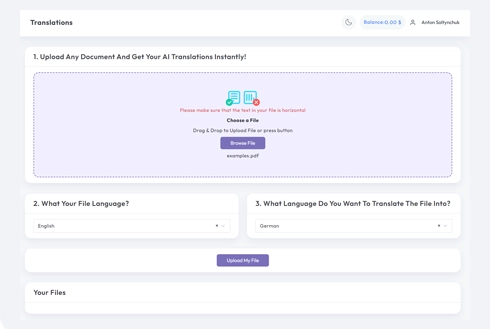
Krok 2: Nahrajte svoj súbor
Nahrajte súbory vo formátoch Word, Excel, PowerPoint, TXT, InDesign alebo CSV. Máte možnosť ich pretiahnuť a pustiť alebo k nim pristupovať zo svojho zariadenia.
Krok 3: Vyberte jazyky
Špecifikujte jazyk pôvodného textu a jazyk, do ktorého chcete preložiť. Zadajte ho priamo alebo si vyberte z preddefinovaného zoznamu.
4. korak: Prevedi in prenesi
Kliknite na tlačidlo 'Preložiť'. Váš dokument bude spracovaný a následne si ho budete môcť stiahnuť. Pôvodné rozloženie a dizajn zostanú nedotknuté.
Google Translate PDF: Často kladené otázky
Môže Google Prekladač preložiť PDF?
Áno, Google Translate má režim dokumentov, ktorý prijíma PDF, ale nahrávanie obmedzuje na približne 10 MB, má problémy so skenovanými PDF a často mení rozloženie. Pre väčšie súbory, naskenované strany alebo keď má formátovanie zostať nedotknuté, DocTranslator prekladá pomocou vlastného enginu AI, pričom zachováva štruktúru dokumentu a číta skeny pomocou OCR.
Ako preložiť PDF pomocou Google Prekladača?
Na stránke translate.google.com otvorte kartu Dokumenty, nahrajte svoje PDF, vyberte zdrojový a cieľový jazyk, potom si stiahnite výsledok. Ak je súbor väčší ako 10 MB, je to sken alebo potrebuje zachovať rozloženie, namiesto toho ho nahrajte do DocTranslator a za pár minút si stiahnite naformátovanú kópiu.
Prečo sa moje PDF neprekladá v Google Prekladači?
Bežné dôvody sú, že súbor je väčší ako limit 10 MB, je to naskenovaný obrázok bez vyberateľného textu alebo má zložité formátovanie. DocTranslator zvláda všetky tri: súbory až do 1 GB, vstavané OCR pre skeny a zachované pôvodné formátovanie.
Môžem preložiť naskenované PDF?
Áno. DocTranslator číta text vo vnútri naskenovaných PDF a obrázkov pomocou vstavaného OCR, takže fotografované alebo naskenované strany sa prekladajú rovnako ako bežné textové PDF.
Je preklad PDF zadarmo?
Registrácia do DocTranslator je bezplatná, ale každý preklad PDF v pláne Free sa platí za dokument, približne 1 dolár za stranu, skenovaný alebo nie, s minimom 0,99 dolára a prvá strana je zadarmo na ukážku. Ak prekladáte PDF často, Basic, Pro a Business každý zahŕňajú preklad pomocou AI pre stanovený počet strán každých 30 dní, spolu s väčšími nahrávkami. Všetky plány zahŕňajú 108 jazykov.
Zachováva formátovanie PDF a koľko jazykov je podporovaných?
Tabuľky, fonty, obrázky a rozloženie strán sa vrátia tak, ako boli, takže prekladáte dokument, nielen text. DocTranslator podporuje 108 jazykov vrátane španielčiny, francúzštiny, nemčiny, čínštiny, japončiny, arabčiny, hindčiny, portugalčiny a ruštiny.
ZAČAŤ PREKLAD!
Zaregistrujte sa ešte dnes a pozdvihnite svoje podnikanie pre väčší dopad.
Ďalšie prekladové nástroje
Formáty súborov
Naši partneri




