AI搭載・120+言語

Google 翻訳 PDF

Auto PDF Translation in 120+ Languages with AI

最大ファイルサイズ 1 GB 元の書式設定を維持します

翻訳するドキュメントをアップロードまたはドロップします

最大ファイルサイズ 1 GB

。PDF 。DOCX 。PPTX 。XLSX 。TXT 。JPG 。パプアニューギニア 。IDML 。EPUB 。HTML
アフリカーンス語(アフリカーンス語)
シュキップ(アルバニア語)
አማርኛ(アムハラ語)
العربية(アラビア語)
Հայերեն(アルメニア語)
Azərbaycan ディリ(アゼルバイジャン)
エウスカラ(バスク)
Беларуская(ベラルーシ語)
বাংলা(ベンガル語)
ボサンスキー(ボスニア語)
Български(ブルガリア語)
မြန်မာဘာသာ(ビルマ語)
カタルーニャ(カタルーニャ語)
セブアノ(セブアノ)
チチェワ(チチェワ)
中文简体(中国語簡体字)
中文繁體(中国の伝統)
コルス(コルシカ島)
フルヴァツキー(クロアチア語)
チェシュティナ(チェコ語)
ダンスク(デンマーク語)
オランダ(オランダ語)
英語(英語)
エスペラント語(エスペラント)
エスティ(エストニア語)
スオミ(フィンランド語)
フランセ(フランス語)
フリスク(フリジア語)
ガレゴ(ガリシア語)
ქართული(ジョージア語)
ドイツ語(ドイツ語)
Ελληνικά(ギリシャ語)
ગુજરાતી(グジャラート語)
クレイョル アイシェン(ハイチ人)
ハウサ語(ハウサ語)
オレロ ハワイ(ハワイ語)
עברית(ヘブライ語)
हिंदी(ヒンディー語)
フムーブ(モン族)
マジャル語(ハンガリー語)
イスレンスカ(アイスランド語)
イボ語(Igbo)
インドネシア語(インドネシア語)
ゲイルゲ(アイルランド語)
イタリアーノ(イタリア語)
日本語(日本語)
バサ ジャワ(ジャワ人)
ಕನ್ನಡ(カンナダ語)
Қазақ тілі(カザフスタン)
ខ្មែរ(クメール語)
イキニャルワンダ(キニャルワンダ)
한국어(韓国語)
クルディ(クルド語)
Кыргызча(キルギス)
ລາວ(ラオス人)
ラティーナ(ラテン語)
ラトヴィエシュ(ラトビア語)
リエトゥヴィウ(リトアニア語)
レッツェビュルゲシュ(ルクセンブルク)
Македонски(マケドニア語)
マダガスカル語(マダガスカル語)
Bahasa Melayu(マレー語)
മലയാളം(マラヤーラム語)
マルティ(マルタ語)
テ・レオ・マオリ(マオリ語)
मराठी(マラーティー語)
Монгол хэл(モンゴル語)
नेपाली(ネパール語)
ノルスク(ノルウェー語)
ଓଡ଼ିଆ(オディア)
فارسی(ペルシャ語)
ポルスキ(ポーランド語)
ポルトガル語(ポルトガル語)
ਪੰਜਾਬੀ(パンジャブ語)
ロマナ(ルーマニア語)
Русский(ロシア語)
ガガナ サモア(サモア語)
ガイドリグ(スコットランド語)
Српски(セルビア語)
セソト(セソト)
ショナ(ショナ)
سنڌي(シンディー語)
සිංහල(シンハラ語)
スロベニア語(スロバキア語)
スロベニア語(スロベニア語)
スーマリ(ソマリア)
エスパニョール(スペイン語)
バサ スンダ(スンダ語)
スワヒリ語(スワヒリ語)
スヴェンスカ(スウェーデン語)
タガログ語(タガログ語)
Тоҷикӣ(タジク語)
தமிழ்(タミル語)
Татарча(タタール語)
తెలుగు(テルグ語)
ไทย(タイ語)
トルコ語(トルコ語)
トルコ人(トルクメン人)
Українська(ウクライナ語)
اردو(ウルドゥー語)
ئۇيغۇرچە(ウイグル)
オズベクチャ(ウズベク語)
Tiếng Việt(ベトナム語)
シムラーグ(ウェールズ語)
イシコサ語(コサ語)
ייִדיש(イディッシュ語)
ヨルバ語(ヨルバ語)
イシズールー(ズールー語)
アフリカーンス語(アフリカーンス語)
シュキップ(アルバニア語)
አማርኛ(アムハラ語)
العربية(アラビア語)
Հայերեն(アルメニア語)
Azərbaycan ディリ(アゼルバイジャン)
エウスカラ(バスク)
Беларуская(ベラルーシ語)
বাংলা(ベンガル語)
ボサンスキー(ボスニア語)
Български(ブルガリア語)
မြန်မာဘာသာ(ビルマ語)
カタルーニャ(カタルーニャ語)
セブアノ(セブアノ)
チチェワ(チチェワ)
中文简体(中国語簡体字)
中文繁體(中国の伝統)
コルス(コルシカ島)
フルヴァツキー(クロアチア語)
チェシュティナ(チェコ語)
ダンスク(デンマーク語)
オランダ(オランダ語)
英語(英語)
エスペラント語(エスペラント)
エスティ(エストニア語)
スオミ(フィンランド語)
フランセ(フランス語)
フリスク(フリジア語)
ガレゴ(ガリシア語)
ქართული(ジョージア語)
ドイツ語(ドイツ語)
Ελληνικά(ギリシャ語)
ગુજરાતી(グジャラート語)
クレイョル アイシェン(ハイチ人)
ハウサ語(ハウサ語)
オレロ ハワイ(ハワイ語)
עברית(ヘブライ語)
हिंदी(ヒンディー語)
フムーブ(モン族)
マジャル語(ハンガリー語)
イスレンスカ(アイスランド語)
イボ語(Igbo)
インドネシア語(インドネシア語)
ゲイルゲ(アイルランド語)
イタリアーノ(イタリア語)
日本語(日本語)
バサ ジャワ(ジャワ人)
ಕನ್ನಡ(カンナダ語)
Қазақ тілі(カザフスタン)
ខ្មែរ(クメール語)
イキニャルワンダ(キニャルワンダ)
한국어(韓国語)
クルディ(クルド語)
Кыргызча(キルギス)
ລາວ(ラオス人)
ラティーナ(ラテン語)
ラトヴィエシュ(ラトビア語)
リエトゥヴィウ(リトアニア語)
レッツェビュルゲシュ(ルクセンブルク)
Македонски(マケドニア語)
マダガスカル語(マダガスカル語)
Bahasa Melayu(マレー語)
മലയാളം(マラヤーラム語)
マルティ(マルタ語)
テ・レオ・マオリ(マオリ語)
मराठी(マラーティー語)
Монгол хэл(モンゴル語)
नेपाली(ネパール語)
ノルスク(ノルウェー語)
ଓଡ଼ିଆ(オディア)
فارسی(ペルシャ語)
ポルスキ(ポーランド語)
ポルトガル語(ポルトガル語)
ਪੰਜਾਬੀ(パンジャブ語)
ロマナ(ルーマニア語)
Русский(ロシア語)
ガガナ サモア(サモア語)
ガイドリグ(スコットランド語)
Српски(セルビア語)
セソト(セソト)
ショナ(ショナ)
سنڌي(シンディー語)
සිංහල(シンハラ語)
スロベニア語(スロバキア語)
スロベニア語(スロベニア語)
スーマリ(ソマリア)
エスパニョール(スペイン語)
バサ スンダ(スンダ語)
スワヒリ語(スワヒリ語)
スヴェンスカ(スウェーデン語)
タガログ語(タガログ語)
Тоҷикӣ(タジク語)
தமிழ்(タミル語)
Татарча(タタール語)
తెలుగు(テルグ語)
ไทย(タイ語)
トルコ語(トルコ語)
トルコ人(トルクメン人)
Українська(ウクライナ語)
اردو(ウルドゥー語)
ئۇيغۇرچە(ウイグル)
オズベクチャ(ウズベク語)
Tiếng Việt(ベトナム語)
シムラーグ(ウェールズ語)
イシコサ語(コサ語)
ייִדיש(イディッシュ語)
ヨルバ語(ヨルバ語)
イシズールー(ズールー語)
アラビア語 ポルトガル語 ロシア イタリア語 韓国語 オランダ語 ポーランド語 トルコ語 スウェーデン語 英語 スペイン語 フランス語 ドイツ語 中国語 日本語 ヒンディー語 ベンガル語 ベトナム人 タイ語 ギリシャ語 ヘブライ語 アラビア語 ポルトガル語 ロシア イタリア語 韓国語 オランダ語 ポーランド語 トルコ語 スウェーデン語 英語 スペイン語 フランス語 ドイツ語 中国語 日本語 ヒンディー語 ベンガル語 ベトナム人 タイ語 ギリシャ語 ヘブライ語
the best PDF translator

コミュニケーションの革命

Why Google Translate isn’t Enough

Google Translate leverages artificial intelligence to translate documents in various formats fast. These include Word, PDF, and plain text. Nevertheless, it has notable limitations. The most common is formatting issues, which make it unsuitable for specific business applications that demand the preservation of the document's structural integrity. For example, when translating a pitch deck where the arrangement of images and text must remain unchanged, or when dealing with essential documents like business contracts and proposals.

DocTranslator stands out as a superior translation service to Google Translate. It performs better in niche scenarios. The platform, though powered by the Google Translate AI engine, additionally incorporates Optical Character Recognition (OCR) technology. DocTranslator can convert PDF files into 100 languages while ensuring that the original formatting remains intact, thus avoiding any reformatting hassles. It also captures the cultural and idiomatic aspects of the translations. The OCR technology provides the means to extract text from scanned documents, broadening its usability.

Beyond Google Translate: Next-gen PDF translation tool

When organizations and professionals become frustrated with the misinterpretation of their value propositions in different languages, they turn to DocTranslator. Our platform is designed to meet the enterprise communication requirements of numerous companies that engage with international clients. DocTranslator enables them to remain agile while enhancing their local and global presence. It is an ideal choice for those who have outgrown legacy tools such as Google Translate and are in search of a smarter, enterprise-grade solution.

Translate your PDF
A purple cartoon office image

DocTranslator に会いましょう!

DocTranslator offers seamless translation for Word files, PDFs, and PowerPoint presentations. Powered by Google Translate, it ensures accurate, professional-quality translations while preserving the original document format. With DocTranslator, enjoy fast, reliable translations without the limitations of standard tools.

Try DocTranslator free →
translating scanned PDF documents

Disadvantages of Using Google Translate for PDF Translation

Although Google Translate is a convenient tool for many users, it has several drawbacks that make it less effective for critical document translations:

  • Poor contextual intelligence

    Google Translate tends to generate translations that are primarily literal and superficial. It overlooks the cultural context required for clear communication. This is apparent in idiomatic expressions, industry-specific language, or regional dialects. The resulting job sounds awkward, misconstrued, or very erroneous.

  • Inconsistent quality across language pairs

    Translation fidelity is notably inconsistent across various language combinations. While prominent languages often achieve acceptable accuracy, lesser-used languages may result in inferior translations, which can compromise the reliability of the tool for global companies with diverse content needs.

  • Unsuitable for business-critical use cases

    Google Translate is not designed for high-precision use cases. It is advisable to avoid its application in business, legal, technical, or specialized terminology, as well as in situations involving privacy concerns. It is more fitting for informal, personal translations.

  • Formatting failures in scanned files

    PDFs require structural preservation: tables, headers, visuals, and layout must remain intact. Google Translate disrupts the original formatting in image texts, leading to misaligned or unusable output that creates more work for teams downstream.

  • Crowdsourced inputs and data privacy concerns

    It incorporates crowdsourced translations that introduce potential discrepancies, reducing the quality. Another concern is that uploading sensitive content into a consumer-grade platform poses significant data privacy risks, particularly for organizations operating in regulated industries.

Why DocTranslator

Unlock True Impact with DocTranslator

Enterprise-ready PDF translation that goes far beyond what Google Translate can offer.

Enterprise-grade accuracy

AI-powered translations that retain tone, terminology, and intent, ideal for regulated and technical content.

Format preservation

Maintains original structure, layout, and design across all major file types including PDFs and Word docs.

High-volume capability

Supports files up to 5,000 pages or 1GB, with batch translation for bulk workflows.

100+ languages supported

Enables seamless communication across global markets and regions.

内蔵OCR

Translates scanned documents and image-based files without external tools.

Browser-based access

No downloads or installations. Accessible anywhere, instantly from any device.

Editable output

Delivers clean, editable files, ready for final review or publishing.

Data security

No content is stored post-session; compliant with GDPR, HIPAA, and more.

Cost-efficient

From $14.99/month, built for budget-conscious global operations.

Rapid turnaround

Fast, automated processing to meet tight deadlines at scale.

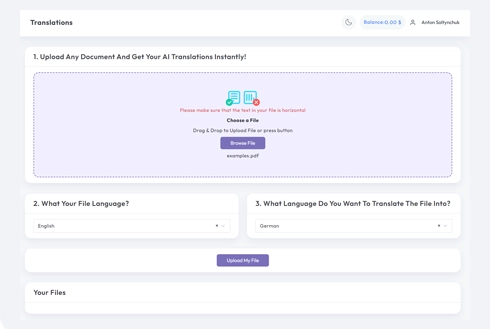
DocTranslator translation interface

The Best Choice

DocTranslator is the #1 Best Alternative to Google Translate

DocTranslator.com is an AI-powered document translation platform that supports PDF, Word, and Excel formats in 100+ languages. With pricing starting at $0.005 per word, it delivers scalable, cost-efficient alternatives to traditional Google Translate.

Switch to DocTranslator →

実際に動作しているのを見てください

Google翻訳のベスト代替品

Watch this video to learn what sets Doctranslator apart.

プランを選択してください

$2 の 7 日間のトライアルから始めて、次に $14。99/月、または年間請求でさらに節約してください

7日間裁判

最も人気のある作品
今日2ドル

その後、裁判終了後は月額14.99ドルとなります

  • 7日間のフルアクセス試験
  • 試用制限:10ページまたは3,000語
  • $0。005/ワード AI 翻訳
  • 120+言語
  • PDF、DOCX、XLSX、PPTX、IDML、TXT、JPG、PNG、CSV、JSON
  • チームアクセスとカスタム用語集
  • 電子メールサポート

月刊

人気のある
月額14.99ドル

通常価格 $29。99、現在 50% オフ

  • 月100ページまたは30,000語
  • $0。005/ワード AI 翻訳
  • 120+言語
  • 無制限のファイルストレージ
  • PDF、DOCX、XLSX、PPTX、IDML、TXT、JPG、PNG、CSV、JSON
  • チームアクセスとカスタム用語集
  • 優先メールサポート
🎉 最高の価値:年間44。88ドル節約

年間

25%節約
年間135ドル

~$11。25/月、月額と比較して 25% 割引

  • 月100ページまたは30,000語
  • $0。005/ワード AI 翻訳
  • 120+言語
  • 無制限のファイルストレージ
  • PDF、DOCX、XLSX、PPTX、IDML、TXT、JPG、PNG、CSV、JSON
  • チームアクセスとカスタム用語集
  • 優先メールサポート

Google Translate vs DocTranslator for PDFs

Both run on Google's translation engine. The difference is what happens to your file around the text.

Google翻訳

  • Caps document uploads at about 10 MB, so large PDFs will not go through
  • Often breaks tables, columns and layout in the translated file
  • Limited with scanned PDFs and image-based pages
  • A consumer tool, with files sent to a shared service
  • Output is not always editable or ready to send

DocTranslator

  • Handles files up to 1 GB or 5,000 pages, with no 10 MB wall
  • Keeps the original formatting, tables and page layout
  • Built-in OCR reads scanned PDFs, JPGs and PNGs
  • Encrypted, and your files are not stored after the session
  • Same Google translation engine, 120+ languages, editable output
必要な手順

How DocTranslator Works

01

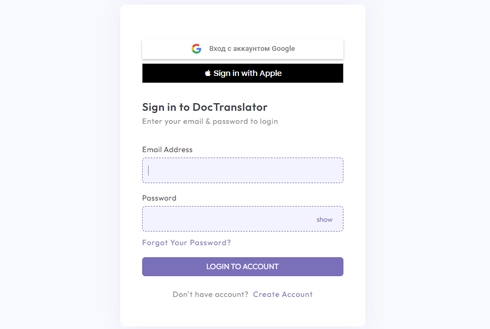
ステップ1: 無料アカウントを作成する

Complete the registration by filling out your name, email address, and a password. This process is quick and will only take a few minutes.

02

ステップ2: ファイルをアップロードする

Submit files in Word, Excel, PowerPoint, TXT, InDesign, or CSV formats. You have the option to drag and drop or access them from your device.

03

ステップ3: 言語を選択

Specify the language of the original text and the language into which you wish to translate. Enter it directly or choose from a predetermined list.

04

ステップ4: 翻訳してダウンロード

Click the ‘Translate’ button. Your document will be processed, and you will subsequently be able to download it. The initial layout and design will remain intact.

Google Translate PDF: Frequently Asked Questions

Can Google Translate translate a PDF?

Yes, Google Translate has a document mode that accepts PDFs, but it caps uploads at about 10 MB, struggles with scanned PDFs, and often changes the layout. For larger files, scanned pages, or when the formatting has to stay intact, DocTranslator uses the same Google engine while keeping the document structure and reading scans with OCR.

How do I translate a PDF with Google Translate?

On translate.google.com, open the Documents tab, upload your PDF, choose the source and target languages, then download the result. If the file is over 10 MB, is a scan, or needs its layout preserved, upload it to DocTranslator instead and download a formatted copy in minutes.

Why is my PDF not translating in Google Translate?

The usual reasons are that the file is larger than the 10 MB limit, it is a scanned image with no selectable text, or it has complex formatting. DocTranslator handles all three: files up to 1 GB, built-in OCR for scans, and the original formatting kept.

Can I translate a scanned PDF?

Yes. DocTranslator reads text inside scanned PDFs and images with built-in OCR, so photographed or scanned pages translate just like regular text-based PDFs.

Is it free to translate a PDF?

DocTranslator offers a 7-day trial for $2 (up to 10 pages or 3,000 words). After that, the Monthly plan is $14.99/month (100 pages or 30,000 words) and AI translation runs at $0.005 per word. All plans include 120+ languages.

Does it keep the PDF formatting and how many languages are supported?

Tables, fonts, images and page layout come back as they were, so you translate the document, not just the text. DocTranslator supports more than 120 languages, including Spanish, French, German, Chinese, Japanese, Arabic, Hindi, Portuguese and Russian.

START TRANSLATION!

Sign up today and elevate your business for impact.

当社のパートナー

Accenture
Bloomberg
Citrix
P&G
SAP