
Google Translate PDF
Përkthim PDF automatik në 120+ Gjuhë me AI
Ngarkoni ose hidhni dokumentin për të përkthyer
Madhësia maksimale e skedarit 1 GB
- OCR për skanime dhe fotografi
- 108 gjuhë
- Paraqitja origjinale ruhet
Revolucionarizimi i Komunikimit
Pse Google Translate nuk është i mjaftueshëm
Google Translate përdor inteligjencën artificiale për të përkthyer shpejt dokumente në formate të ndryshme. Këto përfshijnë Word, PDF dhe tekst të pastër. Megjithatë, ka kufizime të dukshme. Më e zakonshmja janë problemet me formatimin, të cilat e bëjnë të papërshtatshëm për aplikime specifike të biznesit që kërkojnë ruajtjen e integritetit strukturor të dokumentit. Për shembull, kur përktheni një pitch deck ku rregullimi i imazheve dhe tekstit duhet të mbetet i pandryshuar, ose kur merreni me dokumente thelbësore si kontratat dhe propozimet e biznesit.
DocTranslator dallohet si një shërbim përkthimi superior ndaj Google Translate. Ai performon më mirë në skenarë të veçantë. Platforma, megjithëse e fuqizuar nga motori AI i Google Translate, gjithashtu përfshin teknologjinë e Optikës së Karakterit (OCR). DocTranslator mund të konvertojë skedarë PDF në 120 gjuhë duke siguruar që formatimi origjinal të mbetet i paprekur, duke shmangur kështu ndonjë mundim ri-formëtimi. Ai gjithashtu kap aspektet kulturore dhe idiomatike të përkthimeve. Teknologjia OCR ofron mjetet për nxjerrjen e tekstit nga dokumentet e skanuara, duke zgjeruar përdorimin e tij.
Përtej Google Translate: Mjeti i gjeneratës së ardhshme për përkthimin e PDF
Kur organizatat dhe profesionistët frustrohen nga keqinterpretimi i propozimeve të tyre të vlerës në gjuhë të ndryshme, ata i drejtohen DocTranslator. Platforma jonë është krijuar për të përmbushur kërkesat e komunikimit të ndërmarrjeve të shumta kompanive që merren me klientë ndërkombëtarë. DocTranslator u mundëson atyre të mbeten fleksibël duke përmirësuar praninë e tyre lokale dhe globale. Është një zgjedhje ideale për ata që kanë tejkaluar mjetet e vjetra si Google Translate dhe kërkojnë një zgjidhje më inteligjente, të nivelit të ndërmarrjes.
Përkthe PDF-in tuaj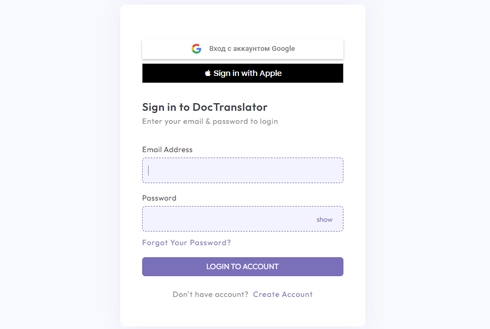
Takoni DocTranslator!
DocTranslator ofron p\[ërshtatje t\[ë pand\[ërhyr\[ë p\[ë r skedar\[ë Word, PDF dhe prezantime PowerPoint. E fuqizuar nga Google Translate, ai siguron p\[ërshtatje t\[ë sakta, profesionale, duke ruajtur formatin origjinal t\[ë dokumentit. Me DocTranslator, shijoni p\[ërshtatje t\[ë shpejta dhe t\[ë besueshme pa kufizimet e mjeteve standarde.
Provo DocTranslator falas →
Disavantazhet e përdorimit të Google Translate për përkthimin e PDF
Megjithëse Google Translate është një mjet i përshtatshëm për shumë përdorues, ai ka disa të meta që e bëjnë atë më pak efektiv për përkthime kritike të dokumenteve:
Inteligjencë e dobët kontekstuale
Google Translate ka tendencë të gjenerojë përkthime që janë kryesisht literale dhe sipërfaqësore. Ai lëshon jashtë kontekstin kulturor të nevojshëm për komunikim të qartë. Kjo është e dukshme në shprehjet idiomatike, gjuhën specifike të industrisë ose dialektet rajonale. Puna rezultuese tingëllon e çuditshme, e keqkuptuar ose shumë e gabuar.
Cilësi e paqëndrueshme në çiftet e gjuhëve
Besnikëria e përkthimit është dukshëm e paqëndrueshme në kombinime të ndryshme gjuhësh. Ndërsa gjuhët kryesore shpesh arrijnë saktësi të pranueshme, gjuhët më pak të përdorura mund të rezultojnë në përkthime më të ulëta, gjë që mund të komprometojë besueshmërinë e mjetit për kompanitë globale me nevoja të ndryshme përmbajtjeje.
I papërshtatshëm për rastet e përdorimit kritik të biznesit
Google Translate nuk është krijuar për raste përdorimi me saktësi të lartë. Këshillohet të shmanget aplikimi i tij në terminologji biznesi, ligjore, teknike ose të specializuar, si dhe në situata që përfshijnë shqetësime për privatësinë. Ai është më i përshtatshëm për përkthime informale, personale.
Dështime të formatimit në skedarë të skanuar
PDF-të kërkojnë ruajtje strukturore: tabelat, titujt, pamjet dhe dizajni duhet të mbeten të paprekura. Google Translate prish formatimin origjinal në tekstet e imazheve, duke çuar në rezultate të çrregulluara ose të papërdorshme që krijojnë më shumë punë për ekipet më poshtë.
Kontribute të grumbulluara nga komuniteti dhe shqetësime për privatësinë e të dhënave
Ai përfshin përkthime të grumbulluara nga komuniteti që prezantojnë mospërputhje të mundshme, duke ulur cilësinë. Një shqetësim tjetër është se ngarkimi i përmbajtjes së ndjeshme në një platformë të nivelit të konsumatorit paraqet rreziqe të konsiderueshme të privatësisë së të dhënave, veçanërisht për organizatat që operojnë në industri të rregulluara.
Çlironi Ndikimin e Vërtetë me DocTranslator
Përkthim PDF i gatshëm për ndërmarrje që shkon shumë përtej asaj që mund të ofrojë Google Translate.
Saktësi e nivelit të ndërmarrjes
Përkthime të fuqizuara nga AI që ruajnë tonin, terminologjinë dhe qëllimin, ideale për përmbajtje të rregulluar dhe teknike.
Ruajtja e formatit
Ruhet struktura, dizajni dhe pamja origjinale në të gjitha llojet kryesore të skedarëve duke përfshirë PDF dhe dokumente Word.
Kapcitet i volumit të lartë
Mbështet skedarë deri në 5,000 faqe ose 1 GB, me përkthim në grup për flukse pune masive.
120+ gjuhë të mbështetura
Mundëson komunikim të pandërprerë në tregjet dhe rajonet globale.
OCR e integruar
Përkthen dokumente të skanuara dhe skedarë bazuar në imazhe pa mjete të jashtme.
Qasje bazuar në shfletues
Asnjë shkarkim ose instalim. E aksesueshme kudo, menjëherë nga çdo pajisje.
Rezultat i modifikueshëm
Ofron skedarë të pastër, të modifikueshëm, gati për rishikim përfundimtar ose publikim.
Siguria e të dhënave
Asnjë përmbajtje nuk ruhet pas sesionit; në përputhje me GDPR, HIPAA dhe më shumë.
Efikasitet kostimor
Paguani për dokument nga 0.99 dollarë në Free, ose përktheni brenda limitit të faqeve që përfshin një abonim çdo 30 ditë, i ndërtuar për operacione globale me buxhet të kujdesshëm.
Kthim i shpejtë
Procesim i shpejtë dhe i automatizuar për të përmbushur afate të ngushta në shkallë.
Zgjedhja më e mirë
DocTranslator është Alternativa më e mirë #1 për Google Translate
DocTranslator.com është një platformë përkthimi dokumentesh e fuqizuar nga AI që mbështet formatet PDF, Word dhe Excel në 108 gjuhë. Me çmime që fillojnë nga 0.005 dollarë për fjalë, ajo ofron alternativa të përshtatshme dhe me kosto efektive ndaj Google Translate tradicionale. Krahasimi ynë i dhjetë përkthyesve të PDF-ve tregon se ku kufijtë 10 MB dhe 300-faqesh të Google Translate qëndrojnë kundrejt pjesës tjetër.
Kaloni te DocTranslator →Shikoje në veprim
Alternativa më e mirë për Google Translate
Shikoni këtë video për të mësuar se çfarë e dallon DocTranslator.
Zgjidhni Planin Tuaj
Regjistrimi është falas. Paguan për dokument në Free, ose pajtohesh dhe merr përkthim AI çdo muaj.
Free
Nuk nevojitet kartë për t'u regjistruar
- 0.005 dollarë/fjalë përkthim AI
- 1 dollar për faqe për skanime dhe PDF imazhi
- 108 gjuhë
- Skedarë deri në 20 MB dhe 20 faqe
- DOCX, PDF, XLSX, PPTX, IDML, TXT, JPG, PNG dhe CSV
- Vetëm ruajtje skedari 24-orëshe
- Redaktues PDF dhe konvertues PDF në DOCX
Bazik
Më popullorFaturuar çdo javë · anulloni në çdo kohë
Faturuar mujore
Faturuar një herë në vit · kurseni 33%
- përkthim AI përfshirë çdo muaj
- Pastaj 0.005 $/fjalë përkthim AI
- Dosje deri në 100 MB dhe 300 faqe
- DOCX, PDF, XLSX, PPTX, IDML, TXT, JPG, PNG dhe CSV
- OCR për dokumente të skanuara
- Ruajtje dokumentesh
- Mbështetje prioritare
- 7 ditë provë falas në planin mujor
- Anuloni në çdo kohë
Pro
Faturuar mujore
Faturuar një herë në vit · kurseni 34%
- përkthim AI përfshirë çdo muaj
- Pastaj 0.004 $/fjalë përkthim AI
- Dosje deri në 1 GB dhe 5,000 faqe
- DOCX, PDF, XLSX, PPTX, IDML, TXT, JPG, PNG dhe CSV
- Fjalor
- Cuesorë prioritarë
- 5 vende ekipore
- Kërkesa API · 1,000 faqe në muaj
- Qasje MCP për asistentë AI
- Anuloni në çdo kohë
Biznes
Faturuar mujore
Faturuar një herë në vit · kurseni 33%
- përkthim AI përfshirë çdo muaj
- Pastaj 0.003 $/fjalë përkthim AI
- Dosje deri në 1 GB dhe 5,000 faqe
- DOCX, PDF, XLSX, PPTX, IDML, TXT, JPG, PNG dhe CSV
- Fjalor
- Cuesorë prioritarë
- 15 vende ekipore
- Kërkesa API · 5,000 faqe në muaj
- Qasje MCP për asistentë AI
- Anuloni në çdo kohë
Ndërmarrje
Nevojitet më shumë volum, faturim ose një marrëveshje me porosi? Folni me ne për një plan Enterprise.
Google Translate vs DocTranslator për PDF
Të dy funksionojnë në motorin e përkthimit të Google. Dallimi është se çfarë ndodh me skedarin tuaj rreth tekstit.
Google Translate
- ✕ Ngarkimet e dokumenteve kufizohen në rreth 10 MB, kështu që PDF-të e mëdha nuk do të kalojnë
- ✕ Shpesh prish tabelat, kolonat dhe formatin në skedarin e përkthyer
- ✕ Kufizuar me PDF të skanuara dhe faqe të bazuara në imazh
- ✕ Një mjet konsumatori, me skedarë të dërguar në një shërbim të përbashkët
- ✕ Rezultati nuk është gjithmonë i redaktueshëm ose gati për dërgim
DocTranslator
- ✓ Trajton skedarë deri në 1 GB ose 5,000 faqe, pa kufizim 10 MB
- ✓ Ruhet formati origjinal, tabelat dhe dizajni i faqes
- ✓ OCR i integruar lexon PDF, JPG dhe PNG të skanuara
- ✓ I enkriptuar, dhe skedarët tuaj nuk ruhen pas sesionit
- ✓ I njëjti motor përkthimi Google, 120+ gjuhë, rezultat i redaktueshëm
Si Funksionon DocTranslator
Hapi 1: Krijo një llogari falas
Plotësoni regjistrimin duke futur emrin, adresën e postës elektronike dhe një fjalëkalim. Ky proces është i shpejtë dhe do të zgjasë vetëm disa minuta.
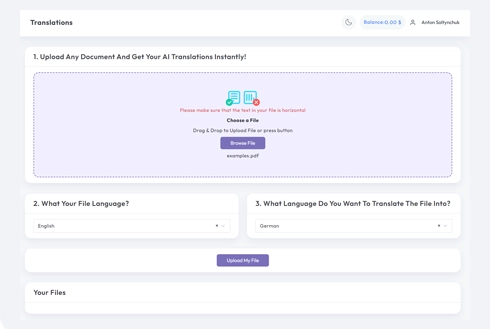
Hapi 2: Ngarkoni skedarin tuaj
Dor\[ëzoni skedar\[ë n\[ë formate Word, Excel, PowerPoint, TXT, InDesign, ose CSV. Keni mund\[ësin\[ë t\[ë t\[ërhiqni dhe l\[ëshoni ose t\[ë aksesoni ato nga pajisja juaj.
Hapi 3: Zgjidhni gjuhët
Specifikoni gjuhën e tekstit origjinal dhe gjuhën në të cilën dëshironi të përktheni. Futeni drejtpërdrejt ose zgjidhni nga një listë e paracaktuar.
Hapi 4: Përkthe dhe shkarko
Klikoni butonin 'Përkthe'. Dokumenti juaj do të përpunohet, dhe më pas do të mund ta shkarkoni atë. Paraqitja dhe dizajni fillestar do të mbeten të papërdorura.
Google Translate PDF: Pyetjet e Bëra Shpesh
A mund të përkthejë Google Translate një PDF?
Po, Google Translate ka një modalitet dokumentesh që pranon PDF, por kufizon ngarkimet në rreth 10 MB, ka vështirësi me PDF-të e skanuara dhe shpesh ndryshon pamjen. Për skedarë më të mëdhenj, faqe të skanuara, ose kur formatimi duhet të ruhet, DocTranslator përdor të njëjtin motor Google duke ruajtur strukturën e dokumentit dhe duke lexuar skanime me OCR.
Si përkthej një PDF me Google Translate?
Në translate.google.com, hapni skedën Dokumente, ngarkoni PDF-në tuaj, zgjidhni gjuhët burimore dhe pritëse, pastaj shkarkoni rezultatin. Nëse skedari është mbi 10 MB, është një skanim, ose ka nevojë për ruajtjen e pamjes, ngarkojeni në DocTranslator në vend të kësaj dhe shkarkoni një kopje të formatuar në pak minuta.
Pse nuk po përkthehet PDF-ja ime në Google Translate?
Arsyet e zakonshme janë se skedari është më i madh se kufiri 10 MB, është një imazh i skanuar pa tekst të zgjedhshëm, ose ka formatim kompleks. DocTranslator trajton të treja: skedarë deri në 1 GB, OCR të integruar për skanime, dhe formatimin origjinal të ruajtur.
A mund ta përkthej një PDF të skanuar?
Po. DocTranslator lexon tekstin brenda PDF-ve dhe imazheve të skanuara me OCR të integruar, kështu që faqet e fotografuara ose të skanuara përkthehen si PDF-të e rregullta me bazë teksti.
A është falas përkthimi i një PDF?
Regjistrimi në DocTranslator është falas, por çdo përkthim PDF paguhet për dokument: 0.005 dollarë për fjalë, ose 1 dollarë për faqe për skanime, me një minimum prej 0.99 dollarësh. Nëse përktheni PDF shpesh, Basic, Pro dhe Business secila përfshijnë përkthim AI për një numër të caktuar faqesh çdo 30 ditë, së bashku me ngarkime më të mëdha. Të gjitha planet përfshijnë 120+ gjuhë.
A ruan formatimin e PDF-së dhe sa gjuhë mbështeten?
Tabelat, fontet, imazhet dhe pamja e faqes kthehen siç ishin, kështu që ju përktheni dokumentin, jo vetëm tekstin. DocTranslator mbështet më shumë se 120 gjuhë, duke përfshirë Spanjishten, Frëngjishten, Gjermanishten, Kinezishten, Japonishten, Arabishten, Hindishten, Portugezen dhe Rusishten.
FILLONI PËRKTHIMIN!
Regjistrohuni sot dhe ngrini biznesin tuaj për ndikim.
Më shumë Mjete Përkthimi
Formate Skedari
Partnerët Tanë




