
ترجمة مستند من الإنجليزية إلى الصينية
أسرع مترجم عبر الإنترنت، ما عليك سوى تحميل ملفك، والحصول على ترجمتك الجديدة
قم بتحميل أو إسقاط المستند للترجمة
الحد الأقصى لحجم الملف 1 جيجابايت على خطتي Pro و Business
يفتح الزر تسجيلًا مجانيًا. تتم الترجمة نفسها في لوحة التحكم الخاصة بك، حيث تختار الملف مرة أخرى. هل تستخدم مساعدًا للذكاء الاصطناعي؟ قم بتوصيله عبر MCP.
- التعرف الضوئي على الحروف للمسح الضوئي والصور
- 108 لغة
- الحفاظ على التخطيط الأصلي
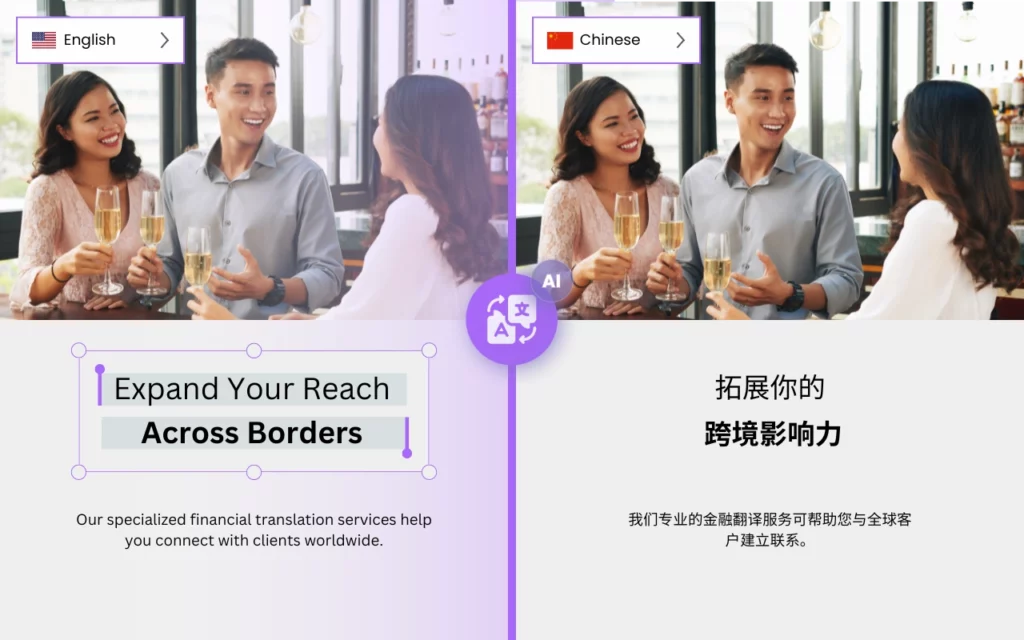

هل من الممكن ترجمة الإنجليزية إلى الصينية بسرعة؟
DocTranslator هو الخيار الأفضل لترجمة المستندات الكبيرة والمعقدة باللغة الصينية. بفضل تقنيته المتقدمة وواجهته سهلة الاستخدام، يسهل DocTranslator على الشركات والأفراد ترجمة المستندات المهمة بدقة بأقل جهد.
تتمثل إحدى المزايا الرئيسية لـ DocTranslator في قدرته على التعامل مع المستندات الكبيرة والمعقدة بسهولة. سواء كنت بحاجة إلى ترجمة عقد قانوني أو دليل تقني أو تقرير مالي، يمكن لـ DocTranslator التعامل مع كل ذلك. يكتشف تلقائيًا لغة مستندك ويوفر ترجمات دقيقة باللغة الصينية، مما يضمن أن تكون مستنداتك واضحة وسهلة الفهم.
ميزة أخرى لـ DocTranslator هي سرعته وكفاءته. بفضل خوارزميات التعلم الآلي القوية الخاصة به، يمكن لـ DocTranslator ترجمة المستندات الكبيرة والمعقدة بسرعة، دون المساس بالجودة. هذا يعني أنه يمكنك استلام مستنداتك المترجمة في وقت قصير، مما يتيح لك التركيز على المهام المهمة الأخرى.
بالإضافة إلى قدراته التقنية، يوفر DocTranslator أيضًا واجهة سهلة الاستخدام تجعل من السهل على أي شخص استخدامه. يمكنك ببساطة تحميل مستندك، وتحديد الصينية كلغة مستهدفة، ودع DocTranslator يقوم بالباقي. بالإضافة إلى ذلك، فإنه يوفر مجموعة واسعة من تنسيقات الملفات المدعومة، لذلك يمكنك ترجمة المستندات من Word و PDF و PowerPoint و Excel والمزيد.
يقدم DocTranslator مجموعة من ميزات الأمان لضمان حماية مستنداتك الحساسة. يتم إرسال الملفات عبر اتصال مشفر، ويتم حذف التحميلات المجانية بعد حوالي 24 ساعة من التحميل، وفي أي خطة يمكنك حذف الترجمة الصينية ومصدرها من علامة التبويب "الملفات" بنفسك.
جرب DocTranslator اليوم واختبر الفرق بنفسك!

تعرف على DocTranslator!
DocTranslator هي خدمة ترجمة متطورة عبر الإنترنت تتيح للمستخدمين تحميل تنسيقات مستندات مختلفة، بما في ذلك Word و PDF و PowerPoint، وترجمتها إلى لغات مختلفة. تم تصميم DocTranslator خصيصًا للمستندات وتتضمن ميزات إضافية تجعلها أكثر ملاءمة لهذا الغرض مقارنة بخدمات الترجمة القياسية.
ترجمة صينية ←
هل أنت فضولي بشأن دقة ترجمة جوجل من الصينية إلى الإنجليزية؟
بينما توفر ترجمة جوجل الراحة، إلا أنها قد لا تقدم دائمًا نتائج دقيقة، خاصة للمحتوى المعقد أو المعتمد على السياق. جرب موثوقية ودقة Doctranslator لاحتياجات الترجمة من الصينية إلى الإنجليزية. تضمن تقنية الترجمة المتقدمة لدينا ترجمات دقيقة ومناسبة للسياق، مما يجعل المحتوى الخاص بك سهل الفهم لجمهور المتحدثين باللغة الإنجليزية. مع Doctranslator، يمكنك الوثوق في أن ترجماتك ستتم معالجتها بعناية واهتمام بالتفاصيل، مما يوفر نتائج عالية الجودة في كل مرة. قل وداعًا لعدم اليقين في الترجمات الآلية واختبر الفرق مع Doctranslator اليوم!
هل تحتاج إلى ترجمة موقع ويب كامل بدلاً من مستند؟ شريكنا ConveyThis.com يتعامل مع ترجمة الموقع بالكامل، وهي مهمة مختلفة عن ترجمة ملف.

ما هو المترجم الصيني الأكثر دقة؟
Google Translate و Microsoft Translator و Amazon Translate هي جميعها محركات ترجمة آلية شائعة يمكنها ترجمة النصوص الصينية. ومع ذلك، يمكن أن يختلف دقة الترجمة اعتمادًا على السياق المحدد وتعقيد النص.
بشكل عام، تم العثور على Google Translate و Microsoft Translator من بين أكثر المترجمين الصينيين دقة، مع مستوى عالٍ من الطلاقة والدقة النحوية. كلاهما يستخدم نماذج الترجمة الآلية العصبية (NMT)، والتي ثبت أنها تنتج ترجمات أكثر دقة من نماذج الترجمة الآلية الإحصائية (SMT) القديمة.
Amazon Translate هي خدمة جديدة نسبيًا، وقد تختلف دقتها اعتمادًا على النص المحدد وزوج اللغات. ومع ذلك، فهي تستند أيضًا إلى نماذج الترجمة الآلية العصبية، لذلك يمكن توقع أن يكون لها أداء مماثل أو أفضل من خدمات الترجمة الآلية الأخرى.
من المهم أن تضع في اعتبارك أن الترجمة الآلية ليست دائمًا مثالية، وقد لا تكون النتائج دقيقة بنسبة 100%. لذلك، يوصى دائمًا بالاستعانة بمترجم بشري لمراجعة الترجمات، خاصةً للمستندات المهمة والحساسة.
كيفية ترجمة مستندي إلى اللغة الصينية؟
هناك عدة طرق لترجمة مستند إلى اللغة الصينية. بالنسبة لتقرير أو دليل طويل، انظر كيف تترجم ملف PDF كبير إلى الصينية في تحميل واحد. فيما يلي بعض الخيارات:
- استخدام برنامج ترجمة: هناك العديد من البرامج المتاحة التي يمكنها ترجمة ملفات PDF، مثل Adobe Acrobat Pro DC أو SDL Trados أو MemoQ. يمكن لهذه البرامج التعامل مع ملفات PDF الكبيرة والمعقدة وتوفير ترجمات دقيقة باللغة الصينية.
- خدمة الترجمة عبر الإنترنت: هناك العديد من خدمات الترجمة عبر الإنترنت التي يمكنها ترجمة ملفات PDF، مثل Google Translate أو Microsoft Translator أو Amazon Translate. ما عليك سوى تحميل ملف PDF الخاص بك إلى الموقع، وتحديد الصينية كلغة مستهدفة، وستوفر الخدمة نسخة مترجمة من ملف PDF.
- الاستعانة بمترجم محترف: يمكنك أيضًا الاستعانة بمترجم محترف لترجمة ملفات PDF الخاصة بك. هذا خيار جيد إذا كنت بحاجة إلى ترجمة دقيقة وعالية الجودة ولديك معلومات حساسة في ملفات PDF الخاصة بك.
- استخدام DocTranslator: DocTranslator هو برنامج ترجمة يمكنه التعامل مع المستندات الكبيرة والمعقدة بسهولة. يكتشف تلقائيًا لغة مستندك ويوفر ترجمات دقيقة باللغة الصينية، مما يضمن أن تكون مستنداتك واضحة وسهلة الفهم. بفضل خوارزميات التعلم الآلي القوية الخاصة به، يمكن لـ DocTranslator ترجمة ملفات PDF الكبيرة والمعقدة بسرعة، دون المساومة على الجودة.
بغض النظر عن الطريقة التي تختارها، من الجيد مراجعة الترجمات بحثًا عن الأخطاء أو الترجمات الخاطئة، خاصةً للمستندات المهمة والحساسة.
أي تطبيق صيني أفضل من Google Translate؟
هناك العديد من التطبيقات الصينية التي تعتبر أكثر دقة من Google Translate لترجمة اللغة الصينية، ومن أشهرها:
- Baidu Translate: تم تطوير هذا التطبيق بواسطة عملاق البحث الصيني Baidu ويستخدم على نطاق واسع في الصين. يوفر ترجمة غير متصلة بالإنترنت، ويستخدم تقنية التعلم العميق لتوفير ترجمات دقيقة.
- Microsoft Translator: تم تطوير هذا التطبيق بواسطة Microsoft، ويستخدم الترجمة الآلية العصبية (NMT) لتقديم ترجمات دقيقة. كما أنه يوفر ترجمة غير متصلة بالإنترنت وميزات ترجمة المحادثات في الوقت الفعلي.
- Pleco: هذا تطبيق قاموس وترجمة صيني-إنجليزي شهير يقدم مجموعة واسعة من الميزات، بما في ذلك الترجمة غير المتصلة بالإنترنت، والتعرف على الكتابة اليدوية، وبطاقات المفردات لبناء المفردات.
- Youdao Translate: هذا تطبيق ترجمة صيني شهير طورته منصة التعليم عبر الإنترنت الصينية Youdao. يوفر ترجمة غير متصلة بالإنترنت، والتعرف على الكتابة اليدوية، وميزة التعرف على الصوت، ويعتبر أيضًا أحد أدق المترجمين الصينيين.
- Waygo: هذا تطبيق ترجمة مرئي يستخدم كاميرا هاتفك الذكي لمسح النص الصيني وتقديم ترجمات فورية. إنه مفيد بشكل خاص لقراءة اللافتات والقوائم والمواد المطبوعة الأخرى باللغة الصينية.
تجدر الإشارة إلى أن أفضل تطبيق ترجمة لك سيعتمد على احتياجاتك وتفضيلاتك المحددة. يوصى دائمًا بتجربة تطبيقات مختلفة ومقارنة ميزاتها ودقتها، للعثور على الخيار الأفضل لك.
كيف يعمل
الخطوة 1: إنشاء حساب مجاني
ابدأ رحلة الترجمة الخاصة بك عن طريق إنشاء حساب مجاني على منصتنا. يستغرق الأمر بضع لحظات فقط لتقديم معلوماتك الأساسية وتأكيد عنوان بريدك الإلكتروني. سيعمل هذا الحساب كمركز شخصي لك لتحميل وتتبع وإدارة جميع مشاريع الترجمة الخاصة بك.
الخطوة 2: تحميل ملف
بعد تسجيل الدخول، حان الوقت لتحميل مستندك. يدعم نظامنا مجموعة واسعة من التنسيقات، بما في ذلك MS Word و Excel و PowerPoint و TXT و InDesign و CSV. ما عليك سوى سحب الملف وإفلاته أو استخدام خيار "استعراض" لتحديد الملف من جهازك.
الخطوة 3: تحديد اللغات الأصلية والهدف
حدد اللغة التي كُتب بها مستندك الأصلي. ثم اختر اللغة المستهدفة التي تريد ترجمة المستند إليها. من خلال قائمتنا الواسعة من اللغات المدعومة، ستجد المطابقة المثالية لجمهورك، سواء كان ذلك لعرض تقديمي تجاري أو حملة إبداعية.
الخطوة 4: انقر فوق زر الترجمة وقم بالتنزيل
بمجرد تحديد تفضيلات اللغة الخاصة بك، انقر فوق الزر "تحميل" لبدء المعالجة. اجلس واسترخ بينما يعمل نظام الترجمة المتقدم لدينا على ملفك، مع الحفاظ على التخطيط والأسلوب الأصليين مع تقديم ترجمة دقيقة.
ترجم ملفك الآن!
سجل اليوم واكتشف قوة DocTranslator وكيف سيحدث فرقًا كبيرًا لك ولعملك.
شركاؤنا
أدوات وخدمات ذات صلة
تنسيقات الملفات
ترجمة PDF حسب اللغة
شركاؤنا




