
Prevedi dokument s engleskog na kineski
Najbrži online prevoditelj, samo prenesite svoju datoteku i dobit ćete svoj novi prijevod
Učitajte ili ispustite dokument za prijevod
Maks. veličina datoteke 1 GB na Pro i Business
Gumb otvara besplatnu prijavu. Samo prevođenje odvija se na vašoj nadzornoj ploči, gdje ponovno odabirete datoteku. Koristite AI pomoćnika? Povežite ga putem MCP-a.
- OCR za skenirane dokumente i fotografije
- 108 jezika
- Izvorni izgled zadržan
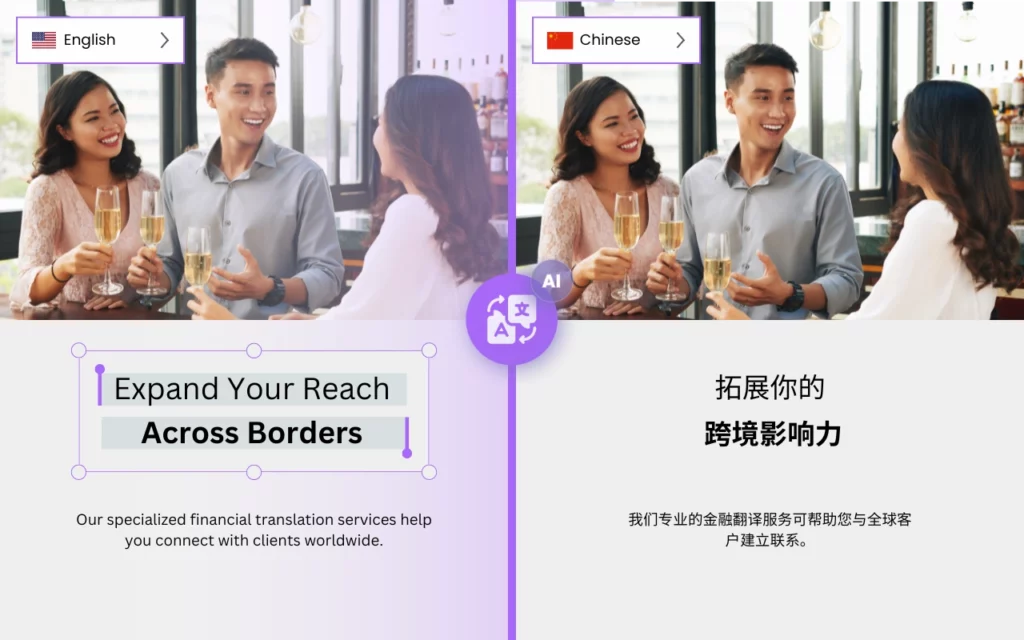

Je li moguće brzo prevesti s engleskog na kineski?
DocTranslator je najbolja opcija za prevođenje velikih i složenih dokumenata na kineski jezik. Sa svojom naprednom tehnologijom i sučeljem jednostavnim za korištenje, DocTranslator olakšava tvrtkama i pojedincima točno prevođenje važnih dokumenata s minimalnim naporom.
Jedna od ključnih prednosti DocTranslator-a je njegova sposobnost da se lako nosi s velikim i složenim dokumentima. Bilo da trebate prevesti pravni ugovor, tehnički priručnik ili financijsko izvješće, DocTranslator to sve može obraditi. Automatski otkriva jezik vašeg dokumenta i pruža točne prijevode na kineski jezik, osiguravajući da vaši dokumenti budu jasni i laki za razumijevanje.
Druga prednost DocTranslator-a je njegova brzina i učinkovitost. Sa svojim snažnim algoritmima strojnog učenja, DocTranslator može brzo prevesti velike i složene dokumente, bez kompromisa u kvaliteti. To znači da svoje prevedene dokumente možete dobiti u tren oka, omogućujući vam da se usredotočite na druge važne zadatke.
Osim svojih tehničkih mogućnosti, DocTranslator također nudi korisničko sučelje koje olakšava korištenje svima. Možete jednostavno prenijeti svoj dokument, odabrati kineski kao ciljni jezik i pustiti DocTranslator da učini ostalo. Osim toga, nudi širok raspon podržanih formata datoteka, tako da možete prevoditi dokumente iz Worda, PDF-a, PowerPointa, Excela i drugih.
DocTranslator nudi niz sigurnosnih značajki kako bi se osiguralo da su vaši osjetljivi dokumenti zaštićeni. Datoteke se šalju putem šifrirane veze, prijenosi na besplatnom planu brišu se otprilike 24 sata nakon prijenosa, a na bilo kojem planu možete sami izbrisati kineski prijevod i njegov izvornik iz kartice Datoteke.
Isprobajte DocTranslator danas i sami iskusite razliku!

Upoznajte DocTranslator!
DocTranslator je sofisticirana internetska usluga prevođenja koja korisnicima omogućuje učitavanje raznih formata dokumenata, uključujući Word, PDF i PowerPoint, te njihovo prevođenje na različite jezike. DocTranslator je posebno dizajniran za dokumente i uključuje dodatne značajke koje ga čine prikladnijim za tu svrhu u usporedbi sa standardnim uslugama prevođenja.
Kineski prijevod →
Znatiželjni ste o točnosti Google Translatea za prijevode s kineskog na engleski?
Iako Google Translate nudi praktičnost, možda ne uvijek daje precizne rezultate, posebno za složene ili kontekstno ovisne sadržaje. Iskusite pouzdanost i preciznost DocTranslator-a za vaše potrebe prevođenja s kineskog na engleski. Naša napredna tehnologija prevođenja osigurava točne i kontekstno primjerene prijevode, čineći vaš sadržaj lako razumljivim za englesko govorno područje. S DocTranslator-om možete vjerovati da će vaši prijevodi biti obrađeni s pažnjom i posvećenošću detaljima, pružajući kvalitetne rezultate svaki put. Recite zbogom nesigurnosti automatskih prijevoda i iskusite razliku s DocTranslator-om već danas!
Trebate prevesti cijelu web stranicu umjesto dokumenta? Naš partner ConveyThis.com obrađuje prijevod cijele web stranice, što je drugačiji posao od prevođenja datoteke.

Što je najtočniji kineski prevoditelj?
Google Translate, Microsoft Translator i Amazon Translate popularni su strojni prevoditeljski sustavi koji mogu prevoditi kineski tekst. Međutim, točnost prijevoda može varirati ovisno o specifičnom kontekstu i složenosti teksta.
Općenito, Google Translate i Microsoft Translator smatraju se među najtočnijim kineskim prevoditeljima, s visokom razinom tečnosti i gramatičke točnosti. Oba koriste modele neuronskog strojnog prevođenja (NMT), za koje je pokazano da proizvode točnije prijevode od starijih modela statističkog strojnog prevođenja (SMT).
Amazon Translate je relativno nova usluga, a njezina točnost može varirati ovisno o specifičnom tekstu i jezičnom paru. Međutim, također se temelji na modelima neuronskog strojnog prevođenja, pa se može očekivati da će imati slične ili bolje performanse od drugih usluga strojnog prevođenja.
Važno je imati na umu da strojno prevođenje nije uvijek savršeno i da rezultati možda neće biti 100% točni. Stoga se uvijek preporučuje da prevoditelj pregleda prijevode, posebno za važne i osjetljive dokumente.
Kako prevesti moj dokument na kineski jezik?
Postoji nekoliko načina za prijevod dokumenta na kineski. Za dugi izvještaj ili priručnik, pogledajte kako prevesti veliki PDF na kineski u jednom učitavanju. U nastavku su neke opcije:
- Upotrijebite softver za prevođenje: Postoji nekoliko dostupnih softverskih programa koji mogu prevesti PDF datoteke, kao što su Adobe Acrobat Pro DC, SDL Trados ili MemoQ. Ovi programi mogu obraditi velike i složene PDF datoteke i pružiti točne prijevode na kineskom jeziku.
- Internetska usluga prevođenja: Postoji nekoliko internetskih usluga prevođenja koje mogu prevoditi PDF datoteke, kao što su Google Translate, Microsoft Translator ili Amazon Translate. Jednostavno prenesite svoju PDF datoteku na web mjesto, odaberite kineski kao ciljni jezik, a usluga će pružiti prevedenu verziju PDF-a.
- Unajmite profesionalnog prevoditelja: Također možete unajmiti profesionalnog prevoditelja za prijevod svojih PDF datoteka. Ovo je dobra opcija ako vam je potreban visokokvalitetan, točan prijevod i ako u svojim PDF-ovima imate osjetljive informacije.
- Upotrijebite DocTranslator: DocTranslator je softver za prevođenje koji s lakoćom može obraditi velike i složene dokumente. Automatski otkriva jezik vašeg dokumenta i pruža točne prijevode na kineski jezik, osiguravajući da su vaši dokumenti jasni i laki za razumijevanje. Sa svojim moćnim algoritmima strojnog učenja, DocTranslator može brzo prevesti velike i složene PDF datoteke, bez kompromisa u kvaliteti.
Bez obzira na odabranu metodu, dobra je ideja pregledati prijevode radi pogrešaka ili netočnih prijevoda, posebno za važne i osjetljive dokumente.
Koja je kineska aplikacija bolja od Google Translatea?
Postoji nekoliko kineskih aplikacija koje se smatraju točnijima od Google Translatea za prijevod na kineski jezik, neke od najpopularnijih su:
- Baidu Translate: Ovu aplikaciju razvio je kineski tehnološki div Baidu i široko se koristi u Kini. Nudi izvanmrežni prijevod i koristi tehnologiju dubokog učenja za pružanje točnih prijevoda.
- Microsoft Translator: Ovu aplikaciju razvio je Microsoft i koristi neuronsko strojno prevođenje (NMT) za pružanje točnih prijevoda. Također nudi izvanmrežno prevođenje i značajke prevođenja razgovora u stvarnom vremenu.
- Pleco: Ovo je popularni kinesko-engleski rječnik i aplikacija za prevođenje koja nudi širok raspon značajki, uključujući izvanmrežni prijevod, prepoznavanje rukopisa i kartice za učenje vokabulara.
- Youdao Translate: Ovo je popularna kineska aplikacija za prevođenje koju je razvila kineska online platforma za obrazovanje Youdao. Nudi izvanmrežni prijevod, prepoznavanje rukopisa i značajku prepoznavanja glasa, a također se smatra jednim od najtočnijih kineskih prevoditelja.
- Waygo: Ovo je vizualna aplikacija za prevođenje koja koristi kameru vašeg pametnog telefona za skeniranje kineskog teksta i trenutno pružanje prijevoda. Posebno je korisna za čitanje natpisa, jelovnika i drugih tiskanih materijala na kineskom.
Vrijedno je napomenuti da će najbolja aplikacija za prijevod za vas ovisiti o vašim specifičnim potrebama i željama. Uvijek se preporučuje isprobati različite aplikacije i usporediti njihove značajke i točnost kako biste pronašli najbolju opciju za vas.
Kako funkcionira
Korak 1: Stvorite besplatan račun
Započnite svoje putovanje prevođenja postavljanjem besplatnog računa na našoj platformi. Potrebno je samo nekoliko trenutaka za unos osnovnih podataka i potvrdu adrese e-pošte. Ovaj račun će vam služiti kao personalizirano središte za učitavanje, praćenje i upravljanje svim vašim projektima prevođenja.
Korak 2: Prenesite datoteku
Nakon prijave, vrijeme je za učitavanje vašeg dokumenta. Naš sustav podržava širok raspon formata, uključujući MS Word, Excel, PowerPoint, TXT, InDesign i CSV. Jednostavno povucite i ispustite svoju datoteku ili upotrijebite opciju "Pregledaj" za odabir datoteke s vašeg uređaja.
Korak 3: Odaberite izvorni i ciljni jezik
Navedite jezik na kojem je napisan vaš izvorni dokument. Zatim odaberite ciljni jezik na koji želite da se dokument prevede. S našim opsežnim popisom podržanih jezika pronaći ćete savršeno podudaranje za svoju publiku, bilo da se radi o poslovnom prijedlogu ili kreativnoj kampanji.
Korak 4: Kliknite gumb za prijevod i preuzmite
Nakon što postavite svoje jezične postavke, kliknite gumb "Učitaj" za početak obrade. Sjednite i opustite se dok naš napredni sustav za prevođenje radi na vašoj datoteci, održavajući izvorni izgled i stil te isporučujući točan prijevod.
Prevedite svoju datoteku odmah!
Prijavite se danas i otkrijte snagu DocTranslator-a i koliko će to značiti za vas i vaše poslovanje.
Naši partneri
Alati i usluge u vezi s tim
Formati datoteka
Prevedi PDF prema jeziku
Naši partneri




